David Davis on vRealize Operations – Post #35 –…

David Davis on vRealize Operations – Post #35 – NEW! VMware VSAN Dedicated Management Pack in vROps 6.4

David Davis on vRealize Operations – Post #35 –…

In case you missed my last post, I covered one of the coolest features in the vRealize Operations version 6.4 — predictive distributed resource scheduler. In this post, I’m going to cover another one of the very coolest features of vROps 6.4 and that is the new dedicated VMware Virtual SAN (VSAN) management pack.


VMware Social Media Advocacy

Announcing the VMware Horizon 7 Enterprise…

Announcing the VMware Horizon 7 Enterprise Edition Multi-Site Reference Architecture Paper – VMware EUC Blog

Announcing the VMware Horizon 7 Enterprise…

Organizations want to keep the business operating during an extended or catastrophic technology outage, providing continuity of service and allowing staff to carry out their day-to-day responsibilities. VMware Horizon 7 Enterprise Edition Multi-Site Reference Architecture provides best practices and architectural blueprints for building a deployment that addresses these issues.


VMware Social Media Advocacy

API Commands in the vCenter Server Appliance Shell

API Commands in the vCenter Server Appliance Shell – ntpro.nl

API Commands in the vCenter Server Appliance Shell

The API commands in the vCenter Server Appliance let you perform various administrative tasks in the vCenter Server Appliance. The API commands are provided by appliance management service in the vCenter Server Appliance. You can edit time synchronization settings, monitor processes and services, set up the SNMP settings, and so on.


VMware Social Media Advocacy

Picking the right design for VMware vRealize…

Picking the right design for VMware vRealize Orchestrator – via TechTarget

Picking the right design for VMware vRealize…

Choosing the right vRealize Orchestrator design option will determine how effective your environment runs. This chapter excerpt can help you make the right decision.


VMware Social Media Advocacy

Success in Software-Defined Networking with Tieto

Success in Software-Defined Networking with Tieto – via VMware vCloud Blog

Success in Software-Defined Networking with Tieto

The virtualization journey begun with the compute layer, then storage, and now, network virtualization. Network virtualization is the most important step in the journey, taking the step to maximize efficiency and cost reduction in IT, resulting in reducing Tieto customers’ total cost of ownership through high-quality standardized cloud services and automation.


VMware Social Media Advocacy

Risk management for the VCDX candidate

Risk management for the VCDX candidate – Elastic Sky

Risk management for the VCDX candidate

During my VCDX journey I took an existing design I created and guided into production. It was working and supportable. A good start, but in retrospect it was a long way from VCDX level. I have reviewed several VCDX candidate work recently and most of them are in the same place I was. In addition, this question pops up from time to time so I thought it would be nice to explore the topic a little. In my documentation, I originally listed a few risks that were business perspective based, neatly labelled them RSK001, RSK002 etc and referenced to them in my design. Done? Not even started?


VMware Social Media Advocacy

VMwares’ Instant Clones technology with a touch…

VMwares’ Instant Clones technology with a touch of XenDesktop – via basvankaam.com

VMwares’ Instant Clones technology with a touch…

Also know as Just In Time (JIT) desktops, or vmFork technology. In short, it enables you to clone an existing virtual machine in just a matter of seconds — close to one clone per second actually.


VMware Social Media Advocacy

How to prove your IaaS Cluster is fast -…

How to prove your IaaS Cluster is fast – virtual red dot

How to prove your IaaS Cluster is fast -…

You provide IaaS to your customers. A cluster, be it VMware vSphere Cluster or Microsoft Hyper-V Cluster, is a key component to this service offering. In hyper-converged era, your cluster does storage too. You take time to architect it, making sure all best practices are considered. You also consider performance and ensure it’s not a slow system.


VMware Social Media Advocacy

Capacity planning with vRops

Capacity planning with vRops – via StarWind Blog

Capacity planning with vRops

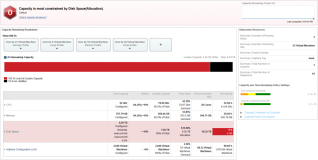
Capacity planning is one of the tasks that every IT organization need to do, but most do very poorly. This is not out of bad will or lack of skills. Most often, it is because they lack a good way of dealing with all the changes, past, present and future.


VMware Social Media Advocacy

Guest post: Digital transformation in 2017 and…

Guest post: Digital transformation in 2017 and opportunities for our partners

Guest post: Digital transformation in 2017 and…

For many of VMware’s customers, digital transformation will remain one of their key priorities in 2017, and beyond. Whether that’s providing true mobile working to employees or delivering a Cross-Cloud Architecture that brings freedom and control to IT and competitive business advantages, the opportunities for our customers are endless.


VMware Social Media Advocacy

New Architecture Guidelines and Best Practices…

New Architecture Guidelines and Best Practices for Deployments of SAP HANA on VMware vSphere Guide, now available!

New Architecture Guidelines and Best Practices…

I am happy to announce that after a very long review and publication cycle the “Architecture Guidelines and Best Practices for Deployments of SAP HANA on VMware vSphere Guide” is now published. The guide can be downloaded from our central VMware SAP page. Direct link to the document: https://www.vmware.com/content/dam/digitalmarketing/vmware/en/pdf/whitepaper/sap_hana_on_vmware_vsphere_best_practices_guide-white-paper.pdf The chapter on sizing tackles the […] The post New Architecture…Read More


VMware Social Media Advocacy

How does NSX accelerate innovation? This VMware…

How does NSX accelerate innovation? This VMware partner can tell you

How does NSX accelerate innovation? This VMware…

As the adoption of the Software-Defined Data Center continues to transform IT, we have heard from several VMware partners on the pivotal role VMware solutions played in facilitating their own digital transformations. NSX, in particular, has been key both for updating our partners’ internal business processes as well as the products with which they go-to-market.


VMware Social Media Advocacy

[Infographic] Using Fusion to securely browse…

[Infographic] Using Fusion to securely browse the Internet!

[Infographic] Using Fusion to securely browse…

Did you know that today’s Internet is more than just web pages? Shocker, right? Well… did you know that VMware Fusion and VMware Workstation can help protect you when browsing the wide-open Internet? How so, you might ask?


VMware Social Media Advocacy

Securing Your PowerShell Execution and Password…

Securing Your PowerShell Execution and Password in VMware vRealize Orchestrator – via VMware Consulting Blog

Securing Your PowerShell Execution and Password…

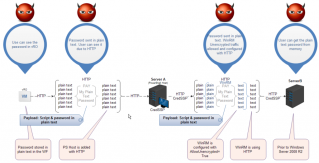
In this blog post we will look at how to secure your end-to-end PowerShell Execution from VMware vRealize® Orchestrator™ (vRO)—including how not to show passwords when using the Credential Security Support Provider (CredSSP) protocol in a double-hop authentication scenario.


VMware Social Media Advocacy

HPE VM Explorer 6.3 now compatible with vSphere…

HPE VM Explorer 6.3 now compatible with vSphere 6.5 – via ESX Virtualization

HPE VM Explorer 6.3 now compatible with vSphere…

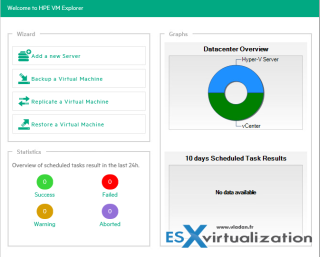
Several backup products still need updates to be compatible with latest VMware vSphere 6.5. This is not the case of HPE VM Explorer 6.3 (Previously Trilead). There is a new release available (v. 6.3.1) for download which adds vSphere 6.5 compatibilities and more. We’ll discuss it in this post.


VMware Social Media Advocacy

How to disable DRS for a single host in the…

How to disable DRS for a single host in the cluster – via Yellow Bricks

How to disable DRS for a single host in the…

I saw a question today which was interesting, how do I disable DRS for a single host in the cluster? I thought about it, and you cannot do this within the UI, at least… there is no “disable DRS” option on a host level. You can enable/disable it on a cluster level but that is it. But there are of course ways to ensure a host is not considered by DRS:


VMware Social Media Advocacy