vRealize Code Stream 2 2 Overview and What’s New

vRealize Code Stream 2 2 Overview and What’s New
This video give an overview of what’s new in vRealize Code Stream 2.2
vRealize Code Stream 2 2 Overview and What’s New
This video give an overview of what’s new in vRealize Code Stream 2.2
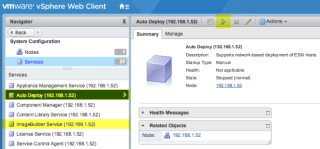
Using vSphere Auto Deploy to Netboot ESXi onto Apple Mac Hardware – via virtuallyGhetto
Last week I published an article that demonstrated for the first time on how to netboot an ESXi installation onto Apple Mac Hardware. As you can imagine, this was very exciting news for our VMware/Apple customers, who historically have not had this capability before. Customers can now automate and install ESXi over the network onto their Apple Mac Hardware just like you would for other non-Apple hardware.
World’s Better Mobile Email: 7 Reasons to Give Your Workers VMware Boxer – via AirWatch Blog
In October 2015, we announced the acquisition of Boxer—a smarter, better mobile email app. A year and some change later, we took the best of the consumer-centric features and spun off a secure and enterprise-ready mobile email solution: VMware Boxer. Our teams remain committed to developing a best-in-class mobile experience across email, calendar and contacts, which is why it may be time to try it out for yourself.
Understanding Storage Policy-Based Management – via Virtual Blocks
Last night while tearing our living room apart looking for the ROKU remote (that apparently grew legs and left our house forever) my daughter asked “why don’t you just download the ROKU remote control app to your phone?” Add that to the ever-growing list of ways I have now come to depend on my phone to do life.
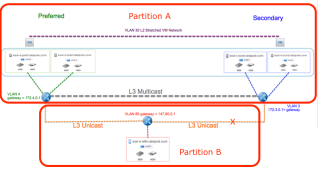
vSAN Stretched Cluster – Partition behavior changes – via CormacHogan.com
My good pal Paudie and I are back in full customer[0] mode these past few weeks, testing out lots of new and upcoming features in future release of vSAN. Our testing led us to building a new vSAN stretched cluster, with 5 nodes on the preferred site, 5 nodes on the secondary site, and of course the obligatory witness node.
New Product Walkthrough – Hybrid vSphere SSL Certificate Replacement – via VMware vSphere Blog
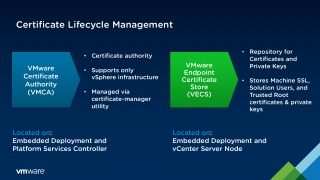
The VMware Certificate Authority (VMCA) was first introduced in vSphere 6.0 to improve the lifecycle management of SSL Certificates. This post will explain a little bit about the VMCA and its capabilities while also making a recommendation on how to deploy certificates in your environment. Finally, a new click-by-click walkthrough has been created to serve as a guide as you are planning the certificate replacement process.
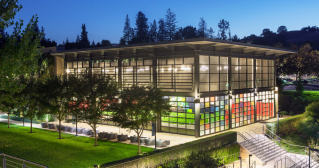
VMware Named One of the Best Workplaces in Technology by Great Place to Work and Fortune
VMware ranks no. 11 on the list of Best Workplaces in Technology. The ranking was based on employees’ assessment of multiple categories.
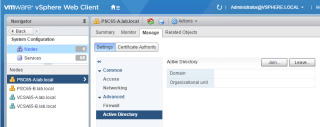
Join VCSA 6.5 to AD Domain – via EnterpriseDaddy
In one of my vSphere 6.0 posts, I mentioned how to join vCenter Server appliance to an AD Domain, which you can find here. Today we will be looking at how to join VCSA 6.5 to AD Domain.
TWiT Bits 3072 VMWare NSX Explained – TWiT.TV
Guido Appenzeller of VMware explains his platform and NSX, which embeds networking and security functionality directly into the hypervisor.
Guest blog post: Divining the Data Center: What’s to Come for Cloud-Native in 2017 – via VMware UK Blog
The second installment in our 2017 Predictions by Kit Colbert, CTO of the Cloud Platform Business Unit at VMware, discusses five key cloud-native trends that are expected to boom in the coming year – tackling subjects such as container security solutions and the Pivotal Cloud Foundry (PCF) open source cloud-native application platform.
[SlideShare] Gotta Secure Them All—Enterprise Apps! – via VMware EUC Blog
Here are 10 facts about the unrelenting flood of apps at work and IT’s daunting task to secure them all.
VMware User Environment Manager, Part 1: Easier, Faster Windows Logins with Mandatory Profiles – via VMware EUC Blog
It is no secret that Microsoft Windows profiles grow as end users use and customize their PCs. Granting users the ability to customize all components of the profile expedites this growth. Over time, this can lead to excessive Windows login times, causing lost productivity for end users and extra work for IT administrators. However, locking down the profile to prevent all changes leads to end-user frustration and complaints.
How to Upgrade ESXi 6.0 to 6.5 via CLI [On Line] – ESX Virtualization
This is a follow-up learning post on a post we did recently, where we have upgraded an ESXi host via an ISO image. Today, we’ll learn how to upgrade ESXi 6.0 via Command line interface (CLI).
vSphere Optimization Assessment Enhanced Evaluation
Improve your vSphere configuration, performance and capacity utilization with a free vSphere Optimization Assessment enhanced evaluation. Get started now.
VMware executive predictions for 2017 and beyond! – via VMware Radius
The coming year promises exciting developments in the technology space, particularly for cloud, storage, networking, and security.
VMware sees NFV potential in telecom market – NFV/SDN Reality Check Ep. 87
While an established player in the virtualization software world, VMware sees new opportunities for NFV in the telecom market.
VMware User Environment Manager, Part 2: Complementing Mandatory Profiles with VMware User Environment Manager
In Part 1 of this two-part blog-post series, we presented an overview of how to implement Microsoft mandatory profiles. In Part 2, we present specific examples of using VMware User Environment Manager to provide flexibility for end users, while controlling profile growth and keeping login times low.
Drive Better Database Performance Across Amazon Solutions – via VMware Cloud Management Blog
From gaining insight into network utilization to having the capability to report on key components like CPU and storage, extending visibility beyond traditional metrics and reporting within your Amazon database solutions can drive better performance across instances, resulting in higher performance across your IT stack.
The 10 Coolest Software-Defined Networking Technologies Of 2016 – via CRN
CRN looks at the 10 technologies in the booming SDN market that made waves in 2016.
Three Ways to Enable ESXi Shell and Timeout – via ESX Virtualization
There are several ways to enable ESXi shell, so we’ll look into it, and also we will also look at an option, to set a timeout setting for the ESXi Shell.