My last episode HomeLab Stage LXXVII Mac Studio, AI Supercomputer was about my AI system on my desk. This episode is again about AI, but I am showing some cool gadgets.
Apple Vision Pro for AI workloads and Demos
Diverging from traditional gaming headsets, the new Apple Vision Pros completely transform the way you use apps you love. This Apple headset allows you to browse the web, make to-do lists, game, chat to friends in iMessages and even watch movies – all on a bigger scale immersive wrapped around you.
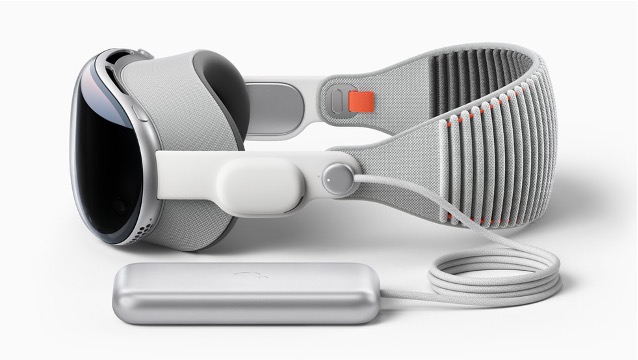
Apple Vision Pro is an amazing device, especially for customer demos. There are a ton of Augmented Reality apps in the App Store, Immersive Videos are stunning, but what can you do with AI workloads on it?
ChatGPT is available for the Vision Pro, including voice commands. That is to cool and a breathtaking experience. You can automate tasks and play with it. Very intuitive and even Kids love it.

Downside: The price for this device! Oh, that hurts. And you need extra stuff as well. Zeiss inserts, if you wear glasses, travel case, extra power bank, extra straps…..
This gadget is also integrated with Apples first 3D camera which allows you to capture sentential spatial images and videos in 3D and relive them like never before with spatial audio!
Oura Ring 4
How to use AI workloads for your daily routine? One very impressive option is the Oura 4 Ring. I am using it since one year and I still love it. It tracks my health status, especially sleep information, which my previous device (Apple Watch Ultra) was not really able to, because of charging requirements. This ring offers 5 day runtime with one charge. Amazing!


The ring is using machine learning algorithms to check your health data and give you prescription about your body data. This is my all day AI wearable!
Sleep information tracking is working great and the app on your phone gives to suggestions on when to prepare for bed time etc…
Meta Wayfarer Smart Glasses

I ordered my Wayfarer with custom cylinder values for my eyes including the polarization as a sunglasses version.

Meta AI app
Manage your glasses and customise settings, import and share photos, and interact with your personalised Meta AI assistant on both your glasses and the app. Learn about new features and see how others are getting the most out of Meta AI through the feed. The Meta AI app is required to support your glasses experience.
Bystander privacy
The Capture LED lets others know when you use your glasses to take photos and record videos for your gallery or streaming. If the LED is covered, you’ll be notified to clear it.
Accessibility
AI glasses by Meta provide helpful utility for those with reduced vision, hearing or mobility. Tasks such as making calls, sending messages and taking photos can be done with your voice, hands-free. Meta AI can provide descriptions about your surroundings, or connect you with the Be My Eyes network for assistance from sighted volunteers.
All settings within the Meta AI app where availble in the US, but not in Germany. That changed with the last firmware update. I have now german language and all features including “Hey Meta, what did I see?” AI function. Taking pictures everywhere and with voice control or hearing music while walking, hearing navigation information or answering calls with it, I really love it!
Stay tuned for the next episodes….
#HomeLabKing