Why you need VM monitoring tools (via TechTarget)
Why you need VM monitoring tools
Dedicated VM monitoring tools should be a critical piece of an administrator’s toolbox to manage and maintain the health of a virtual data center.
Why you need VM monitoring tools (via TechTarget)
Dedicated VM monitoring tools should be a critical piece of an administrator’s toolbox to manage and maintain the health of a virtual data center.
Getting More Out of #vRealize Operations 6.x: Full Stack Application Monitoring
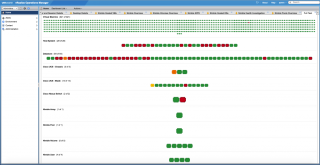
On May 25th, the Getting More Out Of webinar series will present a session on vRealize Operations Manager 6.x – Full Stack Application Monitoring. As a preview, here are some highlights from the session and what you can do to prepare and get the most out of this session.
Storage Troubleshooting in a 3-2-1 Hardware Stack
As the storage market transitions to all-flash, hybrid array storage providers strategically work to accelerate performance and utilization. In doing so, it becomes more difficult to categorize hot data, dynamic and agile storage capacities, and other new age concepts. Today we will be following up on a previous blog where we investigated network troubleshooting in a 3-2-1 hardware stack. As a reminder, the term “3-2-1” refers to a redundant architecture of 3 servers, 2 switches, and 1 storage array, or some derivative of that nature (2-2-1, etc). We will then dive into vRealize Operations to determine the root cause of an issue within a 3-2-1 stack at the storage layer and expand on using robust management console as a data aggregator.
sshAutoConnect #vCenter plugin – vmdude
Here is our first vCenter plugin ! It’s been a while we wanted to do this, here it is now :p
#vRealize Log Insight: Part-2: Installation/Configuration
In last post Log Insight Introduction of this series we had a look on what is vRealize Log Insight and where did it came from. What is the advantage of using it and how it fit together with other VMware components.
All Flash #VSAN & NSX Homelab – Requirements (via darrylcauldwell.com)
As VMware add more products to its suite its more difficult to run a suitable homelab to host them. With this series of five blog posts I aim to describe the steps I followed to create my current homelab. In this post I hope to describe the requirements the lab will hopefully deliver.
All Flash #VSAN & NSX Homelab – Base Hardware Configuration (via darrylcauldwell.com)
As VMware add more products to its suite its more difficult to run a suitable homelab to host them. With this series of five blog posts I aim to describe the steps I followed to create my current homelab. This post follows on from the design post and describes the steps I used to install the physical aspects of the lab.
#VMware NSX DFW Policy Rules Configuration Technical White Paper – ntpro.nl
VMware NSX Distributed Firewall (DFW) provides the capability to enforce firewalling functionality directly at the Virtual Machines (VM) vNIC layer. It is a core component of the micro-segmentation security model where east-west traffic can now be inspected at near line rate processing, preventing any lateral move type of attack.
SAP HANA on #vSphere – Support Status and Best Practices Summary
Since SAPHIRE 2016, SAP supports now also SAP HANA on vSphere 6 deployments for production workloads, see SAP Note 2315348 for details.
600GB write buffer limit for #VSAN? (via Yellow Bricks)
I get this question on a regular basis and it has been explained many many times, I figured I would dedicate a blog to it. Now, Cormac has written a very lengthy blog on the topic and I am not going to repeat it, I will simply point you to the math he has provided around it. I do however want to provide a quick summary:
All Flash #VSAN & NSX Homelab – Physical Design (via darrylcauldwell.com)
As VMware add more products to its suite its more difficult to run a suitable homelab to host them. With this series of five blog posts I aim to describe the steps I followed to create my current homelab. This post follows on from on the requirements post and aims to describe the design of the lab.
All Flash VSAN & NSX Homelab – #VSAN and vCenter (via darrylcauldwell.com)
As VMware add more products to its suite its more difficult to run a suitable homelab to host them. With this series of five blog posts I aim to describe the steps I followed to create my current homelab. This post follows on from the base hardware post and describes the steps I used to deploy VSAN and vCenter.
All Flash VSAN & NSX Homelab – NSX (via darrylcauldwell.com)
As VMware add more products to its suite its more difficult to run a suitable homelab to host them. With this series of blog posts I aim to describe the steps I followed to create my current homelab. This post follows on from the VSAN and vCenter post and describes the steps I used to deploy NSX.
NSX 6.2 Central CLI MindMap
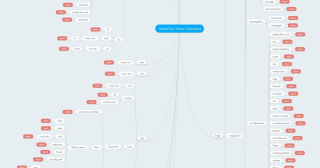
For those of you not familiar with the Central CLI feature available in NSX 6.2 it allows you to troubleshoot your environment from a single interface rather than having to connect to multiple systems such as NSX Manager, Hosts, Edges and Controllers. I’m going to be doing some work for the VMware Hands On Labs so I figured I’d create a MindMap of all the Central CLI commands that are available:
Partition / Isolation and VM flip flopping between hosts? – Yellow Bricks
Last week I was talking to one of our developers at our R&D offsite. He has a situation where he saw his VM flip flopping between two hosts when he was testing a certain failure scenario and he wondered why that was. In his case he had a 2 node cluster connected to vCenter Server and a bunch of VMs running on just 1 host.
VCAP6-DCV Deployment – Objective 1.2 – Deploy and Configure Core Management Infrastructure Components
Objectives for 1.2 are broke down as the following
4 Ways Views Can Improve Your #vROps Workflow
VMware vRealize Operations (vROps) offers a significant level of customization to the end user, from alerts to views to dashboards and more. This level of customization empowers the end user to mold the platform to their specific needs without making system-wide changes. A great example of this comes in the form of vROps views.
#vSphere Update Manager – Cannot Scan Host (via mylesgray.com)
I have been testing out Runecast Analyzer in my lab recently – it’s pretty badass, you can set it up to scan your virtual infrastructure at a vCenter level and will scan your vC, VMs and hosts looking for KBs that may apply, security compliance and best practises.
ESXi 6.0 May 2016 Patch (Build 3825889) – Virten.net
VMware has published a patch for ESXi 6.0
#vSphere audit trail with Log Insight – Michael Ryom
Had a talk with a former colleague of mine, a month or two ago, about a customer that wished to use Log Insight to do audit trail of there vSphere environment and if this was possible. My first reaction was I couldn’t see why it shouldn’t be possible to do audit trail with Log Insight. I mean it’s getting it’s logs from the different logs in a VMware environment so it should be pretty easy.