Replication Bandwidth Calculator – teimouri.net

Replication Bandwidth Calculator
I want to introduce two tools for Veeam Backup & Replication sizing when your virtual machines are hosting by vSphere or Hyper-V: Replication Bandwidth Calculator
Replication Bandwidth Calculator – teimouri.net
I want to introduce two tools for Veeam Backup & Replication sizing when your virtual machines are hosting by vSphere or Hyper-V: Replication Bandwidth Calculator
Stepping towards segmentation – RunNSX
Almost daily, we read about a prolific rise in breaches and expansion of the security threat landscape. With each attack demanding new approaches and concepts when applying network security, highly virtualized or cloud based environments are often a critical focal point.
#PowerNSX Log Insight Segmenter – Network Inferno
PowerNSX has been a focus of mine for a little while. I also have a penchant for Log Insight. I like the product. I have outlined previously a blog here for approaching the segmentation of any application with Log Insight and NSX Distributed Firewall.
#VCAP5 Exam Retirements Suspended – Registration Remains Open
Since we announced the retirement of the remaining VCAP5 exams in late March, we have heard from quite a number of you who have requested additional time to prepare for and take those exams. Additionally, we are still working on the development and refinement of the VCAP6 exams (which will replace VCAP5), so these new exams have not yet been released in production.
VDP Backup Job Not Appearing In Recent Tasks – virtuallyPeculiar
This is going to be a small article for few issues that I worked on recently. When you login to vSphere Web Client and run a backup job, the task progress does not show up under the “Recent Tasks” pane. When you login to vSphere Windows client, you can see the Create Snapshot and VDP backup job task. And in Web Client, when you click the Tasks section on the left hand side, you can see this task.
SAP HANA on #VMware vSphere – Sizing (Compute)
This is the second blog of my SAP HANA on vSphere blog series and will provide information on SAP HANA on VMware vSphere compute resource sizing.
#Linux Desktops with Horizon – VMGuru
Since version 6 Horizon has the possibility to use Linux desktops for VDI. There are other ways to access your Linux, like VNC,NX, X-terminals, or even SSH if you only need a text based session. By using Horizon to deliver your Linux desktop you get the option to amp up your Linux virtual desktop with graphical power with GRID cards, unified access by using the same client for Windows and Linux desktops and more.
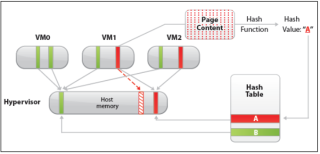
Transperent Page sharing in #vSphere 6.0 – Virtual Maestro
On ESXi host, you may have several virtual machines that are running with same guest operating system, have the same applications, or contain the same user data. Due to this, there is possibility that memory pages created by virtual machines are similar in terms of content. So instead of creating similar multiple pages in host memory for each virtual machine, TPS is used to perform memory page sharing.
Moving VMs is not solving your SDDC Management Problems!
In my last blog article, “What is Intelligent Operations Management in the SDDC” , I discussed how intelligent operations management of the Software Defined Data Center (SDDC) can be broken down into three (3) areas of focus: Topology Scope, Data Collection and Management Functions. We also talked about what each of these areas brings to the table and why they are important. Today I want to talk about what you would be missing if you tried to shortcut your SDDC management solution by not looking at all three areas.
VLAN Cheat Sheet for VMware & #Cisco
I recently found myself in the midst of having to setup some VLANs from scratch in an environment that was a hodgepodge of switches. The terms alone between vendors can drive you mad (e.g. access mode vs untagged, dot1q trunk vs. tagged, etc.)
Free e-learning course – VMware #vRealize Log Insight [V3] Fundamentals
VMware vRealize Log Insight delivers the best real-time and archive log management for VMware environments. Machine learning-based Intelligent Grouping and high performance search enables faster troubleshooting across physical, virtual, and cloud environments.
Send NSX Edge Gateway Statistics to Graphite – Virten.net
To monitor VMware NSX Edge Gateways I want to send interface statistics to my Graphite installation. NSX Manager comes with a REST API that allows to pull information in XML or JSON format. I’ve created a script that pulls Interface, Firewall and Load Balancer statistics from all ESGs and sends them to a Carbon Relay. This allows to create universal custom dashboards with Grafana for example.
FREE download VCP6-DCV Study Guide
The “VMware Certified Professional 6 – Data Center Virtualization” (VCP6-DCV) exam is one of the most popular and recognized certifications in the industry. Becoming certified not only increases your knowledge of VMware Vsphere, but also improves your credibility to your organization.
#VMware User Environment Manager 9.0 – Setup Instructions (via ITuDA)
No description
VDP File Level Recovery Client – virtuallyPeculiar
So, you would be familiar with restoring virtual machines with VDP which is done from the Restore tab of the VDP appliance from the Web Client GUI. However, there are cases, where the necessity is to restore only certain files or folders and not the entire virtual machine or virtual disk. In this case, instead of using disk restore or virtual machine restore we perform File Level restore.
Getting the Log Insight agent – Michael Ryom
This is just a short post on how to get access to the Log Insight agent. I recently found out that there is a neat way of getting the agent directly from the Log Insight server. Instead of downloading from the Log Insight server and then uploading the agent to a new device. Now you can simply download it directly.
Auditing New Role Privileges in vSphere 6 using #PowerCLI
As part of a vSphere 5.5 to vSphere 6 migration effort, we wanted to audit privilege changes for numerous custom roles to see how they would need to be updated in the vSphere 6 environment. I’ll briefly outline the (mostly generic) method I used to do this comparison and also include the results.
VMware ESXi – Get VM’s by VLAN ID with #PowerCLI (via Pragmatic IO)
Often when when working in large environments you’ll get interesting requests. These may be to assist in troubleshooting, auditing, reporting or any other reason.
#VCSA won’t boot – fsck failed (via Tim’s IT Blog)
Today I logged into my lab after a power outage and noticed that vCenter was not up. I accessed to host directly, and opened to console to the VCSA server. The VCSA server was not able to mount the filesystem, and had this on the screen:
Working with Recommendations and Statistics in vR OPs with #PowerCLI
In our previous post you learned how to get started with using PowerCLI against vR Ops and how to use the cmdlets to work with alerts, in this post we take you a step further an learn how to take the work from the previous post and use it with Recommendations and Statistics from vR Ops.