Opinion – NSX’s tipping point, aka, it’s first…

Opinion – NSX’s tipping point, aka, it’s first “vMotion” — via Virtualize the Net

Opinion – NSX’s tipping point, aka, it’s first…

As I study for my VCP6-NV (6.2) beta exam and I read Elver’s excellent book, my thoughts wander off to the VMworld 2016 vExpert party and Pat Gelsinger explaining that he thought NSX hadn’t reached it’s big “oh wow!” moment yet – like when you showed someone a vSphere vMotion for the first time.
VMware Social Media Advocacy

Multi-site with Cross-VC NSX and Palo Alto…

“Multi-site with Cross-VC NSX and Palo Alto Networks Security” via vpierre.it

Multi-site with Cross-VC NSX and Palo Alto…

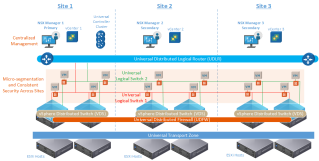
In a prior post, Multi-site with Cross-VC NSX: Consistent Security and Micro-segmentation Across Sites, we discussed how Cross-VC NSX provides micro-segmentation and consistent security across multiple sites. We looked at five reasons to seriously consider Cross-VC NSX for a multi-site solution in terms of security alone: centralized management, consistent security across vCenter domains/sites, security policies follow the workload(s), ease of security automation across vCenter domains/sites, and enhanced disaster recovery use case. In this post, we’ll discuss how advanced third party security services can also be leveraged in a Cross-VC NSX environment.


VMware Social Media Advocacy

Replace NSX Manager SSL Certificate

“Replace NSX Manager SSL Certificate” via Virtualising Middle Earth

Replace NSX Manager SSL Certificate

This process was used to replace the self-signed certificate on NSX Manager 6.2 with a Certificate Authority (CA) signed certificate. I have a Microsoft Windows 2012 R2 Root CA already in-place. You need to create a customised vSphere 6.0 CA template prior to submitting the Certificate Signing Request (CSR) created on the NSX Manager. Follow…Read More


VMware Social Media Advocacy

Multi-site with Cross-VC NSX and Palo Alto…

Multi-site with Cross-VC NSX and Palo Alto Networks Security

Multi-site with Cross-VC NSX and Palo Alto…

A demo showing how a multi-site Cross-VC NSX can be used with third party security services; an example is demonstrated using Palo Alto Networks. Cross-VC NSX provide for consistent security across multiple vCenter domains and sites with Universal Distributed Firewall. Further, third party security services such as Palo Alto Networks can be leveraged for Application/L7-level security.


VMware Social Media Advocacy

Learning NSX-Part-6-Logical Switching and…

“Learning NSX-Part-6-Logical Switching and Transport Zones” via Virtual Reality

Learning NSX-Part-6-Logical Switching and…

In last post of this series we briefly looked what is VXLAN (In actual it’s an ocean of knowledge in itself) and also we configured VXLAN on our cluster/hosts. In this post we will be talking about Logical switching and … Continue reading →


VMware Social Media Advocacy

Restoring NSX from Old Backup – With Control VM

“Restoring NSX from Old Backup – With Control VM” via Elver’s Opinion

Restoring NSX from Old Backup – With Control VM

Ok, yesterday I posted Restoring NSX from Old Backup – Impact on Distributed Network where restore. 5 sigma is probably not as good as 6 sigma (whatever that is) so this post is with its Control VM. That’s right, his diagram is the same diagram from yesterday, with no Control VM. That’s because the logical diagram depicts the Data Plane, not the Control Plane (gotcha). However, the Control VM does have a connection for its HA interface (formerly known as Management Interface), which I dropped…Read More


VMware Social Media Advocacy

Newly Released STIG Validates VMware NSX Meets…

Newly Released STIG Validates VMware NSX Meets the Security Hardening Guidance Required for Installment on Department of Defense (DoD) Networks

Newly Released STIG Validates VMware NSX Meets…

PALO ALTO, CA –(Marketwired – September 12, 2016) – VMware, Inc. (NYSE: VMW), a global leader in virtualization and cloud infrastructure, today announced that the Defense Information Systems Agency (DISA) Risk Management Executive has released the VMware NSX® Security Technical Implementation Guide (STIG), Version 1 for immediate use.As the first…Read More


VMware Social Media Advocacy

VMware NSX 6.2 Installation and Configuration:…

“VMware NSX 6.2 Installation and Configuration: A to Z” via Virtual Issar

VMware NSX 6.2 Installation and Configuration:…

This has been a long pending series of blog Posts on VMware NSX (6.2.2) Installation and configuration I wanted to share. Last month I have installed NSX 6.2.2 in my lab and wanted to share my experience. I have written 12 blog posts in an attempt to cover the complete procedure for NSX installation and…Read More


VMware Social Media Advocacy

Cloud Pod Architecture with F5 LTM or NSX

“Cloud Pod Architecture with F5 LTM or NSX” via vhojan.nl

Cloud Pod Architecture with F5 LTM or NSX

In 2014, VMware announced a new feature in Horizon 6 called Cloud Pod Architecture. This feature can make sure that you can run Horizon based VDI/Remote Apps from multiple data centers and that the maximum number of desktops can exceed 10,000 per Horizon implementation (by setting up multiple POD’s with 10,000 desktops each). To use … Continue reading Cloud Pod Architecture with F5 LTM or NSX → The post Cloud Pod Architecture with F5 LTM or NSX appeared first on vHojan.nl.


VMware Social Media Advocacy

How to monitor NSX environment with vRealize…

“How to monitor NSX environment with vRealize Operations – Part II – Result” via vtechguru.com

How to monitor NSX environment with vRealize…

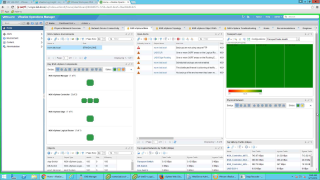
Dear Reader, this is the second part of the vROPS for NSX post. In the earlier Part I post I have discussed about the installation and configuration of the PAK file in vROPs environment. In this part I am going to discuss the results of the configuration, i.e, what information we get from the solution. As could be seen in the earlier post, when we install this solution we get two adapters, first one for NSX-vSphere adapter and the second one for Network Devices. For this post I did not configure any Network Devices and hence have only NSX for vSphere environment for monitoring. Once the solution is installed and configured you would get the following extra Dashboards by default.


VMware Social Media Advocacy

Restoring NSX from Old Backup – Impact on…

“Restoring NSX from Old Backup – Impact on Distributed Network” via Elver’s Opinion

Restoring NSX from Old Backup – Impact on…

I’ve been slacking (from writing) for a few months now but at VMWorld 2016 ‪@LuisChanu‪ reminded me of a blog I had promised him. My first ever blog was NSXManager Backup and Restore but he wanted to know of a few “whatifs”, like what would happen if you restore NSX Manager using an old backup. So this post is to fulfill (better late than never) my promise to Luis and write about what happens to the distributed network when you use old backups to restore NSX Manager.


VMware Social Media Advocacy

Deploying NSX Logical Switches

“Deploying NSX Logical Switches” via Let’s v4Real

Deploying NSX Logical Switches

Continuing from where we left off with deploying NSX controllers and preparing our hosts for NSX, now its time to deploy a logical switch and add virtual machines to it. A logical switch can be looked at as a logical broadcast domain to which virtual machines can be connected to. The segment IDs that are associated…Read More


VMware Social Media Advocacy

How to Deploy NSX Controllers and Configure…

“How to Deploy NSX Controllers and Configure Hosts for NSX” via Let’s v4Real

How to Deploy NSX Controllers and Configure…

Once you’ve deployed the NSX manager appliance and you’ve setup the registration with your vCenter, its time to deploy our controllers and being our host preparations for NSX. From the Networking & Security pane click Installation > Management. At the bottom you will see the NSX Controller nodes pane. Click the green + Click Select…Read More


VMware Social Media Advocacy

Network Virtualization: New Skills for a New Era

Network Virtualization: New Skills for a New Era

Network Virtualization: New Skills for a New Era

Networking has continually evolved to reflect new technology capabilities and changing demands – it’s always moving toward the future. And virtualized networks is the next step. To get the most out of network virtualization project, you’ll need to learn more about it and stay up to date on the most current and important technologies. This […] The post Network Virtualization: New Skills for a New Era appeared first on VMware Education and Certification Blog .


VMware Social Media Advocacy