Using #VMware Horizon 7 Direct Connect (via Virtualization Review)

Using VMware Horizon 7 Direct Connect
How to connect directly to a virtual desktop.
Using #VMware Horizon 7 Direct Connect (via Virtualization Review)
How to connect directly to a virtual desktop.
#VMware App Volumes, Part 1: Introduction and Requirements (via Virtualization Review)
Unsure about whether App Volumes is for you? In this primer, Sean untangles its uses and what you’ll need to give it a spin.
Top Horizon 7 Insights and IT Best Practices From Our Pros
vmw-tech-consulting-servicesWe’ve talked a lot about the newest capabilities introduced in VMware Horizon 7, but how does it change the roles within your IT organization or impact your long-term end-user computing strategy?
8 Most Popular #VMware EUC Product Diagrams & Charts, According to Social
Thanks to recent product releases and the expertise of our VMware End-User Computing (EUC) technical and creative teams, we’ve developed some great resources for our @VMwareHorizon social followers in the past month or so. And thanks to social media, we can always tell when we’re providing you, our readers and customers, with the right product news, FAQs and how-to guides.
Prediction: By end of 2016, #VMware Horizon will be neck-and-neck with Citrix XenDesktop/XenApp (via TechTarget)
I predict that by the end of next year, VMware Horizon 6 will be neck-and-neck with Citrix XenDesktop / XenApp in the enterprise. I base this prediction on talking to many customers (several of them very large), who are seriously looking at Horizon 6 as their next platform to replace their current XenApp 6.
#VMware Horizon View 7: Setup Remote Access through Security Server [Part 5]
Part 5 of the series will be configuring the environment so Horizon View can be accessed remotely. There are some ports that need to be opened up on your firewall to the Security Server. As every environment is different I will show how my environment looks so you can mirror it.
Creating RDS Hosted application pools in #VMware Horizon View
With RDS hosted application pools, you can deliver a single application to many users. The application runs on a farm of RDS hosts. When you create an application pool, you deploy an application in the data center that users can access from anywhere on the network.
What to know about Horizon Instant Clones
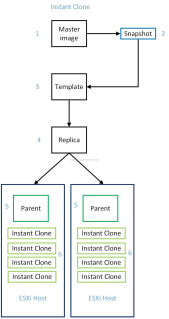
Horizon 7 introduced the Instant Clone feature leverages the vmFork technology introduced in vSphere 6.0 U1. With Instant Clone technology it is possible to clone and deploy a VDI desktop VMs in seconds. This is called the Just-In-Time Desktop.
#VMware Horizon View 7: Deployment and Installation [Part 1]
VMware Horizon View enabled users to access virtual desktops and applications through a single pane of glass. There have been many improvements added to the release of Horizon View 7 such as Blast Extreme protocol, Instant Clone, and enhanced security and policy management. VMware Horizon 7 What’s New. In this blog series I will be going through installation and configuration of Horizon View 7 in my lab environment.
#VMware Horizon 7: Troubleshooting & Performance Optimization – BETA
During this five-day, hands-on training, you will gain the advanced knowledge, skills, methodology, and abilities to achieve competence in troubleshooting the View component of VMware Horizon® 7. You will increase your skills and competence in using VMware and third-party tools to analyze and solve problems associated with a View implementation. This lab-intensive course provides you with a comprehensive environment to test your skills at identifying and solving a broad range of issues.
How To Use #VMware Instant Clone, Part 2: Deploying Desktops (via Virtualization Review)
Yes, creating new virtual desktops is extremely fast.
RT @msandbu: New blogpost #vmware #horizon 7 view blast extreme with #nvidia GPU offload
So when reading about the upcoming release notes with Horizon 7 I was really interesting when it came to the new GPU and Protocol features with Horizon View 7. As I have blogged about earlier, we saw that Blast Extreme is essentially an TCP based remote display protocol –-> https://msandbu.wordpress.com/2016/03/29/remote-protocols-benchmarking-citrix-vmware-and-rdppart-one-pcoip-vs-blast-extreme/ (I can also be configured…
#VMware App Volumes 3.0 Doing UEM – Deep Dive
VMware released app volumes a while ago, today I thought it was time to do a deep dive and see what they created. Strangely we now have two app volumes versions, the 2.5 and the 3.0 version. Customers on version 2.10 are not advised to go to 3.0, which is odd as everyone was expecting a new version that would be the successor of the 2.10 version. Customers can’t upgrade the appstacks to the 3.0 version so they would need to rebuild.
#VMware & NVIDIA Bring Blazing GPU Acceleration Performance to VDI
VMware and NVIDIA are virtualizing the GPU to bring VDI to power users, with workstation-like performance for GPU acceleration of Direct3D, OpenGL, and NVIDIA CUDA applications. Find campaign details and the sales enablement tools you will need on the Partner Demand Center.
Cloud Pod Architecture feature in Horizon 7 Part Three
This is the third part of the series on the Cloud Pod Architecture feature in Horizon 7
Cloud Pod Architecture feature in Horizon 7, Part One
This is part one of a three part series that covers the Cloud Pod Architecture feature in Horizon 7.
Horizon View 7 on #VSAN – Policies Revisited
It has been some time since I last looked at Horizon View on Virtual SAN. The last time was when we first released VSAN, back in the 5.5 days. This was with Horizon View 5.3.1, which was the first release that inter-operated with Virtual SAN.
ANNOUNCING: Our 2016 End User Computing (EUC) Champions
EUC Champions is an “Outsiders-who-are-Insiders” Expert Program designed with the help of several EUC experts in the community. Since its inception, this program has provided a great platform for the EUC expert community and VMware EUC product groups to share feedback, roadmaps and new product information through in-person meetings, networking events, industry conferences and webinars.
My View 7 upgrade
Hi there, It is now time to upgrade my lab to Horizon 7. The info below will help you to do the same. Important note is that I am just doing the View 7 upgrade and not implementing anything else – like True SSO. That will perhaps come later. Like in my 6.2 upgrade I am not ready to start using the Access Point appliance – but still have the Windows based Security Server. The hardest thing of this upgrade – for me – was to find the bits. Life of a vExpert though. Lets get started!
VMware Horizon 7.0: Instant Clones
With the release of Horizon 7, VMware has introduced Instant Clones (previously code-named Project Fargo) into the wild. Instant Clones utilize the vmFork technology within vSphere to fork a virtual desktop from a running virtual machine. Below are highlights about … Continue reading →