Expanding VMware Horizon RDSH Farms Using Instant Clone

Expanding VMware Horizon RDSH Farms Using…
See how quickly VMware Horizon RDSH farms can be expanded using Instant Clone compared to Citrix XenApp using PVS
Expanding VMware Horizon RDSH Farms Using Instant Clone
See how quickly VMware Horizon RDSH farms can be expanded using Instant Clone compared to Citrix XenApp using PVS
VMware makes virtual desktops faster, easier to deploy and manage — via SiliconANGLE
VMware Inc. is updating its Horizon virtual desktop services to reduce the cost and complexity of delivering Windows desktops over a network and improving performance for users as well.
VMware Blast Extreme Adaptive Transport (BEAT) Demo
See how VMware Blast Extreme Adaptive Transport (BEAT) dramatically improves the user experience across non-ideal networks. Learn more at https://blogs.vmware.com/euc/2017/02/horizon-7-1-apps-cloud.html.
VMware Horizon Cloud Demo
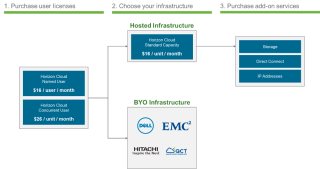
VMware Horizon Cloud delivers feature-rich virtual desktops and applications using a purpose-built cloud platform. Horizon Cloud service scales across multiple deployment options, including on-premises or fully managed infrastructure from VMWare. Learn more at: http://vmware.com/go/horizoncloud
VMware Horizon 7.1 & Horizon Apps: Raising the Bar for User Experience & Published Applications
VMware Horizon 7 is the premier platform for virtual desktops and applications, and we continually strive to make it even better. Today, we are excited to announce Horizon 7.1. In this release, we innovated in two key areas to raise the bar in delivering a great user experience and change the application delivery paradigm. Let’s dive in.
The Next Horizon! Introducing Horizon 7.1, Horizon Apps & Horizon Cloud
Today, we are excited to announce new technologies and offerings that drive the cost and complexity out of getting started and allow you to address more use cases than ever before.
AirWatch Connect Keynote: Boeing’s Sue Harris Chats with Sanjay Poonen
Sue Harris, IT Director for End User Infrastructure Services at Boeing, joined VMware EUC EVP onstage at Connect Atlanta 2016 to talk about how mobility has transformed the airline industry and revolutionized engineering processes at Boeing. Learn more about VMware AirWatch’s secure mobility solutions here: http://bit.ly/2dGtlxZ
[Whitepaper] Unified Endpoint Management—You’re Already Behind – via AirWatch Blog
First came mobile device management (MDM), a way for companies to remotely configure and control mobile devices to provide employees with basic resources for work. Then, enterprise mobility management (EMM) evolved in response to the demand for increased access to corporate data and business-critical applications.
Top 10 Reasons to Join EUC Insights 2017 on Feb. 15 – via VMware EUC Blog
With digital workspaces, new possibilities for productivity, security and enablement help businesses transform like never before. With technology innovations and product updates moving faster than ever, it’s easy to get left behind. That’s why there’s no better time than now to join our EUC Insights 2017 online event on Feb. 15.
Three VDI challenges that can derail any project
VDI challenges, such as poor performance and unexpected costs and complexities, can ruin even the most well-thought-out project.
Reviewer’s Guide for View in Horizon 7: Smart Policies – via ntpro.nl
The Reviewer’s Guide for View in VMware Horizon 7: Smart Policies is one of a series of guides to help you evaluate the View component of Horizon 7.
Automating VMware Horizon 7 with VMware PowerCLI 6.5 – via VMware EUC Blog
With VMware PowerCLI 6.5 Release 1, the automation of VMware Horizon 7 matures and we get integrated PowerShell support for the View component of Horizon 7 built into VMware PowerCLI. We have a proper Horizon 7 module that is distributed and ships with the core VMware PowerCLI installation.
[Virtual Event] EUC Insights 2017
EUC Insights 2017 is coming 2/15! Sign up today for this half-day virtual event to experience hands-on labs, solution-specific breakout sessions and to hear a Digital Workspace keynote delivered by VMware SVP and General Manager, Sumit Dhawan:
Reviewer’s Guide for View in Horizon 7: Install and Configure – via ntpro.nl
The Reviewer’s Guide for View in VMware Horizon 7: Installation and Configuration is one of a series of guides to help you evaluate the View component of Horizon 7.
Announcing the VMware Horizon 7 Enterprise Edition Multi-Site Reference Architecture Paper – VMware EUC Blog
Organizations want to keep the business operating during an extended or catastrophic technology outage, providing continuity of service and allowing staff to carry out their day-to-day responsibilities. VMware Horizon 7 Enterprise Edition Multi-Site Reference Architecture provides best practices and architectural blueprints for building a deployment that addresses these issues.
VMware Horizon 7: View Event Database configuration – Nolabnoparty
VMware Horizon uses the Event Database to store logs about View Manager events instead of storing data in a log file that is limited in information.
VMwares’ Instant Clones technology with a touch of XenDesktop – via basvankaam.com
Also know as Just In Time (JIT) desktops, or vmFork technology. In short, it enables you to clone an existing virtual machine in just a matter of seconds — close to one clone per second actually.
[Infographic] Using Fusion to securely browse the Internet!
Did you know that today’s Internet is more than just web pages? Shocker, right? Well… did you know that VMware Fusion and VMware Workstation can help protect you when browsing the wide-open Internet? How so, you might ask?
VMware User Environment Manager, Part 1: Easier, Faster Windows Logins with Mandatory Profiles – via VMware EUC Blog
It is no secret that Microsoft Windows profiles grow as end users use and customize their PCs. Granting users the ability to customize all components of the profile expedites this growth. Over time, this can lead to excessive Windows login times, causing lost productivity for end users and extra work for IT administrators. However, locking down the profile to prevent all changes leads to end-user frustration and complaints.
VMware User Environment Manager, Part 2: Complementing Mandatory Profiles with VMware User Environment Manager
In Part 1 of this two-part blog-post series, we presented an overview of how to implement Microsoft mandatory profiles. In Part 2, we present specific examples of using VMware User Environment Manager to provide flexibility for end users, while controlling profile growth and keeping login times low.