VMware Horizon for Linux Updates 7.1

VMware Horizon for Linux Updates 7.1

VMware Horizon for Linux Updates 7.1

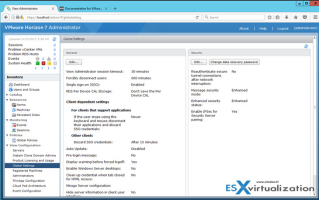
Delivering, managing and accessing Linux virtual desktops with Horizon 7 for Linux continues to get easier with VMware Horizon 7.1. Support is extended to include more Linux distributions and versions plus offering new functionality.

VMware Social Media Advocacy

HTML Access in Horizon 7.1: Tech Preview of…

HTML Access in Horizon 7.1: Tech Preview of Dual Monitor Support [blogs.vmware.com/euc]

HTML Access in Horizon 7.1: Tech Preview of…

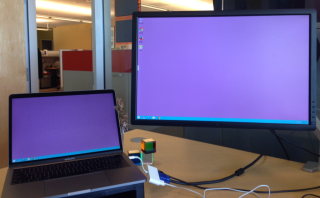
Sure, you can live in a studio apartment and use your couch both for sitting and sleeping, but wouldn’t you rather have a one-bedroom apartment and stretch out? That’s the theory behind our dual monitor support. We’ve built a tech preview of dual monitor support into HTML Access in VMware Horizon 7.1.


VMware Social Media Advocacy

Using PowerCLI to get Horizon view status & events

Using PowerCLI to get Horizon view status & events [www.retouw.nl]

Using PowerCLI to get Horizon view status & events

So two weeks ago I had a nice little post about talking to Horizon View using PowerCLI. I also promised to be digging a bit more into PowerCLI by grabbing the script posted on the VMware blog and editing it a little to my taste. It’s a very useful script they have on there but still I prefer to know what might have caused the issues. I decided I needed to know who the last user was that used the desktop and the last entry into the eventlog and the time of that log. So actually most code used talks to the eventlog database, something already available pre PowerCLI 6.5 but what I hardly ever used.


VMware Social Media Advocacy

Horizon 7.1 New Features and Enhancements

Horizon 7.1 New Features and Enhancements [vladan.fr]

Horizon 7.1 New Features and Enhancements

VMware Horizon View 7.1 a new release from VMware. This is another big release as far as I can say. Many new features and enhancements did made it in in all areas, not only for the client part, but also for the server (Support for Windows Server 2016), platform, protocol parts. In this post, we will focus on all Horizon 7.1 New Features and Enhancements.


VMware Social Media Advocacy

EUC: Can I kick it – upgrading to Horizon 7.1

EUC: Can I kick it – upgrading to Horizon 7.1 [pascalswereld.nl]

EUC: Can I kick it – upgrading to Horizon 7.1

The 16th of March was a good day. The NLVMUG was going on in the Netherlands (great event!) , great weather and Horizon 7.1 went GA. And I wanted to get my TestLab up and running with that version, and take a little peek if there are any of my’s in the upgrade. See what and where things are changed. So why not write-up this pirate’s adventure….


VMware Social Media Advocacy

EUC Toolbox: Don’t wanna be your monkey wrench,…

EUC Toolbox: Don’t wanna be your monkey wrench, use Flings [pascalswereld.nl]

EUC Toolbox: Don’t wanna be your monkey wrench,…

To remind some of whom have had previous experience with flings, or to explain flings to newbies if there still are any, in a few words Flings are apps and tools built by VMware engineers that are intended to be played with and explored. Even more, they are cool ideas worked out in cool apps and tools. Which are not only to play with but are very useful.


VMware Social Media Advocacy

Horizon 7.1 | Everything you need to know

Horizon 7.1 | Everything you need to know [thatvirtualboy.com]

Horizon 7.1 | Everything you need to know

VMware released the highly anticipated Horizon 7.1 this week and there are all sorts of enhancements and new features related to the next-gen virtual desktop infrastructure. Here’s your one-stop-shop for everything you need to know.


VMware Social Media Advocacy

VMware Horizon Virtualization Pack for Skype…

VMware Horizon Virtualization Pack for Skype for Business (Beta) Is Now Available! [VMware EUC Blog]

VMware Horizon Virtualization Pack for Skype…

The Horizon 7 product team is excited to announce that the VMware Horizon Virtualization Pack for Skype for Business (beta release) is now available for download. Organizations can use the virtualization pack with Skype for Business to make optimized audio and video calls within Horizon 7 desktops without negatively affecting the host infrastructure.


VMware Social Media Advocacy

VMware Horizon 7.1 Is GA! What’s New – Part 2

VMware Horizon 7.1 Is GA! What’s New – Part 2 [VMware EUC Blog]

VMware Horizon 7.1 Is GA! What’s New – Part 2

In part 1 of the Horizon 7.1 What New blog article, we looked at the list of new Horizon 7.1 platform features, a sampling of Horizon Client 4.4 features, and an overview of the new remote experience features. In this post, we delve deeper into:


VMware Social Media Advocacy

VMware Horizon 7.1 Is GA! What’s New – Part 1

VMware Horizon 7.1 Is GA! What’s New – Part 1 [VMware EUC Blog]

VMware Horizon 7.1 Is GA! What’s New – Part 1

With this new release, VMware Horizon 7.1 extends just-in-time delivery from virtual desktops to published applications by leveraging our Just-in-Time Management Platform (JMP). With JMP, the operating system (OS), applications, and user personalization are assembled on demand for users. Users get their desktops, their apps, their settings, and their preferences, all based on where they are connecting from at that moment and what type of device they are using.


VMware Social Media Advocacy

Providing Unauthenticated Access to Horizon…

Providing Unauthenticated Access to Horizon Published Applications

Providing Unauthenticated Access to Horizon…

Learn more about providing unauthenticated access in VMware Horizon 7.1, which allows users to connect to a Horizon environment and access RDSH based applications without directly authenticating as themselves. This is useful in Kiosk use cases or where the application has its own security and user management. Quickly see how to configure this and view it in action!


VMware Social Media Advocacy

[Webinar] What’s New with VMware Horizon 7.1…

[Webinar] What’s New with VMware Horizon 7.1 and NVIDIA GRID

[Webinar] What’s New with VMware Horizon 7.1…

Together, VMware Horizon and NVIDIA GRID™ power enterprise virtual workspaces with an immersive, high quality user experience. Now with the latest features of VMware Horizon 7.1, it’s even easier to setup and deploy, providing the security, performance, reliability, and collaboration needed to transform your business.


VMware Social Media Advocacy

Customizing Horizon RDSH Application Icons

Customizing Horizon RDSH Application Icons

Customizing Horizon RDSH Application Icons

VMware Horizon 7.1 gives us the ability to change the icon used by an RDSH application. This allows for the customization of the icon used to make it easier to identity the application they want. This short video will show the process for changing an icon for an application and demonstrate a few examples.


VMware Social Media Advocacy

Hiding the Connection Server URL and Domain…

Hiding the Connection Server URL and Domain list from the Horizon Client

Hiding the Connection Server URL and Domain…

With VMware Horizon 7.1 and the new Horizon Clients version 4.4, there is a new security focused option that allows for the hiding of certain information from the Horizon Client. Two settings separately allow for the hiding of the Connection Server URL and also the Active Directory Domain List. This demo will show the Client without these settings, how to enable them and then what the Client experience is with them enabled.


VMware Social Media Advocacy