VMworld 2014: SEC1746 – NSX Distributed Firewall Deep Dive

VMworld 2014: SEC1746 – NSX Distributed…
VMworld 2014: SEC1746 – NSX Distributed Firewall Deep Dive
VMworld 2014: SEC1746 – NSX Distributed Firewall Deep Dive
VMworld 2014: SEC1746 – NSX Distributed Firewall Deep Dive
Now you can use Onyx in your #vSphere Web Client!
About Brian Graf Brian Graf is a Senior Technical Marketing Manager – Automation in the Cloud Infrastructure Technical Marketing group at VMware. Brian currently focuses on all of the vCloud Suite products as well as the Software-Defined Data Center. Previous to Technical Marketing, Brian worked as a Consultant for EMC Consulting. His main focus was Data center migration methodologies and implementations. His background previous to VMware includes Operations Engineering, Virtualization,…Read More
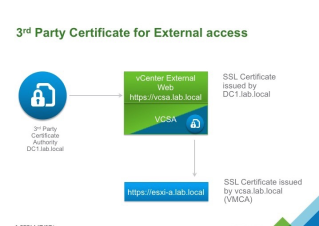
Custom certificate on the outside, VMware (VMCA) on the inside – Replacing SSL Certificate
A customer recently asked me “How do I replace the “external” SSL certificate of vCenter but still use VMCA in default mode?” Ever curious, I asked “Why?”. His security team required that any “externally” facing management web pages needed to have a custom certificate that chained up to the corporate PKI. But behind that, they […]
What is in store for #VMware and the Future of Storage and Availability?
From the early days of VMware, it became clear that dealing with storage in efficient and scalable ways were key requirements for the success of virtualization in enterprise environments. Indeed, the storage stack of ESXi, including VMFS, played a key role in the proliferation of virtualization in data centers, where data is stored and managed by high-end disk arrays. Based on those foundations of storage virtualization, over the years, VMware introduced a range of availability and data…Read More
Integrating #VMware #NSX with #vRealize Log Insight
VMware vRealize Log Insight is a log analyser with capabilities to receive logs from regular syslog (so every device that can send syslog over the network) and from agents for Windows and Linux. Mostly every device can be configured to send logs to it and it can be used for quick and easy operation tasks, giving one a full picture of their environment. Inside Log Insight, you can install (or create your own) content packs. These content packs are a way to create dashboards with filtered data. The filtered data is usually determined by queries to the Log Insight search engine and is targeted to a specific product of which the data you want to see, for example: DRS actions, storage alerts, virtual machine snapshotting, etc. If it is logged…Read More
Know which profile size to deploy for #VMware #vRealize Operations
Decided to fill up the missing information which was not listed in the documentation of vRealize Operations neither was it stated anywhere by anyone in any blog post that I tried to Google around. Was doing a vSphere Optimization Assessment (VOA) and wanted to advise customer on the resources required. Other than the documentation from here or from the vR Ops Installation Guide, it does not state what was provided e.g. the different profile sizes of the vApp is suited for which type of environment other than running the deployment wizard. This is not very helpful especially when you are doing planning and the only way to get that information is to deploy it. Upon deploying, you will get to know the disk size that vR Ops will use. Based…Read More
From the Data Center, With Linux: NVIDIA GRID Virtualizes High-End Linux Workstation Experience
Guest Blog by Will Wade, Director of GRID Product Management, NVIDIA Many businesses use Linux to run some of the most advanced applications on the market. Their opportunity just got bigger thanks to VMware and NVIDIA. NVIDIA GRID technology powers the high-performance 3D graphics of VMware’s recently released Horizon 6 for Linux. This means organizations […]
vSphere Replication 6.0 part 3: enhanced linked mode, backup and recovery scenarios
In the 3rd part of my series I am going to talk aboutthe usage of vCenter enhanced linked mode and vSphere Replication 6.0 and how itcan be used to protect the vSphere replication infrastructure itself. vSphere Replication 6.0 –Part 1: Architecture & features at a glance – vSphere Replication standalone and sample network design vSphere […]]> In the 3rd part of my series I am going to talk aboutthe usage of vCenter enhanced linked mode and vSphere Replication 6.0 and how itcan be used to…Read More
VMware NSX Insight From an Expert, Part 1
VCP6-DCV, VCP6-DCV Delta, and vSphere 6 Foundation Exams Open for Registration Registration opened last month for live versions of the VCP6-DCV, VCP6-DCV Delta, and vSphere 6 Foundation Exams. The exams will be available starting August 30, 2015 at several PearsonVue testing centers around the world. They will also be offered at the special VMworld 2015 exam centers in San Francisco and Barcelona. Register now: vSphere 6 Foundations Exam VMware Certified Professional 6 – Data Center…Read More
Using the Intel Xeon Phi Compute Accelerator with #VMware #ESX 6.0
Compute accelerators — whether they be GPUs, Intel Xeon Phi, or FPGAs — are increasingly common in HPC and so it is important that we assess the use of such technologies from within VMware vSphere® as part of our efforts to virtualize research computing and other HPC environments. Last year when I tested Intel Xeon Phi in passthrough mode (VM Direct Path I/O) with VMware ESX® 5.5, we found that it didn’t work due to some limitations in our passthrough implementation. However, using an…Read More
New Self Paced Courses on vSphere 6, VIO, and User Environment Manager
This is a repost from the EDU Blog. Three new self-paced courses were released last month: VMware vSphere: What’s New [V5.5 to V6] On Demand -This On Demand course explores the newest features and enhancements in VMware vCenter Server™ 6 and VMware ESXi™ 6. Real-world use case deployment scenarios, hands-on lab exercises, and lecture material teach the skills […]
Horizon 6.1.1 Network Ports Diagram
HomeDemoLinksDisclaimerVMware BlogsElearningvSphere5.5 FAQsQ & AAboutWalkthroughsPostersFlingsH-O-L
How to uninstall and remove PernixData FVP for reinstallstion #PernixPro
Hi there, This was not like what the documentation said, and it was not as smooth as I would have liked so I thought I best to write it down. My NFR license expired, and I have to clean things … Read more ›
Deprecated VMFS Volumes found on host in ESXi 6.0
Today after upgraded my ESXi 5.5 host to ESXi 6.0, I started seeing a continuous warning on my ESXi 6.0 host “Deprecated VMFS Volumes found on host. Please consider upgrading volume(s) to the latest version“. From vSphere 6.0, VMFS3 Version is deprecated but all my datastores were already at VMFS 5 Version. I still see […]]> Today after upgraded my ESXi 5.5 host to ESXi 6.0, I started seeing a continuous warning on my ESXi 6.0 host “ Deprecated VMFS Volumes found on host. Please consider…Read More
vCenter Server won’t start
This is actually the second blog post with the same name. I had the same problem, vCenter Server didn’t start, about a year ago and you can read that blog post here. This blog postapplies to vCenter Server 5.5.0 build2442329 and the problem was that thevCenter Server service didn’t start after an unexpected reboot of … Continue reading »
How To Kill Flash on Your Mac
The End of Flash? That might just be the way things will or should pan out over the next year or less. How may times have we all heard of multiple critical vulnerabilities within Adobe’s Flash Player over recent years? Way too many I think.So who is going to tell … The post How To Kill Flash on Your Mac appeared first on The vCenterNerd.
VMware NSX: Install, Configure, Manage [V6.2] Beta Course in DC
On September 21-25 in Reston, Virginia, you have a unique opportunity to participate in the BETA version of our new VMware NSX: Install, Configure, Manage [V6.2] course. This comprehensive, fast-paced training course focuses on installing, configuring, and managing VMware NSX™. This course covers VMware NSX as a part of the software-defined data center (SDDC) platform, […]
Making NSX for Horizon 6 more approachable is as easy as riding a bike: http://t.co/DiMuaCzUsQ
Making NSX for Horizon 6 more approachable is as easy as riding a bike: http://t.co/DiMuaCzUsQ
VCP6-DCV Objective 10.1 – Configure Advanced #vSphere Virtual Machine Settings
Today’s preparation post for VCP6-DCV exam discuss this: VCP6-DCV Objective 10.1 – Configure Advanced vSphere Virtual Machine Settings.
Troubleshooting SSL certificate issues in #VMware #Horizon View
Here is a troubleshooting KB article, written by our support engineers: Troubleshooting SSL certificate issues in VMware Horizon View 5.1 and later