Nuc Nuc Nuc – vSAN !

Nuc Nuc Nuc – vSAN !
This site is focused on VMware’s vCenter Orchestrator (vCO), now named vRealize Orchestrator (vRO). Click around and learn about a great product!
Nuc Nuc Nuc – vSAN !
This site is focused on VMware’s vCenter Orchestrator (vCO), now named vRealize Orchestrator (vRO). Click around and learn about a great product!
VMware vSAN Continues To Gain Customers – StorageReview.com
VMware recently announced that customer adoption of its Virtual SAN is continuing to grow, now topping 5,500. On top of adding customers, VMware has pointed out that the updated branding of their Virtual SAN product is vSAN similar to vSphere.
Common vSAN Troubleshooting Questions Answered
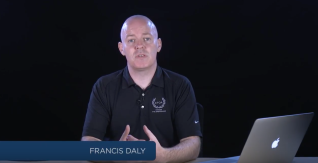
Our monthly webcasts always generate excellent questions from the audience. And when Francis Daly (one of our Staff Technical Training Specialists who trains VMware’s technical staff on all things storage) delivered Virtual SAN Troubleshooting a few weeks ago the questions were outstanding. We pulled a few of the questions below, and you can read the […] The post Common vSAN Troubleshooting Questions Answered appeared first on VMware Education and Certification Blog .
VSAN 6.0 Part 4 – All-Flash VSAN Capacity Tier Considerations – CormacHogan.com
In Virtual SAN version 6.0, VMware introduced support for an all-flash VSAN. In other words, both the caching layer and the capacity layer could be made up of flash-based devices such as SSDs. However, the mechanism for marking some flash Continue reading →
Check out the latest resources for vSAN troubleshooting from VMware Education
Are you getting the most out of your VMware vSAN experience? Curious about how to effectively troubleshoot common issues? Have questions concerning design, requirements, or compatibility? Do you ever wish there was a one-stop shop where you could get all your questions answered, learn new things, and discover how to make best use of vSAN?
Fix slow disk performance (vmw_ahci driver) in ESXi 6.5
VMWare recently released it’s VSphere line versioned as 6.5. I do not recommend to install it yet in a production environment – but it should be fine for your homelab.
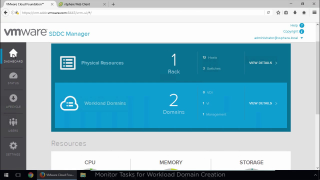
VMware Cloud Foundation – Add VI Workload Domain
In this video, we’ve completed the imaging and initial bring up process for the VMware Cloud Foundation instance. It includes two qualified top-of-rack switches, a management switch and 12 vSAN Ready Nodes. A four-node Management Domain is in place. Now it’s time to add a new workload domain for virtual infrastructure use within the VMware Cloud Foundation instance. There is a ton of automated goodness happening under the hood during the workload domain creation phase. Watch closely and you’ll catch the tasks being orchestrated across the integrated platform.
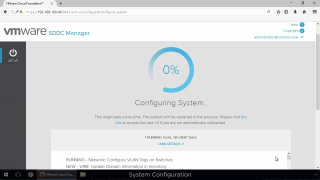
VMware Cloud Foundation – Bring Up the Management Domain
In this video, we’ve completed the imaging process for the VMware Cloud Foundation components – Qualified Top-of-Rack Switches, Management Switch and 12 vSAN Ready Nodes. Now it’s time to bring up the management domain for VMware Cloud Foundation. There is a ton of automated goodness happening under the hood during the configuration phase. Watch closely and you’ll catch the tasks being orchestrated across the integrated platform.
VMware Cloud Foundation – Imaging the Primary Rack
In this video, we demonstrate imaging the primary rack in a VMware Cloud Foundation instance. We’ve deployed and configured the imaging appliance with the software bundle on a laptop that’s plugged into the management switch. From here we’ll kick off the imaging process that will deploy and perform the “first-boot” configuration of the two top-of-rack switches, the management switch, and the 12 qualified vSAN Ready Nodes in the system.
VMware Cloud Foundation – Imaging Preparation
In this video, we demonstrate preparing for the VMware Cloud Foundation imaging process. We’ve downloaded the imaging appliance and the software bundle onto the laptop that’ll be plugged into the first management switch. From here we’ll set a static address on system deploy the imaging appliance, upload and then activate the bundle.
vSAN – Check VM Storage Policy & Compliance via 40 Cent Coffee
As I continue to work with vSAN I discover there’s way more to do than just move some VMs over and you’re on your way. With multiple vSAN clusters each with different configurations I needed a way to monitor the current setup and check for changes. While creating a simple script to check which VM…
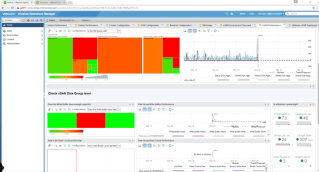
New Dedicated VSAN Management Plugin For vROps Released – ChansBlog
Some of you may have seen the tweets and the article from legendary Duncan Epping here about the release of the new VMware VSAN plugin for vROPS (vRealize Operations Management Pack for vSAN version 1.0)
Click-Through Demo – vSAN 6.5 Deduplication and Compression – ntpro.nl
Deduplication and compression enable considerable capacity savings across the entire Virtual SAN cluster — especially in environments where standard OS builds (templates and clones) are used and where there is abundant data commonality such as file shares.
[Video] Perspectives 2017: VMware’s Lee Caswell on Virtualized Storage
What’s new with storage? For many networking industry insiders, storage has been a sleepy area for the past decade or so. Not anymore, says Lee Caswell, VP of Storage and Availability Products at VMware. Flash technology, combined with hyperconverged software, are now putting stress on networks. Here’s an outlook for 2017.
What’s new with VMware vSAN 6.5? – The Virtual Unknown
Given that I’m a VMware vExpert for vSAN, I guess I’m kind of obliged to write about what’s new with the latest iteration of vSAN – 6.5….. =) vSAN 6.5 is the 5th version of vSAN to be released and it’s had quite a rapid adoption in the industry as end-users start looking at Hyper-Converged…Read More
Denmark’s Largest Retailer Leans Into HCI – VMware Radius
Coop Denmark adopts a hyper-converged infrastructure (HCI) based on VMware vSAN to speed performance and eliminate bottlenecks.
Our Latest Resources for vSAN Troubleshooting – VMware Education and Certification Blog
Are you getting the most out of your VMware vSAN experience? Curious about how to effectively troubleshoot common issues? Have questions concerning design, requirements, or compatibility? Do you ever wish there was a one-stop shop where you could get all your questions answered, learn new things, and discover how to make best use of vSAN? […] The post Our Latest Resources for vSAN Troubleshooting appeared first on VMware Education and Certification Blog .
VMware vSphere 6.5, VSAN among hottest topics in 2016 – TechTarget
Upgrades gave a boost to a lot of VMware’s existing products, like vSphere and VSAN, and helped erase some doubt from early on in the year.
What’s new with VMware vSAN 6.5? – The Virtual Unknown
Given that I’m a VMware vExpert for vSAN, I guess I’m kind of obliged to write about what’s new with the latest iteration of vSAN – 6.5….. =) vSAN 6.5 is the 5th version of vSAN to be released and … Continue reading →
Disk controllers for vSAN with or without cache? – Yellow Bricks
I got this question today and I thought I already wrote something on the topic, but as I cannot find anything I figured I would write up something quick. The question was if a disk controller for vSAN should have cache or not? It is a fair question as many disk controllers these days come […] ” Disk controllers for vSAN with or without cache? ” originally appeared on Yellow-Bricks.com . Follow me on twitter – @DuncanYB.