Designing vSAN networks – Dedicated or Shared…

Designing vSAN networks – Dedicated or Shared Interfaces? – via Virtual Blocks

Designing vSAN networks – Dedicated or Shared…

Every week my top vSAN questions tend to concentrate around networking design. A lot of questions center on if it is ok to share physical interfaces for multiple purposes.


VMware Social Media Advocacy

Designing vSAN Disk groups – All Flash Cache…

Designing vSAN Disk groups – All Flash Cache Ratio Update – via Virtual Blocks

Designing vSAN Disk groups – All Flash Cache…

vSAN cache recommendations for vSAN 5.5 were 10% of used capacity. With the addition of all all flash in 6.0 it stayed at 10% and Cormac here explains the math behind this. Now if you look closely you’ll notice a few issues as vSAN and flash drives have progressed.


VMware Social Media Advocacy

Designing vSAN networks – Why should I use the…

Designing vSAN networks – Why should I use the Distributed Switch? – via Virtual Blocks

Designing vSAN networks – Why should I use the…

The vSphere Distributed Switch (VDS) is a powerful, but often misunderstood technology that is included with VMware vSAN. This post will review some of my favorite settings on the VDS, and how you can use them to get better control, performance, and visibility into your virtual SAN cluster.


VMware Social Media Advocacy

Designing vSAN Networks – Using Multiple…

Designing vSAN Networks – Using Multiple Interfaces? – via Virtual Blocks

Designing vSAN Networks – Using Multiple…

vSAN can leverage a number of core ESXi networking features to increase performance and availability. vSAN VMkernel ports should always be configured to use more than one interface to preserve availability in the event of a link failure. There are a number of ways to configure this fail over.


VMware Social Media Advocacy

Using HCIBench to benchmark vSAN – Part 3: Test

Using HCIBench to benchmark vSAN – Part 3: Test – vMustard.com

Using HCIBench to benchmark vSAN – Part 3: Test

Still with me? Okay good!! So to recap we deployed the HCIBench Controller VM in Part One of this series, then we configured it in Part Two. Let’s crack on with the third and final part where we’ll kick off the test then hit paydirt with some lovely performance benchmarks!


VMware Social Media Advocacy

Using HCIBench to benchmark vSAN – Part 2:…

Using HCIBench to benchmark vSAN – Part 2: Configure – vMustard.com

Using HCIBench to benchmark vSAN – Part 2:…

Welcome to Part Two of this blog series, walking you through putting your vSAN environment through it’s paces with HCIBench. We deployed the Controller VM in Part One, let’s get on and configure it ready for testing.


VMware Social Media Advocacy

Using HCIBench to benchmark vSAN – Part 1:…

Using HCIBench to benchmark vSAN – Part 1: Deploy – vMustard.com

Using HCIBench to benchmark vSAN – Part 1:…

The first thing you’ll want to do with your shiny new vSAN cluster is put it through it’s paces, this series of posts will take you through benchmarking your vSAN cluster with a handy little Fling that’ll do the job perfectly- HCIBench.


VMware Social Media Advocacy

VMware vSAN Two-Node Architecture Service…

VMware vSAN Two-Node Architecture Service Provider Use Cases – via VMware vCloud Blog

VMware vSAN Two-Node Architecture Service…

Welcome to the latest edition of our vCloud Architecture Toolkit for Service Providers (vCAT-SP) blog series! On the third Thursday of the month, we publish blogs around vCloud Architecture Toolkit for Service Providers – a set of reference documents designed to help you construct a superior working cloud solution leveraging current technologies, recommended practices, and innovative tools that have been proven in real-world enterprises.


VMware Social Media Advocacy

vSAN Stretched Cluster – Partition behavior…

vSAN Stretched Cluster – Partition behavior changes – via CormacHogan.com

vSAN Stretched Cluster – Partition behavior…

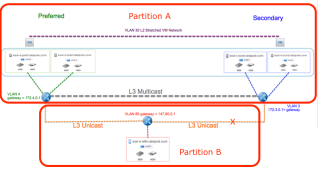
My good pal Paudie and I are back in full customer[0] mode these past few weeks, testing out lots of new and upcoming features in future release of vSAN. Our testing led us to building a new vSAN stretched cluster, with 5 nodes on the preferred site, 5 nodes on the secondary site, and of course the obligatory witness node.


VMware Social Media Advocacy

Migrate a 2-node (ROBO) vSAN from Windows…

Migrate a 2-node (ROBO) vSAN from Windows vCenter (v6.2) to a VCSA (v6.5) – via Virtual Blocks

Migrate a 2-node (ROBO) vSAN from Windows…

One of my good friends from VMware Poland, Aleksander Bukowinski, contacted me recently on behalf of one of our customers. The customer wished to move their 2-node vSAN cluster and the witness to a new vCenter server. They were currently managing their vSAN with a Windows vCenter server (version 6.2), and wanted to move the vSAN cluster to a new appliance based vCenter Server (version 6.5), which we commonly refer to as the VCSA.


VMware Social Media Advocacy

Can you run all-flash with vSAN 6.2 Standard…

Can you run all-flash with vSAN 6.2 Standard license? – via Yellow Bricks

Can you run all-flash with vSAN 6.2 Standard…

As I get the following question a lot I figured I would share the answer here as well: Can you run all-flash with vSAN 6.2 Standard license? Many of you have seen the change in licensing when 6.5 was introduced. No longer is vSAN licenses based on storage hardware used, spindles or all-flash, you can use the lowest license SKU.


VMware Social Media Advocacy

Add All-Flash Support to vSAN 6.0/6.1/6.2 STD

Add All-Flash Support to vSAN 6.0/6.1/6.2 STD – via VMware News and Updates

Add All-Flash Support to vSAN 6.0/6.1/6.2 STD

With vSAN 6.5, we announced that all-flash support would be available to all editions (STD, ADV and ENT). Following that, there have been a few threads on if pre-vSAN 6.5 customers could now deploy vSAN on all-flash hardware. The answer is yes, and we now have an official KB (#2148560) available on this.


VMware Social Media Advocacy

{Excellent} All-Flash VMware Virtual SAN 6.2 on…

All-Flash VMware Virtual SAN 6.2 on Dell FX2 – via Define Tomorrowâ„¢

{Excellent} All-Flash VMware Virtual SAN 6.2 on…

We’ve been lucky enough to get our hands on a Dell Virtual SAN ready node based on the FX2 hardware platform. The FX2 chassis contains 4 x FC430 compute nodes, 2 x storage sleds containing the SSD drives, and 2 x 10Gb IOA modules. Each node has 3 x 800GB and 1 x 200GB SSD drives mapped from the storage sleds and these are presented in pass through mode.


VMware Social Media Advocacy

Rent-A-Center Optimizes VDI with All-Flash vSAN

Rent-A-Center Optimizes VDI with All-Flash vSAN

Rent-A-Center Optimizes VDI with All-Flash vSAN

To maintain a data center with a wide mix of technology running together can be very challenging. With Horizon View and VCE VxRail, Rent-A-Center has standardized their VDI environment leveraging vSAN all-flash storage, and has streamlined and modernized their infrastructure greatly simplifying operations. Aiming to eliminate legacy application and multiple legacy devices, the team is moving towards a completely software defined data center based on vSAN. With the converged infrastructure the IT team can get down to very fine level of detail in software, provisioning the infrastructure through software, dramatically reducing administrative overhead and delivering maximum performance and scalability. “Being able to just deploy and not…Read More


VMware Social Media Advocacy

Automating the VSAN HCL with PowerCLI

Automating the VSAN HCL with PowerCLI

Automating the VSAN HCL with PowerCLI

Recently I was contacted by a customer who needed to be able to update their VSAN Hardware Compatibility List in the VSAN Health Check but was unable to do so via the GUI as their vCenter servers did not have internet access. This is a common setup as a lot of customers clearly do not … Continue reading Automating the VSAN HCL with PowerCLI → This post was original written and posted by Alan Renouf here: Automating the VSAN HCL with PowerCLI


VMware Social Media Advocacy

VSAN Permanent Disk Failure Detection – Health…

VSAN Permanent Disk Failure Detection – Health Status vs Hardware Status – VIRTUALIZATION IS LIFE!

VSAN Permanent Disk Failure Detection – Health…

A month or so ago I had one of our VSAN Management Clusters Health Status flag that there was a failed disk in one of the hosts disk groups. VSAN worked quickly and very efficiently to start an evacuation of the data on the impacted host by triggering a resync operation. Once the data was resynced I checked to see


VMware Social Media Advocacy
Enabling SDDC Health Solution for VSAN monitoring.

Enabling SDDC Health Solution for VSAN monitoring.

Enabling SDDC Health Solution for VSAN monitoring.

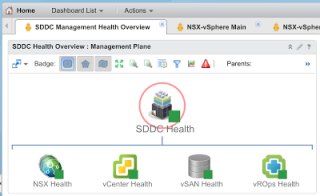
A few days back, I wrote about the release of VMware SDDC health Solution 2.0 which enabled you to monitor all the key components of your Software Defined Datacenter. If you go though the… Click on the title to continue reading the post..


VMware Social Media Advocacy