Key things to consider when assessing cloud backup and recovery

Key things to consider when assessing cloud…
Cloud backup can be part of a comprehensive data protection plan, or a first step to a larger, hybrid cloud world
Key things to consider when assessing cloud backup and recovery
Cloud backup can be part of a comprehensive data protection plan, or a first step to a larger, hybrid cloud world
Rio Olympics Cyber Scams, Hacking Election Polls: This Week’s Top Mobile News, Security Edition
A Rio Olympics mobile travel advisory is in effect. Travelers to the 2016 Olympic Games in Rio de Janeiro, be on the lookout for free Wi-Fi network scams and malicious apps. Mobile security company Skycure identified fake Wi-Fi networks in Rio and fake Olympics apps that are ready to steal your data. Read about it at […]
Choosing the Best VMware Automation Tool — CIOReview
Many companies are looking to deliver IT services and applications that are faster and more efficient to their customers….Read More
Happy 20th Birthday Microsoft Windows Server, get ready for Windows Server 2016
Happy 20th Birthday Microsoft Windows Server, get ready for Windows Server 2016 August 3, 2016 – 1:48 pm Print Friendly Version of this pagePrint Get a PDF version of this webpagePDF Happy 20th Birthday Windows Server, ready for Server 2016? server storage I/O trends In case you have not heard, Microsoft is celebrating the 20th birthday (or anniversary) of Windows Server. Microsoft has a nice site with info graphics and timelines of where Windows Server has been and accomplished over the past…Read More
Top 10 Sessions on DevOps, Continuous Delivery and VMware vRealize Code Stream @ VMworld 2016 There’s no better place to learn more about this than at VMworld 2016 in Las Vegas!
For many organizations today, success hinges on the time-to-market and quality of the applications they are producing. To speed up the software delivery process and bridge the gap that is often prevalent between development and operations teams, organizations are turning to DevOps.
vSphere Authentication Proxy – No Support for 2012/2012R2 Domains — vWud.net
Surprisingly vSphere Authentication Proxy currently has no support for domains that have a functional level of 2012 or 2012R2. The product will install correctly and register the CAM account but will be unable to authenticate the ESXi host with the domain. Domain Functional Level Windows 2000 native Windows Server 2003 Windows Server 2008 Windows Server…Read More
VMware Survey Reveals What IT Thinks about Windows 10 — VMblog
VMware’s Windows 10 Survey Results Despite all the fanfare surrounding the celebrations taking place around the first anniversary of Microsoft… Read more at VMblog.com.
Enabling the Digital Workspace — Andy Nash
Last month I attended the Enabling the Digital Workspace event by VMware and AirWatch in London. This is my summary and personal thoughts on the day. The event was presented by: Ian Evans Vice President End User Computing. Dor Zakai Director Sales Engineering EUC. Thibaut Bellon Manager Systems Engineering AirWatch. Keynote:…Read More
Verify vMotion functionality using PowerCLI — VCDX56
One very important thing during any environment deployment or environment expansion is to verify it actually works as expected. It has been a while since my last script blog post but i wanted to share one PowerCLI script i put together a while ago to verify vSphere vMotion functionality. The script has been very handy … Continue reading »
SQL & Exchange performance in a Virtual Machine — joshodgers.com
The below is something I see far to often: An SQL or Exchange virtual machine using a single LSI Logic SAS virtual SCSI controller. What is even worse is a virtual machine using a single LSI contro…Read More
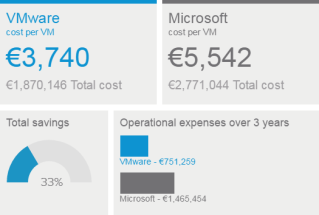
Small Virtual Infrastructure or Large Private Cloud, VMware TCO is Lowest – Here’s Proof
We’ve just updated the VMware TCO Comparison Calculator to help customers see the true Total Cost of Ownership differences between VMware and Microsoft. It’s easy to use – just enter the basic parameters for your virtual infrastructure or private cloud environment, such as the number of VMs, type of servers and storage, and the product edition or features you need. The calculator will generate a complete TCO analysis that includes all the necessary elements of capital and operational expenses.
Try before you buy! VMware On Demand Training courses
VMware On Demand is a robust, self-paced learning solution delivering modular training combined with hands-on practice labs, giving you a powerful alternative to traditional classroom training.
vSphere Client (HTML5) v2.0 – Easy upgrade
vSphere Client (vSphere HTML5 Web Client Fling) Today we are pleased to announce the release of the vSphere Client (HTML5) fling 2.0. From the first version until now, there have been (roughly) 18 updates to the fling with various features, and we’re finally bumping to v2.0! The major feature that comes with v2.0 is the The post vSphere Client (HTML5) v2.0 – Easy upgrade appeared first on VMware vSphere Blog .
VMware applies for a patent to hot-swap your OS — vmspot.com
Hot swapping is nothing new in the IT world. We’ve been able to replace hard drives and power supplies for years. And yet hot swapping within a single host has only really been possible in the realm of hardware. Reboot-less… Continue Reading →
Just Another IT blog: RDM Disk corruption on Microsoft Failover Cluster
Recently I’ve been working on a fresh new vSphere 6 environment and we wanted to test a new functionality, vMotion of clustered guest VMs with RDM. We created and configured Windows Server Failover Cluster solution (WSFC) in accordanced with VMware’s Best Practices and then vMotion it to another hosts, as expected successfully !!! Then we decided to change the Multi Path Policy of the RDM disk to Round Robin, already supported since vSphere 5.5, when we vMotion the clustered guest VM ,in this specific scenario, we faced a disk corruption on the WSFC solution.
An Interview with Top 5 vBloggers within Virtualization
Interview with the Top 5 vBloggers from Eric Siebert and vSphere-Land’s Top vBlog voting contest. They share insight and advice on their creative process.
VMware Validated Designs Physical Networking Overview
VMware Validated Designs are architectures that help simplify deployments of the Software-Defined Data Center.In this video, we provided an overview of the physical network topology used by the VMware Validated Designs. Learn more about VMware Validated Designs at vmware.com/go/vvd or follow updates on Twitter @VMwareSDDC
Network Inferno: Using PowerCLI to match VTEP binding to hosts
A quick one today on PowerCLI. A colleague asked about how to retrieve a list of VTEPs assigned to a host. I was asked because they though PowerNSX may actually do this but low and behold, good old PowerCLI can do the trick. The use of Get-VMHostNetworkAdapter will help here. The first example will Get … Continue reading “Using PowerCLI to match VTEP binding to hosts”
Adding a second vNIC to the VCSA
I recently spun up a new homelab using an Intel NUC, which I love. The foot print is small, you can jam a bunch of RAM and a decent CPU in there, and the power draw is minimal. One of the things I wanted to accomplish with my NUC is the ability to bring it […]]> http://www.42u.ca/2016/08/09/adding-a-second-vnic-to-the-vcsa/feed/ 0 Preparing for VMWorld the second time around http://www.42u.ca/2016/07/18/preparing-for-vmworld-the-second-time-around/…Read More
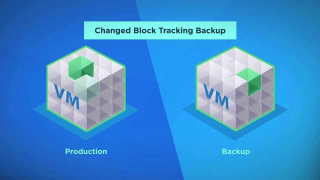
ESXi 6.0 Patch 3 fixes CBT issues in Express Patch 6
Last week VMware released the ESXi 6.0 Patch 3 for the ESXi hosts. There have been a lot of issues that have been fixed with this patch. You can find more about the issuehere. But the most prominent was the one that had a bug from Express Patch 6 that broke the CBT. If you […] The post ESXi 6.0 Patch 3 fixes CBT issues in Express Patch 6 appeared first on Enterprise Daddy.