vCenter Server Appliance as syslog target for…

vCenter Server Appliance as syslog target for Horizon View connection servers

vCenter Server Appliance as syslog target for…

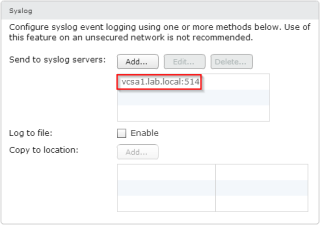
Logging is essential for troubleshooting. VMware Horizon View allows you to configure a SQL database for event logging, and I really recommend to configure the event logging database (I have seen some deployments without).Beside the event logging database, it’s a great idea to configure a secondary log destination. With a event logging database, and logs […] Advertise here with BSA


VMware Advocacy

Remap Dedicated Desktops

Remap Dedicated Desktops

Remap Dedicated Desktops

One of my customers needed to do a complicated migration recently. They wanted to move their View + Unidesk VDI environment from vCenter 5.1 on Windows to the vCenter Server Appliance running vCenter 6. We moved the ESXi hosts and used them to carry the desktops over, just like we do with servers in this sort of situation, but the View stuff added to the complexity. On the Unidesk side, there’s a nice KB article that we followed, but there isn’t such guidance for View. You may not have…Read More


VMware Advocacy

Technical Overview: What is Access Point in…

Technical Overview: What is Access Point in Horizon 6.2 and how is it deployed? https://t.co/22IYfqvaLp https://t.co/2wjyVpUAmv

Technical Overview: What is Access Point in…

Technical Overview: What is Access Point in Horizon 6.2 and how is it deployed? https://t.co/22IYfqvaLp https://t.co/2wjyVpUAmv


VMware Advocacy

Cost leadership in End-User Computing: Virtual…

Cost leadership in End-User Computing: Virtual Desktops, Real Savings https://t.co/bVoaKGbPpX [Whitepaper] https://t.co/YjtcSEuGYk

Cost leadership in End-User Computing: Virtual…

Cost leadership in End-User Computing: Virtual Desktops, Real Savings https://t.co/bVoaKGbPpX [Whitepaper] https://t.co/YjtcSEuGYk


VMware Advocacy

Workaround for the NAT port forwarding issue in…

Workaround for the NAT port forwarding issue in Fusion 8.1

Workaround for the NAT port forwarding issue in…

We recently discovered that NAT network port forwarding doesn’t work properly in Fusion 8.1. While the VMware Fusion team is working on a fix which will be included in the next update, here is a temporary workaround. Steps: Download the NAT network component from http://www.vmware.com/go/dl_vmnet-natd Replace /Applications/VMware\ Fusion.app/Contents/Library/vmnet-natd with the file downloaded in step 1. Restart the […] The post Workaround for the NAT port forwarding issue in Fusion 8.1…Read More


VMware Advocacy

Manually removing a user entitlement from the…

Manually removing a user entitlement from the Adam database in VMware View

Manually removing a user entitlement from the…

Came across an interesting issue where we were unable to remove user entitlements from the VMware View connection server. Was able to resolve the issue by manually removing the user from the adam database. The probable cause of the issue is due to replication failures between the connection servers. To manually remove user entitlements and the user account from the connection broker follow the below instructions: NOTE: Editing the Adam database is quite risky and can lead to rebuilding the…Read More


VMware Advocacy

Getting Started with VMware Fusion eBook: $5

Getting Started with VMware Fusion eBook: $5

Getting Started with VMware Fusion eBook: $5

Happy new year friends! Did you know about this little book I wrote called ‘Getting Started With VMware Fusion’? No? Well good news! It’s on sale for $5! Before I moved down here to Silicon Valley, I was a lead on the Fusion / Workstation Support team in Canada, and in 2014 I was asked by the good folks at Packt Publishing to write […] The post Getting Started with VMware Fusion eBook: $5 appeared first on VMware Fusion Blog .


VMware Advocacy

View 6.2.1. Upgrade, two caveats

View 6.2.1. Upgrade, two caveats

View 6.2.1. Upgrade, two caveats

Recently, I was performing an upgrade from View version 6.0.1 to 6.2.1. On other occasions upgrades from version 6.0.1 to 6.2.0 did not cause serious issues. View 6.2.1 is said to be a “maintenance” release, so I did not expect much problems. The update of the standalone View Composer, the Connection Server and the Security […]


VMware Advocacy

The OS Optimization Tool Fling has been updated…

The OS Optimization Tool Fling has been updated with fixes & new features for Windows 7/8/2008/2012/10 https://t.co/o3WpHdbCDI #HorizonView

The OS Optimization Tool Fling has been updated…

The OS Optimization Tool Fling has been updated with fixes & new features for Windows 7/8/2008/2012/10 https://t.co/o3WpHdbCDI #HorizonView


VMware Advocacy

VMware App Volumes Architecture Whiteboard

VMware App Volumes Architecture Whiteboard

VMware App Volumes Architecture Whiteboard

Jason Marshall from the VMware End-User Computing team walks you through a whiteboard session covering the technical architecture of VMware App Volumes. For more information check out http://www.vmware.com/products/appvolumes.


VMware Advocacy

The App Volumes 2.10 Reference Architecture is…

The App Volumes 2.10 Reference Architecture is now available! More info here: https://t.co/qGlzrMDKYE https://t.co/SL6qjdbjmj

The App Volumes 2.10 Reference Architecture is…

The App Volumes 2.10 Reference Architecture is now available! More info here: https://t.co/qGlzrMDKYE https://t.co/SL6qjdbjmj


VMware Advocacy

App Volumes – Blocking user logon while waiting

App Volumes – Blocking user logon while waiting

App Volumes – Blocking user logon while waiting

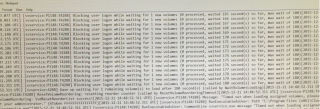
Problem Statement: Using App Volumes 2.10 (Manager and Agent), when logging onto a Windows 10 desktop with one AppStack assigned, the logon time to the Windows desktop takes around 3 minutes. Whilst the AppStack is unassigned, the logon to the desktop is reduced significantly to around 30 seconds. Inspecting the App Volumes agent log file on the Windows… Read More »


VMware Advocacy

Run Windows on Your Mac: VirtualBox vs VMware…

Run Windows on Your Mac: VirtualBox vs @VMwareFusion vs Parallels

Run Windows on Your Mac: VirtualBox vs VMware…

If you need to run Windows inside OS X, you have three options: VirtualBox, VMware, and Parallels. Each has their own strengths and weaknesses, and different use cases where one’s better than another. Let’s break down when each is best and for what.


VMware Advocacy