Will this happen again at VMworld Europe?

Will this happen again at VMworld Europe?
Two weeks ago the biggest VMworld US to date closed … Read More
Will this happen again at VMworld Europe?
Two weeks ago the biggest VMworld US to date closed … Read More
#VMworld US was a blast, but I’m ready for Europe!
VMworld US was a blast, while you may still be recovering from such a busy week we are looking onward to VMworld Europe. Don’t miss 250 expert-led sessions, hands-on training, general sessions, partner solutions, and more! Register today if you’re ready for any.
Relationships are the main thing coming out from this show
Ultimately, for this attendee, the show is about relationships.
#VMware certificate holders should get ready to do their homework.
Nearly all VMware certification programs are changing, except for the VMware Certified Associate level. That includes the introduction of the VMware Certified Implementation Expert program.
#VMware Virtual SAN: The Software-Defined Storage Platform of the Future
At VMworld 2015, we announced Virtual SAN 6.1, the third-generation of VMware’s hyper-converged infrastructure for VMs. With this release, we are introducing several major enhancements and new capabilities, including support for the latest generation of storage devices, new availability and disaster recovery features, and advanced management and serviceability tools. These capabilities build on top of already proven, best-of-breed performance, scalability and reliability features to provide…Read More
How to best optimize View virtual desktops in Horizon 6 in combination with VMware vSphere for high performance 3D http://t.co/z5RS0xNP4o
How to best optimize View virtual desktops in Horizon 6 in combination with VMware vSphere for high performance 3D http://t.co/z5RS0xNP4o
Receive a 10% discount on the new Cert Exam Prep available in #VMware Learning Zone + get a 50% off Exam voucher http://t.co/v3MfK6JeIq
Receive a 10% discount on the new Cert Exam Prep available in #VMware Learning Zone + get a 50% off Exam voucher http://t.co/v3MfK6JeIq
Web-based Management for the VCSA is Back!
When vSphere 6.0 launched, there was a celebration. But one beloved feature didn’t make it to the party: The vCenter Server Appliance Management Interface, or more fondly known as the VAMI. The VAMI was the administration web interface included with previous releases of the VCSA that was used to perform basic administrative tasks to the […] The post Web-based Management for the VCSA is Back! appeared first on VMware vSphere Blog .
App-delivery decision maker for Horizon 6 helps you choose app-delivery methods and platforms http://t.co/iRmdQVDkUQ http://t.co/WbN3QfYu23
App-delivery decision maker for Horizon 6 helps you choose app-delivery methods and platforms http://t.co/iRmdQVDkUQ http://t.co/WbN3QfYu23
Horizon FLEX 1.6 and Windows 10
By Andy Morris, Sr. Product Line Marketing Manager, Horizon FLEX, EUC, VMware Hi, Andy here again. You’ll be happy to know that that we’ve kept to our quarterly promise, and shipped another major release of FLEX. VMware Horizon FLEX 1.6 shipped at the beginning of September. And it’s a doozy. The headline is that it’s […] The post Horizon FLEX 1.6 and Windows 10 appeared first on VMware End-User Computing Blog .
VMware Validated Designs – Certified Partner Architecture Program
At VMworld 2015 there has been a lot of excitement around the newly announced VMware Validated Designs – those prescriptive Software-Defined Data Center architectures & designs being created and validated by VMware experts and made available to you. Included as part of the VMware Validated Designs announcements is a new Certified Partner Architecture Program, and I’d like …Read More
Two New Design Courses + VMware NSX V6.2 Training
Three highly anticipated training courses were released last month: VMware vSphere: Design and Deploy Fast Track [V6] – This extended-hours training course equips you with the knowledge, skills, and abilities to design and deploy a VMware vSphere® 6.0 virtual infrastructure. You will work with peers to hone your skills with a proven approach to designing and deploying […] The post Two New Design Courses + VMware NSX V6.2 Training appeared first on VMware Education and Certification Blog .
VMworld 2015 Labs being released to public
I don’t know which of us crazy people thought it would be a good idea to begin releasing the Hands-on Labs from VMworld 2015 the week immediately following the conference, especially with Labor Day on Monday and several of us on the core team heading out to present at other events, but we have been on an accelerated […] The post VMworld 2015 Labs being released to public appeared first on VMware Hands-On Lab (HOL) Blog .
PowerCLI 6.0 R2 is now available for download. See what’s new and start enjoying the new features and… http://t.co/6GbKuwnlOi
PowerCLI 6.0 R2 is now available for download. See what’s new and start enjoying the new features and… http://t.co/6GbKuwnlOi
Content Library Performance Tuning
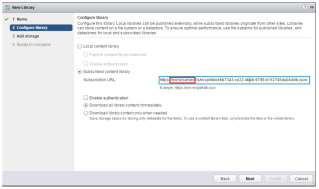
by Joanna Guan and Davide Bergamasco The first two posts in this series assessed the performance of some Content Library operations like virtual machine deployment and library synchronization, import and export. In this post we discuss how to fine-tune Content Library settings in order to achieve optimal performance under a variety of operational conditions. Notice […] The post Content Library Performance Tuning appeared first on VMware VROOM! Blog .
The debate about disabling Hyperthreading in virtualized Exchange server is over
Anyone that virtualized Exchange server in recent years had stumbled into this conundrum: should I disable Hyperthreading on the physical server or not? The main cause of this confusion is conflicting recommendations coming from Microsoft and VMware on the subject, I am happy to say that this debate is finally over. As we at VMware […] The post The debate about disabling Hyperthreading in virtualized Exchange server is over appeared first on Virtualize Business Critical Applications .
Seamless ingestion during Log Insight upgrade
Software upgrades should be simple and require minimal disruption, but all too often upgrading enterprise software is extremely complicated and requires extensive downtime. For tools like Log Insight that are used to monitor critical applications and services, downtime during upgrade could mean missing alerts about the health of the monitored systems, losing logs and metrics […] The post Seamless ingestion during Log Insight upgrade appeared first on VMware Cloud Management .
Why VSAN and ROBO is a Perfect Match
In my many conversations with customers I hear the same feedback over and over: Customers spend too much money on ROBO solutions. Customers do not have infrastructure staff on site Customers don’t run enough compute to justify large amounts of infrastructure Customers typical scale storage capacity on site, rather than compute and performance. In VSAN 6.1 we are removing the requirement for 3 physical VSAN Nodes. By placing the witness VM offsite in the customers central datacenter or even vCloud Air this will allow the customer to deploy only 2 physical nodes on site.
.@CormacJHogan provides an excellent document in the form of a design guide for stretched clustering: https://t.co/Q4ZsGxO9Cw #VSAN
.@CormacJHogan provides an excellent document in the form of a design guide for stretched clustering: https://t.co/Q4ZsGxO9Cw #VSAN
What’s New with VMware Horizon 6.2
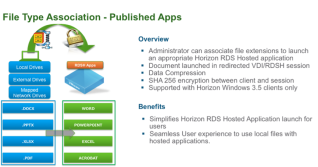
By Matt Coppinger, Director Technical Marketing & Enablement, EUC, VMware September and VMworld 2015 saw the general availability (GA) of VMware Horizon 6.2. This new release for VMware’s flagship EUC product has a wealth of new features and enhancements. In fact, 6.2 represents a monumental release with a huge number of improvements for the server, […] The post What’s New with VMware Horizon 6.2 appeared first on VMware End-User Computing Blog .