vSphere Lifecycle Manager (vLCM)

vSphere Lifecycle Manager (vLCM)
This video demonstrates cluster lifecycle management using vSphere Lifecycle Manager.
vSphere Lifecycle Manager (vLCM)
This video demonstrates cluster lifecycle management using vSphere Lifecycle Manager.
Working from Home Via VMware Horizon in the Age of COVID-19, Part 2 — Virtualiz…
Working from Home Via VMware Horizon in the Age of COVID-10, Part 2 Tom Fenton further details his solution for getting remote workers up and running in a timely manner with minimal hardware requirements and user impact using VMware Horizon.
VMware patches privilege escalation vulnerability in Fusion, Horizon | ZDNet
What are you looking for?Go VMware patches privilege escalation vulnerability in Fusion, Horizon Exploits to root systems with Fusion, VMRC or Horizon Client installations were possible. | March 18, 2020 — 11:50 GMT (04:50 PDT) SecurityMicrosoft shares nightmare tale: 6 sets of hackers on a customer’s networkMicrosoft orchestrates coordinated takedown of Necurs botnetThis ransomware campaign has just returned with a new trickScam, spam and phishing texts: How to spot SMS fraud and stay safeCybersecurity: Do these ten things to keep your networks secure from hackersHow to protect yourself from mobile malware attacks (ZDNet YouTube)Best home security of 2020: Professional monitoring and DIY (CNET)How to set up secure credential storage…Read More
vSphere 7 – vMotion Enhancements
The vSphere vMotion feature enables customers to live-migrate workloads from source to destination ESXi hosts. Over time, we have developed vMotion to support new technologies. The vSphere 7 release is no exception to that, as we greatly improved the vMotion feature. The vMotion enhancements in vSphere 7 include a reduced performance impact during the live-migration The post vSphere 7 – vMotion Enhancements appeared first on VMware vSphere Blog.
11 Secrets for Successful “Remote-First” Working
Learn about strategies for creating a successful remote-first work environment with tips from Charles Barratt, Sr. Manager of Digital Workspace Pursuits.
vSphere 7 – Scalable Shares
In this demo I show a cool new feature part of VMware vSphere 7 called Scalable Shares. This brand new feature is part of vSphere DRS and enables customers using Resource Pools to divide resource in a fair way across workloads.
Who is a vExpert Pro
A vExpert Pro is a current vExpert who excels in their local region, adding value to the program and giving back to the community. This person has a strong relationship with the local IT community in general, and works as an advocate for the vExpert program, recruiting, mentoring and training people…Read More
What is vCenter Identity Federation in vSphere 7.0?
VMware vSphere 7 has been just announced. There are many new features, many things have been improved over the previous release, and completely new concepts have been introduced as well. In this post, we’ll detail vCenter Identity Federation which will be available in vCenter server 7.0.
VMware vRealize Network Insight Introduction & Innovations
This session will review VMware vRealize Network Insight’s customer value proposition. We will look at how vRealize Network Insight delivers – Intelligent operations for software-defined networking and security – Helps customers build an optimized, highly available, and secure network infrastructure across multicloud environments – Accelerates micro-segmentation planning and deployment – Enables visibility across virtual and physical networks; and provides operational views to manage and…Read More
Configure VIP Address for the NSX-T Management Cluster -VMware NSX-T Part 5
This article will help you to understand the detailed step by step procedure to configure VIP address for the NSX-T Management cluster…Read More
Confluent Kafka Platform on VMware Enterprise PKS with NSX-T Networking – Part 1
Let’s continue the blog series on VMware Enterprise PKS and NSX-T, this time we’re going to deploy a multi-tier application to the PKS K8S Cluster. We will deploy an Enterprise-grade version of Kafka from Confluent along with the Confluent platform components. Apache Kafka is built around an…Read More
vSphere 7 – Launch Recap & Links, Week 1
VMware announced a TON of new products and versions last week, including VMware vSphere 7, VMware Cloud Foundation 4, the VMware Tanzu portfolio, updates to VMware Cloud, vSAN 7, and vRealize Suite 8.1. It’s completely understandable that you might have been focused on other things so here’s the rundown on all of them. We will The post vSphere 7 – Launch Recap & Links, Week 1 appeared first on VMware vSphere Blog.
Sneak peak at deploying Tanzu Kubernetes Grid Plus on vSphere & VMware Cloud on AWS
Last week, VMware had its huge launch which included VMware Cloud Foundation 4, vSphere 7, vSAN 7 and the brand new VMware Tanzu Portfolio that will help organizations build, run and manage modern applications for their business. Although we still have a couple of more months before general availability, the level of excitement for these upcoming […]
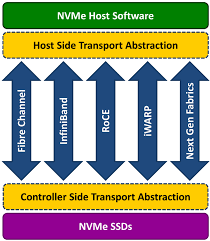
VMware vSphere 7 adds NVMe-oF support to speed storage access
VMWare vSphere 7 support for NVMe-oFgives virtual machines faster read and write access to external stored data, thus increasing performance.
vSphere 7 and DRS Scalable Shares, how are they calculated?
Advertise here with BSA I wrote a post and recorded a short demo that explained this cool new feature called Scalable Shares, part of vSphere 7 / DRS, last week. I didn’t want to go too deep in the post, but now that I am getting more questions about how this actually works, I figured I would provide some […]
VMware Announces Kubernetes Support for VMware Cloud on AWS
VMware has recently rolled out a number of new features for VMware Cloud on AWS. One of the most significant is VMware Tanzu Kubernetes Grid Plus for VMware Cloud on AWS, enabling partners to expand their footprint in existing accounts, sell a unique solution that supports both containers and virtual machines using tools your customers The post VMware Announces Kubernetes Support for VMware Cloud on AWS appeared first on Power of Partnership.
Working from Home – Tips from a remote worker
Disclaimer *This post is unlike most posts published on the {code} blog* In these unprecedented times, it will be an adjustment for all of us to start working remotely over the course of the next few weeks. As someone who works remotely most of the time, I wanted to put together some tips that have The post Working from Home – Tips from a remote worker appeared first on VMware {code}.
VMware vCenter upgrade from 6.7 to 7.0
I would like to share my experience about vCenter upgrade from 6.7 to 7.0. I was part of vSphere private bate tests like last couple of vSphere version. In my Lab environment I have upgraded vCenter. You need the ISO file and moint it. Like previous versions browse the installer and run it on your system. On the Introduction page you can see a yellow warning message which is warn you no external PSC anymore. If you have external PSC you have to convert it embeded first. For more information please visit site: https://kb.vmware.com/s/article/60229 Add your existing / source vCenter server IP and port number. It is necessary becose during in the secund stage data will copy to target vCenter. Click connect to source button. Type login…Read More
Cloud Native Storage and vSAN File Services Integration
Introduction With vSphere 6.7 U3 we introduced the Cloud Native Storage control plane into vSphere, built to cater for container based workloads that required on-demand provisioning of volumes on vSphere. The initial release catered for the most common workloads that required Persistent Volumes, namely of the ReadWriteOnce type (essentially, a single container mounting a single The post Cloud Native Storage and vSAN File Services Integration appeared first on Virtual Blocks.
Track vSAN Memory Consumption in vSAN 7
One of the most common requests in relation to vSAN performance is how much CPU and memory does vSAN actually consume on an ESXi host, i.e. what is the overhead of running vSAN. Through the vSAN Performance Service, we have been able to show both host and vSAN CPU usage for some time. However, up to now, we have only been able to show host memory usage, and not overhead attributed to vSAN. It has also been extremely difficult to determine how much memory vSAN required. Way back in 2014, with…Read More