Tips for vSphere Datacenter Design #VCDX #vExpert #vcdx181.com

Tips for vSphere Datacenter Design — Plus More…
Tips, how-tos and more from VMware Professional Services.
Tips for vSphere Datacenter Design #VCDX #vExpert #vcdx181.com
Tips, how-tos and more from VMware Professional Services.
vSphere with Operations Management Product Walkthroughs #VCDX #vExpert #vcdx181.com
If you’ve ever tried to watch a product demo video, or tried to use it to show a product to someone else, often times you find yourself trying to pause the video at the exact right moment, and then having scrub backwards or forwards because you missed the timing. At VMware we’ve created an alternative […]
Capacity Management in SDDC #VCDX #vExpert #vcdx181.com
In Part 5, I explained a new concept, where we use Contention as the basis of Capacity Management in SDDC. In Part 6, I provided the super metric equation for each charts. In this part, I will provide example of the super metric formula and dashboard screenshots. Tier 1 (Highest) To recap, we need to […]
#VMware and F5 Hands-On-Lab Now Available! #VCDX #vExpert #vcdx181.com
VMware and F5 are proud to announce the availability of one of the first partner-centric labs utilizing VMware’s global Hands-On-Lab infrastructure. In close collaboration with the VMware End-User Computing Technical Enablement team, the VMware Alliance team at F5 created this lab for easy-to-use yet rich technical exercises.
#EVO:Rail Hands-on Lab Challenge: #VMware Announces 1st Winner #VCDX #vExpert #vcdx181.com
In the spirit of competition, we are excited to announce the winners of the EVO:RAIL Hands-on Lab Challenge for May. In the contest, you are faced with three challenges and have 60 minutes to complete them.
Save on Training and Certification at VMworld EMEA #VCDX #vExpert #vcdx181.com
Maximize your VMworld 2015 EMEA experience with discounted training and certification offers. 1) Join us in Barcelona the week before VMworld and take advantage of these discounted pre-conference training courses. VMware vSphere: Optimize & Scale [V6] VMware NSX: Install, Configure, Manage [V6.0] VMware vSphere: Bootcamp [V6] VMware vRealize Operations Manager: Install, Configure, Manage [V6.0] VMware vSphere: Design […]
How to deploy #vCSA with external Platform Services Controller #VCDX #vExpert #vcdx181.com
In one of my previous posts we had a closer look on how to upgrade the vCenter Server Appliance from version 5.5 to version 6.0. This upgrade procedure described the upgrade process of the vCenter Server Appliance with an embedded Platform Services Controller (PSC) but doesn’t provide an upgrade or migration process if you want to deploy the vCenter Server Appliance with an external Platform Services Controller. According to the vSphere 6 Installation and Setup guide, if you want to use the vCenter Server Appliance with an external Platform Services Controller, you must deploy a new vCenter Server Appliance and select the appropriate options during the setup if you want to deploy an external Platform Services Controller. Before we jump…Read More
I registered, what are YOU waiting for? #vmwmobility #VCDX #vExpert #vcdx181.com
There’s an exciting world of new opportunities evolving — a world where early movers can take advantage and winners will be defined by mobile-first or mobile-only strategies. Register today for the one event you won’t want to miss.
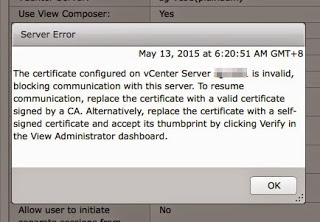
Unable to verify certificate for #vCenter on Horizon View Connection Server #VCDX #vExpert
Recently during an outage of my host during to hardware issue in my home lab where my vCenter 6.0 sit on it, resulted some strange behaviour on my View Connection Server 6.1.
#vRealize Operations with Blue Medora #NetApp Management Pack #VCDX #vExpert #vcdx181.com
There are many things that a VMware admin would love to see from their storage. Often, all they know is the LUNs. What’s backing up those LUNs are not exposed. For example, on the following screenshot you can see that it shows the number of systems I have. For each system, it shows the NetApp aggregate, volume, etc. The Environment tab shows the relationship.
Citrix XenApp and VMware ThinApp Working Hand-In-Hand #VCDX #vExpert #vcdx181.com
By Debra Perrin Coltoff, Technical Writer, End-User-Computing Technical Marketing, VMware You already have a Citrix XenApp implementation, and it is working for you. Why not maximize the return on that investment by using XenApp with VMware ThinApp? Paired, the two solutions solve many of the problems of a XenApp implementation on its own. Wait a […]
VM Component Protection (VMCP) #VCDX #vExpert #vcdx181.com
vSphere 6.0 introduces a powerful new feature as part of vSphere HA called VM Component Protection (VMCP). VMCP protects virtual machines from storage related events, specifically Permanent Device Loss (PDL) and All Paths Down (APD) incidents. Permanent Device Loss (PDL) A PDL event occurs when the storage array issues a SCSI sense code indicating that the […]
Horizon FLEX: remote image management and policy enforcement #VCDX #vExpert #vcdx181.com
Hi, I’m Andy from VMware. Today I’d like to show you something exciting from VMware that may not have made it on to your radar – remotely managed policies for Fusion users! Back in December we launched a new product called Horizon FLEX. The concept behind FLEX is simple, Fusion is fantastic for you on […]
New Configurations for VMware #EVORAIL #VCDX #vExpert #vcdx181.com
Since the general availability of VMware EVO:RAIL™ , we have moved quickly to offer EVO:RAIL customers greater choice and value with new programs, functionality and scale capabilities. Today, we continue this trend.
#VMworld 2015 Europe registration opens June 9! #VCDX #vExpert #vcdx181.com
#VMworld 2015 Europe registration opens June 9! To see highlights from last year check out our #TBT post from 2014. http://t.co/SIEEAA3Dq2
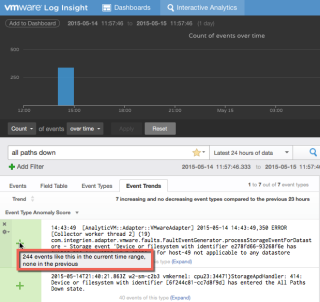
Log Insight Machine Learning: Event Trends #VCDX #vExpert #vcdx181.com
One incredibly powerful use case of vRealize Log Insight that is often overlooked is the new Event Trends analyzer. The Event Trends tab in the Interactive Analytics page provides automatic analysis of your events with context around new insights and anomaly detection. I can now see how events are trending in a specified time interval and easily detect ones that […]
Expanding Beyond Windows with VMware Horizon 6 for Linux #VCDX #vExpert #vcdx181.com
By Pat Lee, senior director of product management, End-User Computing, VMware I am pleased to announce the general availability of VMware Horizon 6 for Linux. The release of VMware Horizon 6 for Linux builds on the success of our Early Access program where over 400 customers were able to test and validate the benefits of […]
Technical preview support for #NeoKylin #Linux desktops #VCDX #vExpert #vcdx181.com
Technical Preview Support for NeoKylin Linux Desktop 6.x has been introduced for these products: ESXi 6.0. VMware announced VDI solutions for enterprise Linux desktops. NeoKylin is one of them. To read more please check out the VMware blog here . For more information about software and hardware support, please check the VMware Compatibility Guide
VMware Virtual SAN Health Check Plug-in Now Available #VCDX #vExpert #vcdx181.com
By Rafi Kabesa This is a repost from the VMware Virtual Blocks Blog. The VMware Virtual SAN team is proud to announce the general availability of the new VMware Virtual SAN Health Check Plug-in. The Health Check Plug-in was created to address one of the pain points many storage solution suffer from – hardware health and configuration – […]
LRO Support for VMXNET3 with Windows VMs on vSphere 6 #VCDX #vExpert #vcdx181.com
Large Receive Offload (LRO) is a technique to reduce the CPU time for processing TCP packets that arrive from the network at a high rate. LRO reassembles incoming packets into larger ones (but fewer packets) to deliver them to the network stack of the system. LRO processes fewer packets, which reduces its CPU time for […]