Automating VMware NSX Security Rules Creation…

Automating VMware NSX Security Rules Creation using Splunk and Some Code

Automating VMware NSX Security Rules Creation…

The VMware NSX network virtualization platform allows us to build sophisticated networking and security constructs in software. NSX has a rich RESTful API which allows one to build highly flexible and automated environments. In this blog, we’re going to focus on operations and automation; we’ll demonstrate one example of automation around security policies/rules that can […] The post Automating VMware NSX Security Rules Creation using Splunk and Some Code appeared first on The Network…Read More



VMware Advocacy

Nested NSX 6.2 – Part 5 North-South Routing

Nested NSX 6.2 – Part 5 North-South Routing

Nested NSX 6.2 – Part 5 North-South Routing

Nested NSX 6.2 – Part 5 North-South Routing Posted on January 15, 2016 by Kyle jenner I have now established east-west communication I must now configure north-south communication – this is achieved by using NSX Edge (ESG). ESG supports dynamic routing protocols that can be peered with the physical infrastructure, for my lab I will be attempting to pass the traffic onto my home router. This is a bog standard Virgin Media router with limited features, I really need a managed router with…Read More


VMware Advocacy

Technical Overview: What is Access Point in…

Technical Overview: What is Access Point in Horizon 6.2 and how is it deployed? https://t.co/22IYfqvaLp https://t.co/2wjyVpUAmv

Technical Overview: What is Access Point in…

Technical Overview: What is Access Point in Horizon 6.2 and how is it deployed? https://t.co/22IYfqvaLp https://t.co/2wjyVpUAmv


VMware Advocacy

Cost leadership in End-User Computing: Virtual…

Cost leadership in End-User Computing: Virtual Desktops, Real Savings https://t.co/bVoaKGbPpX [Whitepaper] https://t.co/YjtcSEuGYk

Cost leadership in End-User Computing: Virtual…

Cost leadership in End-User Computing: Virtual Desktops, Real Savings https://t.co/bVoaKGbPpX [Whitepaper] https://t.co/YjtcSEuGYk


VMware Advocacy

PowerShell Friday: Copying files with…

PowerShell Friday: Copying files with Copy-VMGuestFile

PowerShell Friday: Copying files with…

Every now and then you can run into the situation that you have a file wich needs to be distributed to any number of virtual machines. Now you could logon to these servers and copy the file manually and for maybe a handfull of virtual machines this is doable. But to make it easier on yourself you could also make use of Powershell. With Powershell you could make use of the cmdlet called Copy-Item to exchange data between your source and destionation. [crayon-5698dab33837d343449845/] This…Read More


VMware Advocacy

Nested NSX 6.2 – Part 4 Distributed Routing

Nested NSX 6.2 – Part 4 Distributed Routing

Nested NSX 6.2 – Part 4 Distributed Routing

Nested NSX 6.2 – Part 4 Distributed Routing Posted on January 15, 2016 by Kyle jenner The next part of my lab is to start creating logical switches, connecting VMs and configuring routing. Routing can be achieved by either centralised routing or distributed routing. Centralised routing represents NSX Edge as an on-ramp/off-ramp setup, this can provide east-west routing but is not optimised as the traffic must be hair-pinned to where the NSX is deployed even when VMs which belong to separate…Read More


VMware Advocacy

Virtual SAN Delivers Enterprise Level…

Virtual SAN Delivers Enterprise Level Availability (via Virtual Blocks)

Virtual SAN Delivers Enterprise Level…

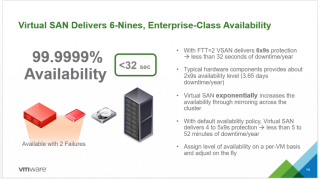
One of the slides we showcased during the VMware Virtual SAN 6.1 Launch that got a lot of attention was the fact that VSAN delivers 6x9s enterprise level availability. A lot of eyebrows in the audience were going up wondering how we came to the conclusion that VSAN delivers 6-9s availability level (or less than 32 seconds of downtime a year).


VMware Advocacy

Prep for success! Study with Certification Exam…

Prep for success! Study with Certification Exam Prep videos in the VMware Learning Zone: https://t.co/1W1YXVpc4i

Prep for success! Study with Certification Exam…

Prep for success! Study with Certification Exam Prep videos in the VMware Learning Zone: https://t.co/1W1YXVpc4i


VMware Advocacy

VCP6-DTM Objective 1.6 – Install, Configure and…

VCP6-DTM Objective 1.6 – Install, Configure and Manage vRealize Operations Manager For Horizon

VCP6-DTM Objective 1.6 – Install, Configure and…

Another chapter towards the end concerning our VCP6-DTM study guide for VMware Horizon View Suite, but especially towards all the objectives on the VCP6-DTM blueprint. Todays post coversVCP6-DTM Objective 1.6 – Install, Configure and Manage vRealize Operations Manager For Horizon. vRealize Operations Manager for Horizon is available in 3 different installation packages, starting with OVA(pre-packaged […] Read the full post VCP6-DTM Objective 1.6 – Install, Configure and Manage vRealize…Read More


VMware Advocacy

Creating a Custom Role for SQL DBAs with the…

Creating a Custom Role for SQL DBAs with the Management Pack for Microsoft SQL Server

Creating a Custom Role for SQL DBAs with the…

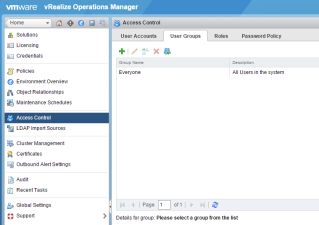
By: Greg Hohertz, Blue Medora As you expand the reach of vRealize Operations Manager outside the realm of vSphere and down the stack into your compute, network and storage infrastructure and up the stack in databases, middleware, and applications, you’ll quickly find the need to create custom groups within vRealize Operations to limit access to […] The post Creating a Custom Role for SQL DBAs with the Management Pack for Microsoft SQL Server appeared first on VMware Cloud Management .


VMware Advocacy

Deploying Veeam Availability Suite – Veeam ONE

Deploying Veeam Availability Suite – Veeam ONE

Deploying Veeam Availability Suite – Veeam ONE

Veeam Availability Suitecontains abackup & replication solution (Veeam Backup & … Read more… The post Deploying Veeam Availability Suite – Veeam ONE appeared first on virtuallyBoring.


VMware Advocacy

vDCA550-Objective 2.2-4-Analyze command line…

vDCA550-Objective 2.2-4-Analyze command line output to identify vSS and vDS configuration details

vDCA550-Objective 2.2-4-Analyze command line…

Commands can also be used to analyze details of existing vSS and vDS. For example, to list all vSS and vDS, use these commands: #esxcli network vswitch standard list […]


VMware Advocacy

Changing ESXi Hostname on an EVO:RAIL Appliance

Changing ESXi Hostname on an EVO:RAIL Appliance

Changing ESXi Hostname on an EVO:RAIL Appliance

The other day I did a VSPEX Blue (EMC’s flavor of EVO:RAIL Appliance) install for a customer that couldn’t conform to the hostname standards set forth by the EVO:RAIL Installation Wizard. After a little bit of digging and work I was able to change the hostnames and get everything working like it came from the factory. You simply cannot just change the ESXi hostname, you also need to modify EVO:RAIL Manager so things like health reporting actually function. So, how do we do this? First a quick…Read More


VMware Advocacy

To TPS, or not to TPS, that is the question?

To TPS, or not to TPS, that is the question?

To TPS, or not to TPS, that is the question?

Something that crops up again and again when discussing vSphere designs with customersis whether on not they should enable (Inter-VM) TPS (Transparent Page Sharing) as since the end of 2014 VMware decided to disable TPS by default. To understand if … Continue reading →


VMware Advocacy

VMware Fling – VMware Access Point Deployment…

VMware Fling – VMware Access Point Deployment Utility

VMware Fling – VMware Access Point Deployment…

With Horizon 6.2 VMware introduced the VMwareAccess Point, which is a virtual appliance designed to allow secure remote access to virtual desktops and applications served by Horizon 6. The VMwareAccess Point is very similar to the View Security Server, but offers some additional benefits. VMware Access Point is a hardened Linux appliance that can be deployed into the DMZ. Big difference with the View Security Server is, that an Access Point does not need to be paired with a View Connection…Read More


VMware Advocacy

Workaround for the NAT port forwarding issue in…

Workaround for the NAT port forwarding issue in Fusion 8.1

Workaround for the NAT port forwarding issue in…

We recently discovered that NAT network port forwarding doesn’t work properly in Fusion 8.1. While the VMware Fusion team is working on a fix which will be included in the next update, here is a temporary workaround. Steps: Download the NAT network component from http://www.vmware.com/go/dl_vmnet-natd Replace /Applications/VMware\ Fusion.app/Contents/Library/vmnet-natd with the file downloaded in step 1. Restart the […] The post Workaround for the NAT port forwarding issue in Fusion 8.1…Read More


VMware Advocacy

Update Manager Cmdlets are now included in…

Update Manager Cmdlets are now included in PowerCLI since 6.0 R2

Update Manager Cmdlets are now included in…

It’s always great to have new features, functionality, and updates included in releases of any product. One of the changes to PowerCLI in 6.0 Release 2 is that we have included the vSphere Update Manager cmdlets into the installer. No longer will you have to search through MyVMware to find the additional executable to install […] The post Update Manager Cmdlets are now included in PowerCLI since 6.0 R2 appeared first on VMware PowerCLI Blog.


VMware Advocacy