New Contest : Share Your vROps 6.6 Upgrade Story

New Contest : Share Your vROps 6.6 Upgrade Story

New Contest : Share Your vROps 6.6 Upgrade Story

The VMware Communities is running a contest on vRealize Operations 6.6 (vROps 6.6). Make sure you check it out and participate by sharing your upgrade experience. Top winners will get exciting prizes! Click HERE to Share Your Story If you are all excited about our new release of vROps 6.6 and have already upgraded, please The post New Contest : Share Your vROps 6.6 Upgrade Story appeared first on VMware Cloud Management .

VMware Social Media Advocacy

vRealize Operations 6.6 – Troubleshoot a Host…

vRealize Operations 6.6 – Troubleshoot a Host Dashboard

vRealize Operations 6.6 – Troubleshoot a Host…

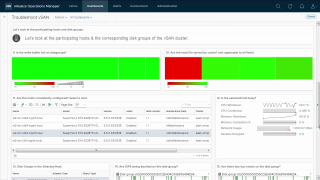
http://bit.ly/2uiPhbK Since ESXi servers are the main source of providing resources to a VM, they are extremely critical when it comes to performance and availability. This dashboard will help you insure the health of your ESXi hosts.


VMware Social Media Advocacy

vRealize Operations 6.6 – Optimize vSAN…

vRealize Operations 6.6 – Optimize vSAN Deployments Dashboard

vRealize Operations 6.6 – Optimize vSAN…

http://bit.ly/2uiPhbK The Optimize vSAN Deployments Dashboard allows you to determine which VMs might benefit from moving into vSAN storage from non-vSAN storage, as well as confirming that VMs which have been migrated are performing as well or better on vSAN. And you don’t have to be a vSAN expert to use the dashboard!


VMware Social Media Advocacy

vRealize Operations 6.6 – Troubleshoot with…

vRealize Operations 6.6 – Troubleshoot with Logs Dashboard

vRealize Operations 6.6 – Troubleshoot with…

http://bit.ly/2uiPhbK vRealize Operations allows you to view log data along with metric data for 360 degree troubleshooting with vRealize Log Insight embedded in the product user interface.


VMware Social Media Advocacy

vRealize Operations 6.6 – Host Usage Overview…

vRealize Operations 6.6 – Host Usage Overview Dashboard

vRealize Operations 6.6 – Host Usage Overview…

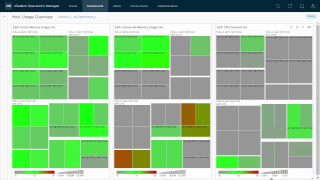
http://bit.ly/2uiPhbK The Host Usage Overview Dashboard is recommended for a Network Operations Center display. There are three heatmaps showing ESXi host Active Memory Usage, Consumed Memory Usage and CPU Demand. These can help find hotspots in your environment where hosts are struggling to provide resources to VMs.


VMware Social Media Advocacy

vRealize Operations 6.6 – vSAN Capacity…

vRealize Operations 6.6 – vSAN Capacity Overview Dashboard

vRealize Operations 6.6 – vSAN Capacity…

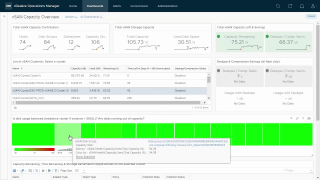
http://bit.ly/2uiPhbK The dashboard simplifies vSAN capacity management by providing you an aggregated view of capacity contributors and utilization for all your vSAN clusters. It also provides transparency into your return on investments on all flash vSAN clusters by showing you the storage savings achieved due to dedupe and compression.


VMware Social Media Advocacy

vRealize Operations 6.6 – vSAN Operations…

vRealize Operations 6.6 – vSAN Operations Overview Dashboard

vRealize Operations 6.6 – vSAN Operations…

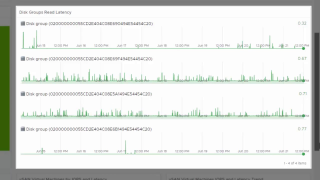
http://bit.ly/2uiPhbK The vSAN Operations Overview Dashboard provide a holistic view of your vSAN environment, from the vSAN clusters down to the physical disks. You can also view trending information for VMs being served by vSAN, as well as vSAN IOPS and Latency.


VMware Social Media Advocacy

vRealize Operations 6.6 – vSphere Hardening…

vRealize Operations 6.6 – vSphere Hardening Compliance Dashboard

vRealize Operations 6.6 – vSphere Hardening…

http://bit.ly/2uiPhbK The vSphere Hardening Compliance Dashboard dashboard measures your environment against the vSphere Hardening Guide and shows you the results along with affected objects.


VMware Social Media Advocacy

vRealize Operations 6.6 – Heavy Hitter VMs…

vRealize Operations 6.6 – Heavy Hitter VMs Dashboard

vRealize Operations 6.6 – Heavy Hitter VMs…

http://bit.ly/2uiPhbK With the Heavy Hitter VMs Dashboard you can select a cluster from the list to see information about CPU Demand, Memory Demand, Disk IO and Network throughput for the last week. Date controls and zoom allow you to adjust the view. You may also export the data from each of the graphs to CSV for further analysis.


VMware Social Media Advocacy

vRealize Operations 6.6 – Troubleshoot a…

vRealize Operations 6.6 – Troubleshoot a Cluster Dashboard

vRealize Operations 6.6 – Troubleshoot a…

http://bit.ly/2uiPhbK With the Troubleshoot a Cluster Dashboard you can work through a guided approach of identifying issues and isolating them easily. This dashboard is found under Performance Troubleshooting.


VMware Social Media Advocacy

vRealize Operations 6.6 – Cluster Configuration…

vRealize Operations 6.6 – Cluster Configuration Dashboard

vRealize Operations 6.6 – Cluster Configuration…

http://bit.ly/2uiPhbK The Cluster Configuration Dashboard highlights the areas which are important to ensure performance and availability to your virtual machines. Here you can quickly find clusters which are not configured for DRS, HA or Admission Control – without these features enabled you are at risk for resource bottlenecks or VM availability in the event of a host failure.


VMware Social Media Advocacy

Top vRealize Log Insight articles for June 2017

Top vRealize Log Insight articles for June 2017

Top vRealize Log Insight articles for June 2017

FAQ: Log Insight for vCenter Server Update sequence for vSphere 6.5 and its compatible VMware products Starting VMware vRealize Log Insight 2.5 fails with the error: Failed to start Cassandra Server Important information before upgrading to vSphere 6.0 VMware Virtual Appliances and customizations to operating system and included packages Understanding the Source and Hostname fields […] The post Top vRealize Log Insight articles for June 2017 appeared first on Support Insider.


VMware Social Media Advocacy

Upgrade vRealize Operations Manager to 6.6 |…

Upgrade vRealize Operations Manager to 6.6 | Let’s v4Real

Upgrade vRealize Operations Manager to 6.6 |…

Over the past month or so, I’ve been dabbling with vROPs 6. In the midst of my dabbling…VMware released a upgrade to the product that came packed with a bunch of new features. Just to mention some: Simplified usability and faster time to value capabilities: New HTML5 user interface provides an easier and consistent experience….Read More


VMware Social Media Advocacy

Part 9 – Using data roll-ups for longer…

Part 9 – Using data roll-ups for longer retention period in vROps 6.6

Part 9 – Using data roll-ups for longer…

Hope you are enjoying the What’s New with vROps 6.6 series. With this post, I wanted to share a little gem of a configuration which has not been in the lime-light with all the new and cool things… Click on the title to continue reading the post..


VMware Social Media Advocacy