vCenter Server 6 Appliance fsck failed

#vCenter Server 6 Appliance fsck failed
vCenter Server 6 Appliance fsck failed

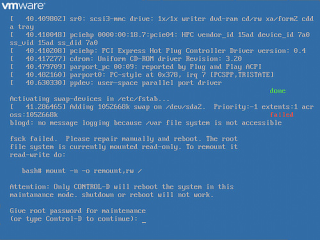
A vCenter Server Appliance (vSphere 6.0 Update 1b) belonging to me was bounced and for some reason was unbootable. The trouble during the boot process begins with /dev/sda3 contains a file system with errors, check forced. At approximately 27% of the way through, the process terminates with fsck failed. Please repair manually and reboot.

VMware Social Media Advocacy

Nominations for the 2016 Top vBlog voting…

Nominations for the 2016 Top #vBlog voting categories are now open!

Nominations for the 2016 Top vBlog voting…

Just like prior years in addition to the traditional top 50 voting I’m opening it up to allow voting in specific categories as well to help distinguish certain types of blogs. To do this I have created a form to allow you to nominate your blog or website for one of the categories that I have defined if your blog fits one or more of the categories, if it does not then don’t nominate it as all blogs on the vLaunchpad will automatically be included in the general top blog voting.


VMware Social Media Advocacy

Top Ten things to consider when moving Business…

Top Ten things to consider when moving Business Critical Applications (BCA) to the Cloud (Part 2 of 3)

Top Ten things to consider when moving Business…

In the first part we looked at public, private and Hybrid Cloud and their characteristics. In this part we will look at the common characteristics of business critical applications. We will also look at how some of these characteristics relate to the different types of Cloud infrastructure. Common Characteristics of Business Critical Applications (BCA): Business critical […] The post Top Ten things to consider when moving Business Critical Applications (BCA) to the Cloud (Part 2 of 3)…Read More


VMware Social Media Advocacy

Deprecated VMFS volume(s) found on the host….

Deprecated VMFS volume(s) found on the host. Please consider upgrading volume(s) to the latest version

Deprecated VMFS volume(s) found on the host….

Today while working in my Lab I was seeing following warning message on my Esxi host: Deprecated VMFS volume(s) found on the host. Please consider upgrading volume(s) to the latest version This error occurred just after I added a new … Continue reading →


VMware Social Media Advocacy

Lookup service fails with the certificate error…

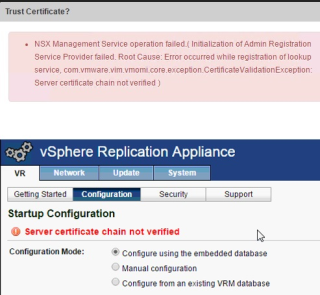
Lookup service fails with the certificate error for external VMware solution like NSX Manager, VMware vCenter Site Recovery Manager, VMware vSphere Replication or vSheild Manager

Lookup service fails with the certificate error…

Some solutions, such as VMware vCenter Site Recovery Manager, VMware vSphere Replication, or vSheild Manager are always installed on a different machine than the associated vCenter Server system or Platform Services Controller that manages the certificates for the solution.


VMware Social Media Advocacy

VMware CPU Co-Stop and SQL Server Performance

VMware CPU Co-Stop and SQL Server Performance (via Convergence of Data and Infrastructure)

VMware CPU Co-Stop and SQL Server Performance

Not too many people know about the intricacies of virtualization CPU scheduling and its impact on the performance of the VMs, so application owners out there – listen up! I’ve written about Ready Time (VMware ESXi) / Wait Time Per Dispatch (Microsoft Hyper-V) in the past, but a different challenge arises with VMs that have large vCPU count footprints. It’s called CPU Co-Stop, and it can devastate your application’s performance in a VM.


VMware Social Media Advocacy

vCenter 6.0u1b to 6.0u2 Upgrade Error: VMware…

vCenter 6.0u1b to 6.0u2 Upgrade Error: VMware Syslog Component

vCenter 6.0u1b to 6.0u2 Upgrade Error: VMware…

I wanted to upgrade my 6.0u1b Windows vCenters to 6.0u2 to start off the QA process, but unfortunately I hit a 1603 error. The TSE I worked with saw a few errors from VMware Syslog Collector and some internal PRs. The following is what he saw in my logs: [crayon-56fea372e991b958353812/] If you go… Read More »


VMware Social Media Advocacy

Two Factor Authentication for vSphere – RSA…

Two Factor Authentication for vSphere – RSA SecurID – Part 1

Two Factor Authentication for vSphere – RSA…

Introduction This is Part 1 of a 2 part blog series. In this post we’ll talk about setting up RSA SecurID Authentication Manager, some architectural assumptions and what you’ll need to take with you to Part 2. Two Factor Authentication Two factor authentication (2FA) has become ubiquitous nowadays. For those of you still in the […] The post Two Factor Authentication for vSphere – RSA SecurID – Part 1 appeared first on VMware vSphere Blog .


VMware Social Media Advocacy

vSphere 6.5 Web Client – Free Preview Released…

vSphere 6.5 Web Client – Free Preview Released by VMware Labs

vSphere 6.5 Web Client – Free Preview Released…

VMware labs released a free vSphere 6.5 Web Client (or if you want vSphere HTML5 Web Client) is a free preview (Fling) of a vSphere client which is compatible HTML5 and Javascript. We’re supposing that we’ll find the finished product in vSphere 6.5, but we’re not sure about that. Some news about the future release of vSphere are known already but nothing is sure just yet. The vSphere Web client product shall be rapidly following the same (fast) development cycles as the ESXi Host client.


VMware Social Media Advocacy

Recent ESXi 6 Storage Bugs and the FlashArray

Recent ESXi 6 Storage Bugs and the FlashArray

Recent ESXi 6 Storage Bugs and the FlashArray

As you might be aware, there have been a few storage-related issues with ESXi 6.0 as of late: Accidental PDL during dropped paths: Storage PDL responses may not trigger path failover in vSphere 6.0 (2144657) Host issues during smartd inquiries: Issuing a 0x85 SCSI Command from a VMware ESXi 6.0 host results in a PDL error (2133286) The question that comes up for the Pure Storage FlashArray is are we susceptible? The short answer is no. Let’s explain why.


VMware Social Media Advocacy

PowerCLI: Enable/Disable the VM Hot Add features

PowerCLI: Enable/Disable the VM Hot Add features

PowerCLI: Enable/Disable the VM Hot Add features

Since the release of vSphere, you are able to Hot Add memory and vCPU. Quote from the VMware website: Virtual Machine Hot Add Support— The new virtual hardware introduced in ESX/ESXi 4.0 supports hot plug for virtual devices and supports addition of virtual CPUs and memory to a virtual machine without powering off the virtual machine. See the Guest Operating System Installation Guide for the list of operating systems for which this functionality is supported. So I wanted to see, if I was able to enable/disable this settings via PowerCLI and came up with a couple of functions.


VMware Social Media Advocacy

Deploy VMware View Access Point the easy way

Deploy VMware View Access Point the easy way

Deploy VMware View Access Point the easy way

In my final part in my series on Implementing a VMware Virtual Desktop Infrastructure with Horizon View 6.2 I showed how to deploy the View Access Point using ovftool. However, thanks to Chris Halstead there is an easier way. He has developed a tool to take the pain out of the deployment.


VMware Social Media Advocacy

Using PowerCLI to build multiple VMs

Using PowerCLI to build multiple VMs

Using PowerCLI to build multiple VMs

My first script that I ever wrote was a script to build VMs. I was the newest member on the team, and i was giving the task of building 50 VMs for a new project that was getting started. It was a very daunting task, due to the completion date to have these 50 VMs to be completed. So one of the other members of the team told me about PowerCLI, but didn’t have any knowledge about it.


VMware Social Media Advocacy

New Fling: vSphere HTML5 Web Client

New Fling: vSphere HTML5 Web Client

New Fling: vSphere HTML5 Web Client

VMware first introduced the vSphere Web Client with the release of vSphere 5.0. The vSphere Web Client would be the future management tool replacing the vSphere client aka “Legacy, Thick or C# Client”. This would be become more evident over time with each release of vSphere. New features could only be managed through the vSphere Web Client.


VMware Social Media Advocacy

Deploying VMware Update Manager 6.0 Update 2

Deploying VMware Update Manager 6.0 Update 2

Deploying VMware Update Manager 6.0 Update 2

With the release of vSphere 6.0 Update 2 I needed to update my hosts! VMware Update Manager [VUM] makes updating and patching your environment very easy. It can also be used to upgrade VMTools and VMHardware versions on your virtual machines. In this post I will be installing VUM on Windows Server 2012 R2 VM using the SQL Express database and attaching it to my VCSA 6.0 U2 appliance. Once installed then I will use VUM to update my environment!


VMware Social Media Advocacy

vSphere 6 Update 2 – Whats In It for Service…

vSphere 6 Update 2 – Whats In It for Service Providers

vSphere 6 Update 2 – Whats In It for Service…

It’s been just over a week since VMware released vSphere 6 Update 2 and I thought I would go through some of the key features and fixes that are included in the latest versions of vCenter and ESXi. As usual I generally keep an eye out for improvements that relate back to Service Providers who use vSphere as the foundation of their Managed or Infrastructure as as Service offerings.


VMware Social Media Advocacy