History of vSphere Storage Size Limitations

History of vSphere Storage Size Limitations

History of vSphere Storage Size Limitations

This seems like a straightforward topic. If you are on vSphere 6 you can create VMFS datastores and VM disks as big as 64TB (62TB for VM disks to be precise). The reality is, not all customers are running the latest and greatest for various reasons.


VMware Social Media Advocacy

VAAI XCOPY not being used with Powered-On…

VAAI XCOPY not being used with Powered-On Windows VM

VAAI XCOPY not being used with Powered-On…

This is an issue I discovered along with my good friend and former colleague Drew Tonnesen a few years back which has cropped up a few times in recent days. I noticed there wasn’t really any information about it online, so made sense to put a quick post together.


VMware Social Media Advocacy

VMware’s new Virtual Technical Advisor (VTA)…

that virtual boy: VMware’s new Virtual Technical Advisor (VTA) Service

VMware’s new Virtual Technical Advisor (VTA)…

Anyone familiar with VMware’s Technical Account Manager (TAM) services knows the benefits to having such a resource as your advocate. Our customers gave TAM services a Net Promotor Score (NPS) of 67.5%, which is incredibly high for such a paid service. We’re in an age where great software paired with great services is the best way to squeeze the most value out of your investments. Adopting new technologies, embracing the Cloud, exploring hyper converged infrastructure can be daunting tasks. VMware wants you to be confident in your endeavors and that’s where the Technical Account Manager and Virtual Technical Advisor services come in!


VMware Social Media Advocacy

Yellow Bricks: I have memory pages swapped, can…

Yellow Bricks: I have memory pages swapped, can vSphere unswap them?

Yellow Bricks: I have memory pages swapped, can…

“I have memory pages swapped out to disk, can vSphere swap them back in to memory again” is one of those questions that comes up occasionally. A while back I asked the engineering team why we don’t “swap in” pages when memory contention is lifted. There was no real good answer for it other than it was difficult to predict from a behavioural point of view. So I asked what about doing it manually? Unfortunately the answer was: well we will look in to it but it has no real priority it this point.


VMware Social Media Advocacy

VMWerni: Change OS (from Windows 2008 to…

VMWerni: Change OS (from Windows 2008 to Windows 2012 R2) of vCenter 5.5 – Change vCenter 5.5 SSO architecture, virtualize a physical vCenter 5.5

VMWerni: Change OS (from Windows 2008 to…

The following checklist describes the process of migration the vCenter 5.5 OS (for example from Windows 2008 to Windows 2012 R2) by actually re-installing a fresh vCenter 5.5 – using the exsitsing vCenter database, inventory database and certificates. A follwoing step could be to update this “refreshed” vCenter 5.5 to vCenter 6.0. – And yes I am talking about Windows vCenter to Windows vCenter I am not talking about vCenter appliance.


VMware Social Media Advocacy

Home Lab fundamentals: Time Sync

Home Lab fundamentals: Time Sync

Home Lab fundamentals: Time Sync

First rule of Home Lab club, don’t talk about time sync! Or so it seems. When starting your home lab, all hints and tips are welcome. The community is full of wisdom, however sometimes certain topics are taken for granted or are perceived as common knowledge. The Home Lab fundamentals series focusses on these subjects, helping you how to avoid the most common pitfalls that provide headaches and waste incredible amounts of time. A ‘time-consuming’ pitfall is dealing with improper time synchronization between the various components in your lab environment.


VMware Social Media Advocacy

New SRM & vSphere with Operations Management…

New SRM & vSphere with Operations Management Sales Briefcases

New SRM & vSphere with Operations Management…

Download these two new Sales Readiness Briefcases (interactive PDFs). These – along with the Virtual SAN and AirWatch briefcases released last month – will prepare you to have more meaningful conversations with your customers and save you valuable time, so that you can focus your energy where it packs the most punch instead of chasing down content, presentations or references. We will continue to release more throughout the quarter, so stay tuned.


VMware Social Media Advocacy

Virtual Blocks: Is Storage DRS Still Needed…

Virtual Blocks: Is Storage DRS Still Needed With Virtual Volumes?

Virtual Blocks: Is Storage DRS Still Needed…

A question that has been coming up frequently in conversations I have had with customers is why Storage DRS is not supported with Virtual Volumes or Virtual SAN? In fact this question came up again in a customer call on Thursday morning with one of our customers who wanted to understand more about the benefits of Virtual Volumes. Taking onboard the advice that if you are asked a question more than twice it’s worth writing a blog post about it I decided it was about time that I wrote up my thoughts on the topic!


VMware Social Media Advocacy

New Updated Oracle Databases on VMware Best…

New Updated Oracle Databases on VMware Best Practices Guide

New Updated Oracle Databases on VMware Best…

Business Critical Applications (BCA) are at the heart of an organization; their performance, availability and reliability are vital to the success of the business. Significant advances in hardware are far outpacing the performance requirements of even the most intensive business-critical applications, including Oracle Database.


VMware Social Media Advocacy

Getting More Out of VMware: Distributed…

Getting More Out of VMware: Distributed Resource Management

Getting More Out of VMware: Distributed…

On June 8th, we will be hosting a Getting More Out of VMware webinar about Distributed Resource Management using Dynamic Resource Scheduler (DRS) and vRealize Operations (vR Ops). In this session, we will examine how to combine DRS and vRealize Operations Manager capabilities to deliver the most efficient compute platform for your virtual machines. We […] The post Getting More Out of VMware: Distributed Resource Management appeared first on VMware Cloud Management .


VMware Social Media Advocacy

VDP Full and File Level Restore Fails: Failed…

VDP Full and File Level Restore Fails: Failed to get disks: Unable to browse as proxies are unavailable

VDP Full and File Level Restore Fails: Failed…

So when trying to perform a full virtual machine restore or a File Level Restore for any virtual machine the task fails, at various possible percentages. The failure descried here is,


VMware Social Media Advocacy

Getting Started with Tech Preview of Docker…

virtuallyGhetto: Getting Started with Tech Preview of #Docker Volume Driver for #vSphere
Getting Started with Tech Preview of Docker…

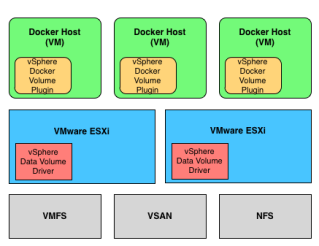
A couple of weeks ago, I got an early sneak peak at some of the work that was being done in VMware’s Storage and Availability Business Unit (SABU) on providing storage persistency for Docker Containers in a vSphere based environment. Today, VMware has open sourced a new Docker Volume Driver for vSphere (Tech Preview) that will enable customers to easily take advantage of their existing vSphere Storage (VSAN, VMFS and NFS) and provide persistent storage access to Docker Containers running on top of the vSphere platform. Both the Developers and vSphere Administrators will have familiar interfaces in how they manage and interact with these Docker Volumes from vSphere, which we will explore further below.


VMware Social Media Advocacy

vSphere Client timeout after replacing Machine…

#vSphere Client timeout after replacing Machine SSL Certificate

vSphere Client timeout after replacing Machine…

The last few days I have been troubleshooting a very strange issue with the C# vSphere client on a new vSphere 6.0 install for a customer. The vSphere Client was initially working fine, until I replaced the Machine SSL Certificate for vCenter. After the Machine SSL Certificate was replaced, the vSphere client would timeout on connection. The issue was only connecting to vCenter, if connecting the vSphere client directly to hosts the client worked fine.


VMware Social Media Advocacy

Latest Fling from VMware Labs – VMware Logon…

Latest Fling from VMware Labs – #VMware Logon Monitor

Latest Fling from VMware Labs – VMware Logon…

VMware Logon Monitor logs a wide array of metrics related to logon, group policy, user profile, and performance. These metrics were selected to provide administrators a detailed view of end user systems during logon time so performance bottlenecks may be more easily root caused.


VMware Social Media Advocacy

We asked, VMware Certified Instructors Answered

We asked, #VMware Certified Instructors Answered

We asked, VMware Certified Instructors Answered

We recently interviewed a few VMware Certified Instructors (VCIs) to get their best advice for students and to learn more about their experience teaching classes for VMware Education Services. We pulled the best (and surprisingly honest) responses below. Hope you enjoy!


VMware Social Media Advocacy

Don’t believe the hype: Cisco and VMware SDN…

Don’t believe the hype: #Cisco and #VMware SDN solutions could work better than you think – TechRepublic

Don’t believe the hype: Cisco and VMware SDN…

VMware and Cisco software-defined networking solutions may both have a place within customer environments. Here’s how a single customer leveraged both in their data center.


VMware Social Media Advocacy

Port blocked due to L2 security violation

Port blocked due to L2 security violation – vAddicted

Port blocked due to L2 security violation

After a customer migration from his vCenter to our cloud, a couple of his VMs didn’t connect to the organization network. Troubleshooting deeper, I realized that the related ports were “Blocked due to L2 security violation”


VMware Social Media Advocacy