Top 10 Mobile News Headlines of 2016 — So Far

Top 10 Mobile News Headlines of 2016 — So Far

Top 10 Mobile News Headlines of 2016 — So Far

The first half of 2016 has been a doozy, giving us mobility enthusiasts some of the biggest mobile news headlines and innovations EVER. Here are the top 10 mobile news headlines of 2016 so far. 1. The digital workspace hit the scene in a big way. With the February launch of VMware Workspace ONE—and its […]

VMware Social Media Advocacy

How to audit vSphere Standalone VMRC or HTML5…

How to audit vSphere Standalone VMRC or HTML5 VMRC connections–virtuallyghetto

How to audit vSphere Standalone VMRC or HTML5…

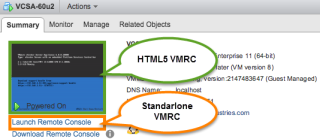
An interesting question that came in last week from one of our TAMs was how to identify and audit Virtual Machine Remote Console (VMRC) logins from vSphere? The TAM was specifically interested in being able to correlate that a particular user had logged into the VMRC of a VM during a specific period of time. Luckily, this is easily retrievable through vCenter Servers’s Event sub-system that stores information about everything that happens in your vSphere environment. The Events can be accessed using either the vSphere Web Client shown below or programmatically using the vSphere API which the UI is built on top of.


VMware Social Media Advocacy

How to find Dell PERC FD332 or H330 Firmware…

How to find Dell PERC FD332 or H330 Firmware Versions in ESXi 6

How to find Dell PERC FD332 or H330 Firmware…

Today’s adventure seemed an easy task but ended up taking much too long to find the right answer. The task… ‘Is there a way to find the firmware version of a Dell Perc FD332 or H330 controller using command line in ESXi 6?’ The answer: ‘zcat /var/log/boot.gz |grep -i firm’ Things that didn’t work […]


VMware Social Media Advocacy

Bring Windows Media Redirection to VMware…

Bring Windows Media Redirection to VMware Horizon Client for Linux

Bring Windows Media Redirection to VMware…

Multimedia redirection (MMR) technology helps improve performance by utilizing the client endpoint to process media—instead of the server—so CPU utilization on the server can be reduced. It also can reduce the bandwidth and thus provide a smooth playback experience. For a long time, MMR can only be deployed to VMware Horizon Client for Windows, as […] The post Bring Windows Media Redirection to VMware Horizon Client for Linux appeared first on VMware End-User Computing Blog .


VMware Social Media Advocacy

Quick Tip – How to quickly find the VM Display…

Quick Tip – How to quickly find the VM Display Name of your vCenter Server?

Quick Tip – How to quickly find the VM Display…

It is a pretty common practice for customers to use their vCenter Server to manage the underlying ESXi host which is also running the vCenter Server VM, sometimes referred to as a self managed vSphere Cluster. For organizations that have a strict naming convention which includes the VM display name as well as the OS hostname (FQDN), it is generally not too difficult to identify the actual VM that is running your vCenter Server.


VMware Social Media Advocacy

Life in the Fast Lane – Previewing the 2016…

Life in the Fast Lane – Previewing the 2016 VMworld Party

Life in the Fast Lane – Previewing the 2016…

Work hard, party hard. The VMworld Party is as much a part of the VMworld experience as the breakout sessions, Solutions Exchange, Hands-on Labs, and keynotes! It’s a great chance for attendees to get together and decompress over some food, drinks and fun.


VMware Social Media Advocacy

Virtual Machine Security & VMware Monitoring:…

Virtual Machine Security & VMware Monitoring: Dark Art or Actual Science? — opvizor

Virtual Machine Security & VMware Monitoring:…

Virtual machine security and VMware monitoring should be all science, right? But it isn’t. According to professionals at Kaspersky Lab, assuring the security and health of a virtual network is still very much a black art. One of the primary issues is that businesses and their IT departments most commonly try to use the same security measures and monitoring techniques they used for their old, physical machines and networks on their new, virtualized ones.


VMware Social Media Advocacy

Restarting VMs after a Datacenter Down Event

Restarting VMs after a Datacenter Down Event

Restarting VMs after a Datacenter Down Event

One of my customers recently had a catastrophic thermal event in one of their datacenters and so had to shut down all of their infrastructure at that site. After the cooling issue was resolved, we were asked to help them to get their infrastructure back online. Fortunately, we have included several small details as best practices in our vSphere designs, and one of those really paid off for us. We always create a VM to Host affinity rule that keeps one Domain Controller, the vCenter server, its PSC and its Database (if external) on a known host in the management cluster.


VMware Social Media Advocacy

My time @VMware (A Love Story)

My time @VMware (A Love Story) — vTimD

My time @VMware (A Love Story)

So, I’m sure I’ve made it very apparent over the past couple months that I made a transition in jobs. I left Dell Services and became a Sr. Pre-Sales SE in the NSBU @VMware. I knew since I started working with VMware products that I would eventually like to work at the “mothership”. I had always heard nothing but great things about the company. After my first couple months in, I can tell you insider information. It’s even better than anyone ever said.


VMware Social Media Advocacy

Michael Ryom: ESXi IOStats – vmkmgmt_keyval

Michael Ryom: ESXi IOStats – vmkmgmt_keyval

Michael Ryom: ESXi IOStats – vmkmgmt_keyval

Just wanted to do a short post about vmkmgmt_keyval, as I think most admins only uses this tool for getting HBA driver/firmware versions, but you get so much more than just that. There is different forms of statistics in there, per target, per lun and block size.


VMware Social Media Advocacy

Tag-based Veeam Backups

Tag-based Veeam Backups–RNelson0

Tag-based Veeam Backups

As I teased in Using vCenter tags with PowerCLI, I want to explore how to use tags in a practical application. To refresh our memory, we looked at creating an Ownership category with individual tags in it, and limited VMs to having just one of the tags. We created a little script that defines our schema, in case we need to re-create it. We are going to work on a new category today for our backups. Specifically, Veeam backups, based on SDDC6282-SPO, Using vSphere tags for advanced policy-driven data protection as presented at VMworld 2015.


VMware Social Media Advocacy

New Training Videos on vRealize, NSX, and vSphere

New Training Videos on vRealize, NSX, and vSphere

New Training Videos on vRealize, NSX, and vSphere

VMware Learning Zone subscribers get a year of unlimited access to our cloud-based video training library taught by top VMware experts, including all our new releases, like these from the past month:


VMware Social Media Advocacy

Disable Num Lock notification in VMware…

Disable Num Lock notification in VMware Workstation–wojcieh

Disable Num Lock notification in VMware…

As a Consultant I travel a lot and I have pleasure to work with fantastic VMware Clients. Unfortunately for myself access to Clients infrastructure is granted via VPN (many times different software) and I am forced to use virtual machine to work. This is quite understandable and make sense for security point of view, but for myself being locked by VPN without Internet access isn’t great. Today post Disable Num Lock notification in VMware Workstation will show you how to fix this issue.


VMware Social Media Advocacy

Renew ESXi SSL certificates in vSphere Web Client

Renew ESXi SSL certificates in vSphere Web Client

Renew ESXi SSL certificates in vSphere Web Client

In my earlier post vCenter Server 6.* – Replacing SSL certificates with Enterprise VMCA I showed you how to use VMware Certificate Authority in Enterprise mode using subordinate Certificate Authority. Once the vCenter Server SSL certificates are replaced the next step is to Renew ESXi SSL certificates in vSphere Web Client in our environment.


VMware Social Media Advocacy