VMware Horizon View Agent installation order

VMware Horizon View Agent installation order

VMware Horizon View Agent installation order

When configuring a Windows desktop or RDSH sessionwith Horizon View, different software components must be installed such as the VMware Tools and the VMware Horizon View Agent. When using User Environment Manager and App Volumes they require an agent too. All these software components must be installed in the correct order to prevent problems such […] The post VMware Horizon View Agent installation order appeared first on http://www.ivobeerens.nl.


VMware Advocacy

Best Practices with 3D Graphics For VMware View…

Best Practices with 3D Graphics For VMware View 6.2

Best Practices with 3D Graphics For VMware View…

Don’t use vSGA with 4K monitors When 4K monitors are configured on machines where 3D Rendering and vSGA are enabled, moving, resizing the Windows Media Player window to full screen mode can be very slow. This issue does not occur with 2D, software 3D Rendering, or monitors with 2560×1440 resolution. Have different templates for NVIDA… Read More


VMware Advocacy

Technical whitepaper: VMware Horizon 6 3D…

Technical whitepaper: VMware Horizon 6 3D engineering workloads reference architecture https://t.co/dT5pRzYUBj https://t.co/xGNViSWVRK

Technical whitepaper: VMware Horizon 6 3D…

Technical whitepaper: VMware Horizon 6 3D engineering workloads reference architecture https://t.co/dT5pRzYUBj https://t.co/xGNViSWVRK


VMware Advocacy

What’s New with VMware Horizon 6.2, Part 3

What’s New with VMware Horizon 6.2, Part 3

What’s New with VMware Horizon 6.2, Part 3

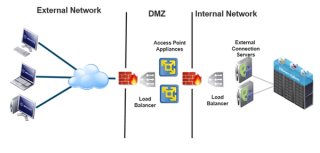
By Matt Coppinger, Director, End-User-Computing Technical Marketing and Enablement, VMware In our last blog post, What’s New with VMware Horizon 6 version 6.2, Part 2, we continued to look at some of the new features in Horizon 6.2, specifically VMware Access Point and the new Microsoft RDSH load-balancing feature for Horizon 6 hosted applications. In […] The post What’s New with VMware Horizon 6.2, Part 3 appeared first on VMware End-User Computing Blog .


VMware Advocacy

VMware Horizon Integration – How the Pieces Fit…

VMware Horizon Integration – How the Pieces Fit Together, Part 2

VMware Horizon Integration – How the Pieces Fit…

By Anthony Rizzo, Staff End-User-Computing Technologist, VMware Part 1 in this Horizon Integration blog series introduced the concept of VMware Horizon as a very flexible and adaptable tooling system for building next-generation end-user-computing architectures—and interoperability is a key contributor to these characteristics. Before going into the details of interoperability, it is essential to understand three […] The post VMware Horizon Integration – How the Pieces Fit Together, Part 2…Read More


VMware Advocacy

Fusion 8.0.2 now available

Fusion 8.0.2 now available

Fusion 8.0.2 now available

Today we have released an important update to Fusion 8 and Fusion 8 Pro, bringing our current version to 8.0.2. All users on Fusion 8 or Fusion 8 Pro will receive notification that a free update is available through the app, but here’s the download link in case you haven’t got the notification yet: Direct Download This release […] The post Fusion 8.0.2 now available appeared first on VMware Fusion Blog .


VMware Advocacy

Workstation Pro and Workstation Player updates…

Workstation Pro and Workstation Player updates released

Workstation Pro and Workstation Player updates…

Updates to VMware Workstation 12 Pro and Workstation 12 Player are now available All users on Workstation 12 Pro and Workstation 12 Player users will receive a notification that a free update to version 12.0.1 is available through the app. The update is mainly focused on minor bug fixes, with an important update for users deploying Windows Server 2016 […] The post Workstation Pro and Workstation Player updates released appeared first on VMware Workstation Zealot .


VMware Advocacy

What’s New with VMware Horizon 6.2, Part 3

What’s New with VMware Horizon 6.2, Part 3

What’s New with VMware Horizon 6.2, Part 3

By Matt Coppinger, Director, End-User-Computing Technical Marketing and Enablement, VMware In our last blog post, What’s New with VMware Horizon 6 version 6.2, Part 2, we continued to look at some of the new features in Horizon 6.2, specifically VMware Access Point and the new Microsoft RDSH load-balancing feature for Horizon 6 hosted applications. In […] The post What’s New with VMware Horizon 6.2, Part 3 appeared first on VMware End-User Computing Blog.


VMware Advocacy

VDI on VSAN Upgrade – Part 3: Host Upgrade via…

VDI on VSAN Upgrade – Part 3: Host Upgrade via Web Client

VDI on VSAN Upgrade – Part 3: Host Upgrade via…

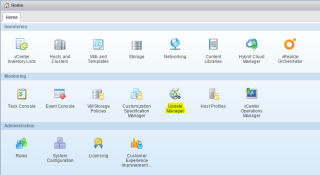
This week I am continuing where I left off in my VDI on VSAN upgrade. Last time I had patched the VUM server ready for the next part of the process which is updating the hosts! Nothing too detailed in this one and most vSphere admins will have seen this done many times. However, since […] The post VDI on VSAN Upgrade – Part 3: Host Upgrade via Web Client appeared first on vRyan.co.uk – Virtualization Blog.


VMware Advocacy

A Guide To VMware Horizon Interoperability, Part 1

A Guide To VMware Horizon Interoperability, Part 1

A Guide To VMware Horizon Interoperability, Part 1

By Anthony Rizzo, Staff End-User-Computing Technologist, VMware Introduction – VMware Horizon as a Digital Workspace Tooling System Although VMware Horizon quickly opens new possibilities for providing end users a digital workspace, many do not consider the true potential of VMware Horizon 6.2, VMware Horizon Air Desktops, and VMware Horizon Air Apps. In this four-part series, […] The post A Guide To VMware Horizon Interoperability, Part 1 appeared first on VMware End-User Computing Blog .


VMware Advocacy

VMware User Environment Manager with VMware App…

VMware User Environment Manager with VMware App Volumes

VMware User Environment Manager with VMware App…

By Gina Daly, Technical Writer for Technical Marketing, End-User Computing, VMware VMware User Environment Manager was released earlier this year, adding a powerful tool to the VMware End-User-Computing portfolio. User Environment Manager provides a consistent and dynamic application and desktop experience across physical, virtual, and cloud infrastructures. With User Environment Manager, users retain a persistent […] The post VMware User Environment Manager with VMware App Volumes appeared…Read More


VMware Advocacy

VMware App Volumes and ThinApp are better together

#VMware App Volumes and ThinApp are better together

VMware App Volumes and ThinApp are better together

VMware App Volumes is useful for groups of virtualized applications, while ThinApp isolates and enables apps that companies can’t use otherwise; they can both play roles in a well-rounded app virtualization strategy.


VMware Advocacy

“VMware Access Point: Better Security for #VDI”…

“VMware Access Point: Better Security for #VDI” https://t.co/cmPi5EYdKn via @VirtReview https://t.co/qGzw5faTSG

“VMware Access Point: Better Security for #VDI”…

“VMware Access Point: Better Security for #VDI” https://t.co/cmPi5EYdKn via @VirtReview https://t.co/qGzw5faTSG


VMware Advocacy

Getting Started with Horizon Linux Desktops

Getting Started with Horizon Linux Desktops

Getting Started with Horizon Linux Desktops

Director of R&D , end user computing Peter Brown gives you some tips on getting a Linux desktop up and running in Horizon. The post Getting Started with Horizon Linux Desktops appeared first on Tech Communications Video Blog .


VMware Advocacy