Horizon on VxRail Whiteboard

Horizon on VxRail Whiteboard
Learn about the evolution of VDI and how VxRail simplifies the Horizon VDI technology stack and slashes the project timeline.
Horizon on VxRail Whiteboard
Learn about the evolution of VDI and how VxRail simplifies the Horizon VDI technology stack and slashes the project timeline.
VDI Calculator is now Open-Source and Available on GitHub -myvirtualcloud.net
What a phenomenal journey this VDI calculator has been through. The VDI Calculator is today in its 7th major release and dozens of features have been added to the application over the years. It all…Read More
Monumental AirWatch 9.0 & Workspace ONE Updates Bring the Digital Workspace to Life -AirWatch Blog
Connect Atlanta always serves as the launch pad for new innovations in the world of business mobility. 2016 is no different. In fact, this might be our most memorable Connect ever. Today at Connect Atlanta 2016, we revealed so many new updates and features that I’m floored by the work our R&D teams did in […]
A hands-on look at VMware Horizon View 7
The upgrade process for VMware Horizon View 7 isn’t groundbreaking, but there is a lot to keep in mind as you plan. Learn about Blast Extreme, the company’s own remote display protocol.
UEM is poised to revolutionize Windows desktop management
It’s not widespread yet, but with Citrix and VMware hopping on board, organizations may soon use UEM software for Windows desktop management.
VMware Horizon 7 – Instant Clone Desktops -ntpro.nl
The new VMware Instant Clone Technology included in the View component of the Horizon 7 Enterprise Edition improves and accelerates the process of creating cloned virtual desktops over the previous View Composer linked-clone technology. In addition, instant clones require less storage and less expense to manage and update because the desktop is deleted when the user logs out, and a new desktop is created using the latest master image. For just-in-time desktops, you can combine instant clones…Read More
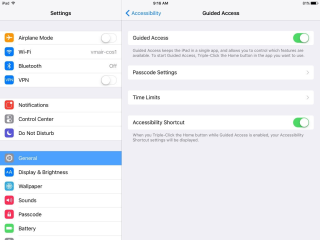
Using iPad in Kiosk Mode with Horizon View -VMware TAM Blog
Mobility means everything these days. Phones and tablets are dominating our world and it’s becoming more and more challenging to avoid them. Just the other day I met a friend at a coffee shop and paid for my drink on the store’s iPad. Later we went out to dinner and every table […] The post Using iPad in Kiosk Mode with Horizon View appeared first on VMware TAM Blog.
Let’s update VMware User Environment Manager (#UEM) to 9.1: features, constraints and howto -vLenzker
With the release of UEM 9.1 a few nice features and fixes (and a few new constraints) have been introduced. Check the release notes here for further details (or just read on). VMware’s User Environment Manager gives us the opportunity to deliver a condition based and personalized user-experience within or (virtual and non-virtual) desktop environment. […]]> http://vlenzker.net/2016/09/lets-update-vmware-user-environment-manager-uem-to-9-1-features-constraints-and-howto/feed/ 0 Let’s…Read More
How to Install the Free VMware Fusion 8.5 for Mac Upgrade -groovyPost
Users running VMware Fusion 8.1.1, can get the upgrade to Fusion 8.5 for free. If you are running an earlier version, you can take advantage of the upgrade pricing.
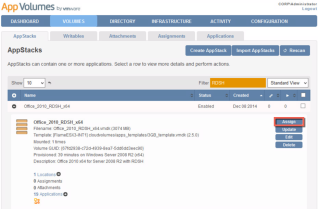
Announcing the New VMware App Volumes Reviewer’s Guide -VMware EUC Blog
End-User-Computing Technical Marketing is excited to announce the release of the much-anticipated VMware App Volumes Reviewer’s Guide. Use it to familiarize yourself with VMware App Volumes, learn more about the architecture and workings of the product, or explore the functionality through the exercises. App Volumes delivers applications to users and desktops in seconds and simplifies the life cycle and image management of applications. Not only does App Volumes integrate with existing…Read More
Let’s troubleshoot UEM 9.X: How to avoid errors during the installation and configuration -vLenzker
As I have written in my last post UEM is a game changer in the way how we can create great VDI solutions. Having worked a lot with VMware’s User Environment Manager (UEM) within the last month I saw many errors made and occurring during the installation phase.
Announcing VMware Horizon FLEX 1.9- VMware EUC Blog
Continuing our unbroken tradition of releasing VMware Horizon FLEX every quarter since it debuted in 2014, we are proud to announce the General Availability of version 1.9. For those not fully up to speed on FLEX, Horizon FLEX gives IT the flexibility to meet the needs of BYO (bring your own) and Mac users by […] The post Announcing VMware Horizon FLEX 1.9 appeared first on VMware End-User Computing Blog .
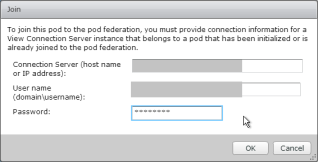
“VMware Horizon 7 Series – Part 5a – Cloud Pod Architecture” via comelofeci.com
Cloud Pod Architecture lets you publisha single icon that load balances connections across multiple pools in multiple pods in multiple sites (datacenters). Global Entitlements – Entitlements are the same thing as icons. When you create an entitlement (local or global), you are publishing an icon from a pool. For local … Continue reading
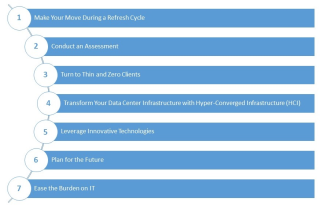
Seven Steps for Getting Started with Desktop Transformation
Physical desktop architectures can be an obstacle to end-user mobility, but cost concerns and fears about complexity stop many organizations from embracing desktop and application virtualization. This brief from the VMware Horizon team offers seven steps you can follow to ease some of these concerns, plus quick customer stories from companies like NetApp, Metro Health […] The post Seven Steps for Getting Started with Desktop Transformation appeared first on VMware Education and Certification…Read More
“@lenzker’s year of VDI: What has changed in 2016 with #VMware #Horizon” via vlenzker.net
Everyone working within the EUC and virtualization field knows this joke. Every year some analysts and vendors are promising us that this year is going to be the year of VDI (Virtual Desktop Infrastructure).
“Finally the VMware App Volumes Technical FAQ is Published” via techarex.net
VM Appliance or VMware app is pre-built, pre-configured software that can be easily installed in a virtual machine. Today this app is being using many companies
“The Story of VMware Blast” via VMware EUC Blog
The ultimate goal in user interface (UI) remoting is to make the remoted end-user experience as close as possible to local application execution. This is a challenging goal that becomes increasingly […] The post The Story of VMware Blast appeared first on VMware End-User Computing Blog .
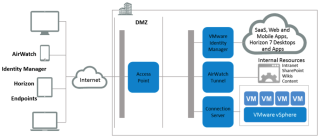
VMware Access Point: The One-Stop Shop for Secure Access to VMware Horizon 7, VMware Identity Manager, and VMware AirWatch
Access Point functions as a secure gateway for users who want to access VMware Horizon 7, VMware Identity Manager, and VMware AirWatch applications and desktops from outside the corporate firewall. The post VMware Access Point: The One-Stop Shop for Secure Access to VMware Horizon 7, VMware Identity Manager, and VMware AirWatch appeared first on VMware End-User Computing Blog .
“VMware OS Optimization Tool available for Windows 7, 8,10” via Windows Report
Many users complain about the performance of their PCs and constantly look for tools to optimize them. A good recommendation is VMware OS Optimization Tool, which is free for Windows 10, 8.1, 8, 7, Windows Server 2008 (including R2) and Windows Server 2012 (including R2). The VMware OS Optimization Tool may not have the simplest user interface …
Network Ports in Horizon 7: Diagram Updated
The Network Ports Diagram has been updated for Horizon 7. The diagram gives you a lot of vital information in one page. It now includes additional connection lines, connection lines that have been changed from one-way to two-way arrows, and some renamed connection lines. The post Network Ports in Horizon 7: Diagram Updated appeared first on VMware End-User Computing Blog .