Try the 30 minute VMware Cloud on AWS Hands-On Lab

Try the 30 minute VMware Cloud on AWS Hands-On Lab
See the new VMware on AWS solution. Interact with the VMware Cloud interface to perform basic tasks and manage your public cloud capacity.
Try the 30 minute VMware Cloud on AWS Hands-On Lab
See the new VMware on AWS solution. Interact with the VMware Cloud interface to perform basic tasks and manage your public cloud capacity.
Installing Pivotal Container Service (PKS) on VMware vSphere and NSX-T
This tutorial will walk the viewer through the steps of getting PKS implemented on a VMware private cloud infrastructure and deploying a sample application to test the implementation
Cellular Module User Space USB Driver on ESXi
This Fling provides this driver to enable deployment on ESXi on their IoT devices.
Emerging Tech and vRealize Suite Radically Transform VMware’s System and Application Support Operations
By Balaji Parthasarathy, Director, Enterprise Architecture and Experience Design, Business IT VMware IT has been experiencing an increasing demand to scale and support a complex footprint of business applications and technologies. In the past three years, the company accelerated its delivery from 80+ to 120+ features/week due to continuous integration/continuous development (CI/CD) and DevOps best The post Emerging Tech and vRealize Suite Radically Transform VMware’s System and Application…Read More
Cool browser plugin for Dark Theme vSphere H5 Client
While catching up on my news feed early this morning, I came across a really slick browser plugin developed by Bery Ju that enables a “Dark” theme for the vSphere HTML5 Client (h5client). If you use either Chrome or Firefox, simply visit Bery’s Github site here to get a link to the plugin. Once the plugin has […]
Horizon on VMware Cloud on AWS Demo
This video provides a demo of Horizon on VMware Cloud on AWS. VMware End-User Computing (EUC) solutions empower the digital workspace by simplifying app & access management, unifying endpoint management & transforming Windows delivery. Follow the VMware EUC Blog to learn more: https://blogs.vmware.com/euc.
vSphere 6.7 – Upgrading to vSphere 6.7
Lightboard illustration of the upgrade process from vCenter Server Appliance 6.0 or 6.5 to vCenter Server Appliance 6.7. Learn more at http://www.vmware.com/education
A Sneak-peek at App Volumes 2.14
App Volumes 2.14 In App Volumes 2.14, we are delivering innovation in three key areas: Improved security Volume attachment performance for improved user experience User data management In addition, starting with this current release, App Volumes will support Windows 10 Semi-Annual Channel (SAC) releases on a regular cadence with VMware Horizon. Custom Roles and Privileges […] The post A Sneak-peek at App Volumes 2.14 appeared first on VMware End-User Computing Blog .
Tech Zone Expert Series – Top Questions on Horizon 7 JMP Technologies
Welcome to the Digital Workspace Tech Zone Expert Series, where you’ll hear from technical experts about the top technical questions in the end user computing space. This Expert Series video will focus on Horizon 7 JMP Technologies including Instant Clones, App Volumes, and User Environment Manager. VMware End-User Computing (EUC) solutions empower the digital workspace by simplifying app & access management, unifying endpoint management & transforming Windows delivery. Follow the VMware EUC Blog to learn more: https://blogs.vmware.com/euc.
[Deep Dive] GPOs and Custom Settings Profiles using MMAT and Workspace ONE
One of the biggest concerns organizations have is either how they are going to migrate their thousands of GPOs over to the cloud or how they’re going to achieve the same level of customization and configuration options. We will discuss how to find 1:1 mappings of GPOs to MDM policies and how to leverage custom settings profiles in Workspace ONE to take advantage of ADMX-backed policies. Samples on VMware {Code}: https://code.vmware.com/samples CSP Development Suite: bit.ly/CSPDev MMAT: http://aka.ms/MMAT CSP Reference: http://aka.ms/CSP VMware End-User Computing (EUC) solutions empower the digital workspace by simplifying app & access management, unifying endpoint management & transforming Windows delivery. Follow the VMware EUC Blog to…Read More
Upgrading your vSphere Environment with Site Recovery Manager and vSphere Replication
With vSphere 5.5 going end of life in September 2018, we have been traveling all over doing workshops for upgrading to vSphere 6.x. However, with each workshop we have at least one customer who is running Site Recovery Manager with their vCenter Server 5.5 and aren’t too sure what the upgrade path is. This blog The post Upgrading your vSphere Environment with Site Recovery Manager and vSphere Replication appeared first on VMware vSphere Blog .
NSX Troubleshooting Scenario 9
Welcome to the ninth installment of my NSX troubleshooting series. What I hope to do in these posts is share some of the common issues I run across from day to day. Each scenario will be a two-part post. The first will be an outline of the symptoms and problem statement along with bits of…Read More
Early Access: VMware Validated Design for NSX-T in a Workload Domain
NSX-T is the next major evolution in VMware’s Software Defined Networking. The VMware Validated Design team constantly looks for solutions that will bring value to our customers. As NSX-T is one of those solutions we wanted to bring it into the design in such a way as to not disrupt existing customers deployments, which are The post Early Access: VMware Validated Design for NSX-T in a Workload Domain appeared first on Cloud Foundation .
vSpeaking Podcast Episode 78: vSphere 6.7 Core Storage
The vSphere 6.7 release offers several new features and enhancements to further the advancement of storage functionality. This week we welcome VMware Core Storage expert Jason Massae to walk us through various features and enhancements. Sitting in for John this week is VMware Chief Technologist in the Office of the CTO and good friend of the Virtually The post vSpeaking Podcast Episode 78: vSphere 6.7 Core Storage appeared first on Virtual Blocks .
Take your career to the next level – get VMware certified
VMware Certification provides industry leading programs that demonstrate your knowledge, skills, and expertise to your employers, colleagues, and customers.
vSphere 6.7 – vCenter Server High Availability
Lightboard illustration of the vCenter Server High Availability options for each deployment type. Learn more at http://www.vmware.com/education
vSphere 6.7 – Upgrading from vSphere 5.5
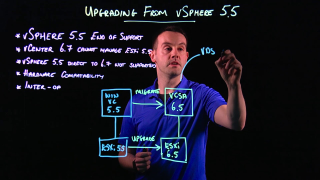
Lightboard illustration of the upgrade process from vSphere 5.5 to vSphere 6.7 Learn more at http://www.vmware.com/education
Free guide: Operationalizing VMware NSX
Operationalizing VMware NSX® offers guidance to management-level decision makers and influencers concerned with the impact of VMware NSX on their organization, staff, and operational processes. It also speaks to engineers and technical decision makers responsible for optimizing operational tooling in a VMware NSX environment.
How To Upgrade ESXi 6.x to 6.7 via ISO
Today a quick lab post which shows how simple is to upgrade VMware ESXi 6.x to 6.7 via ISO image. There are several ways of upgrading standalone ESXi hosts, and via the ISO image it’s just so simple that I wanted to show this for the newcomers and people who just starting with VMware technology. […] Read the full post How To Upgrade ESXi 6.x to 6.7 via ISO at ESX Virtualization .