Attending VMworld 2017 or not, tune in live for…

Attending VMworld 2017 or not, tune in live for the US General Sessions

Attending VMworld 2017 or not, tune in live for…

Our VMworld 2017 US general sessions feature top VMware leaders discussing the company’s industry perspective on digital business, transformative technologies and innovation, as well as three cutting-edge scientists exploring the future of natural machines.



VMware Social Media Advocacy

The Evolution of Infrastructure Is Driving…

The Evolution of Infrastructure Is Driving Digital Transformation

The Evolution of Infrastructure Is Driving…

VMware’s Pere Monclus, CTO for the Networking and Security Business Unit, explains why the evolution of infrastructure from hardware to software is driving digital transformation. Companies are using nascent technologies to reach new customers, automate processes, and put more productive tools into the hands of their employees. This business innovation is both supported by and enabled through a much less visible transformation happening across IT infrastructure.


VMware Social Media Advocacy

My favorite VMware fling tools | Settlersoman -…

My favorite VMware fling tools | Settlersoman – A settler in the SDDC world.

My favorite VMware fling tools | Settlersoman -…

VMware releases useful tools named flings. Those tools help not only in daily activities but also simplify migration or upgrade vSphere environment. Some tools are included in later version of VMware product after testing and solving potential problems/bugs during “fling phase” 🙂 In this post I will show my favorite fling tools that I often use. vSphere HTML5 Web Client VMware vSphere 6.5 provides a new web GUI based on HTML 5 (H5) and JavaScript. A new version of this fling is released…Read More


VMware Social Media Advocacy

vSphere 6.5 Upgrade Considerations Part-3

vSphere 6.5 Upgrade Considerations Part-3

vSphere 6.5 Upgrade Considerations Part-3

In the previous post we covered a scenario demonstrating how to upgrade from vSphere 5.5 to 6.5. This post will cover another scenario but this time upgrading from vSphere 6.0 to 6.5 Update 1. Keep in mind this is an example scenario and may or may not cover your particular environment. The key take away The post vSphere 6.5 Upgrade Considerations Part-3 appeared first on VMware vSphere Blog .


VMware Social Media Advocacy

HPE briefing for #vExperts and Bloggers at…

HPE briefing for #vExperts and Bloggers at #VMworld Tuesday option

HPE briefing for #vExperts and Bloggers at…

Tue, Aug 29 @ 3:30pm at Solution Exchange Meeting Room GD4 | vExperts and Bloggers are invited to attend an exclusive briefing to learn about HPE and VMware solutions. You can pick from one of two sessions options: Tuesday, 3:30 – 5 PM


VMware Social Media Advocacy

Removing orphaned IPs from NSX using REST API -…

Removing orphaned IPs from NSX using REST API – Blah, Cloud.

Removing orphaned IPs from NSX using REST API -…

I had a power outage recently that took out my entire lab in a very ungraceful manner – everything, well mostly everything, came back up without a hitch – but NSX was asking a bit weird, so I decided to redeploy the NSX Controllers. I removed all 3 controllers and tried redeploying but ended up …Read More


VMware Social Media Advocacy

Performance of Storage Policy-Based Management…

Performance of Storage Policy-Based Management in VMware vCenter Server 6.5

Performance of Storage Policy-Based Management…

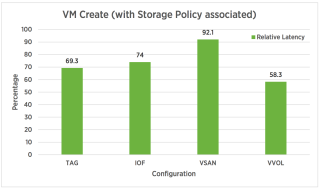
Storage Policy-Based Management (SPBM) is a storage policy framework that helps administrators match virtual machine workload requirements against storage capabilities. SPBM runs as an independent service in the vCenter Server. This paper covers SPBM performance and is divided into two sections. In the first section, we cover performance improvements of SPBM in vCenter 6.5 over vCenter 6.0 U3. In the second section, VMware covers scaling trends of SPBM in vCenter 6.5.


VMware Social Media Advocacy

[Update]: Favorite VMware Flings – August 2017

[Update]: Favorite VMware Flings – August 2017

[Update]: Favorite VMware Flings – August 2017

VMware Flings Flings are apps and tools built by VMware engineers and community that are intended to be played with and explored. Flings are updating by engineers and they are working on them to fixing bugs and adding new features. Updated Flings – August 2017 The below flings are updated: VMware OS Optimization Tool ESXi […] The post [Update]: Favorite VMware Flings – August 2017 appeared first on Davoud Teimouri .


VMware Social Media Advocacy

VMworld: 8 VMTN Community Opportunities You…

VMworld: 8 VMTN Community Opportunities You Don’t Want to Miss

VMworld: 8 VMTN Community Opportunities You…

To recognize VMTN Community contributors, there are going to be 8 fantastic programs running at VMworld – including some for those who cannot attend the event. Get excited and get signed up for the following:


VMware Social Media Advocacy

vSAN Encryption, vSphere Replication and SRM –…

vSAN Encryption, vSphere Replication and SRM – It just works !

vSAN Encryption, vSphere Replication and SRM –…

I’ve seen a few questions around this and I wanted to put together a quick post to put them to rest. Long story short, vSphere Replication and SRM work together the same with vSAN Encryption turned on as they do with it turned off. The reason for this is that vSAN encryption happens at the last/lowest layer or stage of the I/O path, . . .


VMware Social Media Advocacy

VMware Fun Facts 2017

VMware Fun Facts 2017

VMware Fun Facts 2017

VMware started with 5 people in 1998 and now has over 20,000 people. Take a quick tour of VMware’s history with this fun facts animation. Learn more about life at VMware: https://careers.vmware.com/ http://facebook.com/vmwarecareers http://twitter.com/vmwarecareers http://instagram.com/vmwarecareers https://www.linkedin.com/company-beta/2988/life/


VMware Social Media Advocacy

Register now for VMware Cloud on AWS Technical…

Register now for VMware Cloud on AWS Technical Deep Dive Session

Register now for VMware Cloud on AWS Technical…

I noticed that our technical deep dive session on VMware Cloud on AWS was added to the content catalog of VMworld. In this session, Ray Budavari and I will cover the VMware Cloud on AWS infrastructure in detail. For the first time, we are allowed to uncover details about the host configuration, the vSAN infrastructure […] The post Register now for VMware Cloud on AWS Technical Deep Dive Session appeared first on frankdenneman.nl .


VMware Social Media Advocacy

VMware Logon Monitor

VMware Logon Monitor

VMware Logon Monitor

When rolling out a VDI solution (or really, anything that touches on the user experience), it’s crucial to understand how the change might impact the users and to ensure that they are left with a good impression of the solution. They say that first impressions are most lasting, and the first impression that your users are going to see (for most solutions) is logon time. That means that it’s crucial that your solution does not negatively impact logon times, as that will color the entire…Read More


VMware Social Media Advocacy

VMworld Session: 360-Degree Troubleshooting and…

VMworld Session: 360-Degree Troubleshooting and Remediation #MGT2185BU

VMworld Session: 360-Degree Troubleshooting and…

If you’re headed to #VMworld2017, don’t miss @johnddias and @kwfultz talk about 360-Degree Troubleshooting and Remediation using vRealize products – #MGT2185BU. The session will cover how to troubleshoot problems using #Loginsight, #vRNI and #vROps. Then remediate the problems using #vRA.


VMware Social Media Advocacy

5 Technologies to Investigate at VMworld –…

5 Technologies to Investigate at VMworld — Virtualization Review

5 Technologies to Investigate at VMworld –…

VMworld often serves as a sneak-peek into future technologies and provides insight into VMware’s direction as a company. Look out for these offerings at this year’s show.


VMware Social Media Advocacy

vRealize Network Insight Overview

vRealize Network Insight Overview

vRealize Network Insight Overview

“It’s the network!” seems like the battle-cry for some server teams. I come from a system administration background; I get it. When all of your services are running and the event logs look clear, it must be something external to the system… which is either the network, or something is being talked to through the network. I’ve seen so many server guys chant that mantra, toss the problem over the fence and then wash their hands of the whole situation that I want to scream. That said, I’ve…Read More


VMware Social Media Advocacy