Newly Updated: Reviewer’s Guide for On-Premises…

Newly Updated: Reviewer’s Guide for On-Premises VMware Identity Manager 2.9.1

Newly Updated: Reviewer’s Guide for On-Premises…

The Reviewer’s Guide for VMware Identity Manager has been updated. It contains descriptions of the newest features, as well as walk-through exercises. The post Newly Updated: Reviewer’s Guide for On-Premises VMware Identity Manager 2.9.1 appeared first on VMware End-User Computing Blog .


VMware Social Media Advocacy

PowerCLI script to forcibly delete a Datastore…

PowerCLI script to forcibly delete a Datastore that is reported as in use.

PowerCLI script to forcibly delete a Datastore…

Have you ever tried to delete a datastore and get an error saying the Datastore is in use? You browse the datastore and see nothing on it. The pre-checks when you unmount it all pass, yet you cannot delete it. We had this problem. VMware support directed us to delete the partition using the partedUtil command, but I didn’t like the possibility of human error in doing it their way. I wrote a PowerCLI script that performs the following. 1.


VMware Social Media Advocacy

Dell EMC RecoverPoint for Virtual Machines 5.1…

Dell EMC RecoverPoint for Virtual Machines 5.1 – Protect VM

Dell EMC RecoverPoint for Virtual Machines 5.1…

In this post, we will perform one demonstration of new Virtual Machine protection (Local Copy) and see the power of auto-provisioning of replica VMs as well as Journals and VMDKs. Firstly you login into vCenter by Administrator in vSphere Web Client, … Continue reading →


VMware Social Media Advocacy

What is Photon OS, and why would I use it in my…

What is Photon OS, and why would I use it in my data center?

What is Photon OS, and why would I use it in my…

Due to its scalability, low cost and fast deployment, container technology is on the rise. How does VMware harness the power of containers in a vSphere environment?


VMware Social Media Advocacy

NEW! View and engage with our social stream and…

NEW! View and engage with our social stream and map visualizations for #VMworld 2017 and #VMware https://t.co/eiDH3cTazX

NEW! View and engage with our social stream and…

NEW! View and engage with our social stream and map visualizations for #VMworld 2017 and #VMware https://t.co/eiDH3cTazX


VMware Social Media Advocacy

Feedback on VCSA…

Feedback on VCSA Install/Upgrade/Migrate/Restore Terminology

Feedback on VCSA…

The vCenter Server Appliance (VCSA) supports four different lifecycle management workflows: Install, Upgrade, Migrate and Restore. In each of these workflows, you are either asked to provide information about an existing deployment and/or a new deployment. For example, in the Install scenario you will be asked to provide things like the name, hostname, networking information about the VCSA (What) that you wish to deploy as well as information on the underlying infrastructure in which the VCSA…Read More


VMware Social Media Advocacy

VMUG Advantage just added the latest vRealize…

VMUG Advantage just added the latest vRealize Automation Enterprise to EVALExperience!

VMUG Advantage just added the latest vRealize…

On a closely related note, see also:VMUG Advantage just added the latest NSX 6.3.1 and All Flash vSAN 6.6 bits to EVALExperience, great for vSphere home labs, just $200 a year! May 01 2017vSphere 6.5 Update 1 No word yet on when VMUGAdvantage EVALExperience downloads will offer last week’s big update, see:VMware vSphere 6.5 Update 1 downloads available (VCSA 6.5 U1 / ESXi 6.5 U1), new vSAN 6.6.1 goodness baked right in. Meanwhile, performing the updates to Update 1 are pretty darn easy,…Read More


VMware Social Media Advocacy

vSphere SRM 6.X Install and configure – Part 2…

vSphere SRM 6.X Install and configure – Part 2 – Configure Inventory Mappings

vSphere SRM 6.X Install and configure – Part 2…

In the previous post we Installed SRM in our lab environment and we also paired the two sites. In this post we will continue with the configuration. If you look at VMware configuration guide the ne…Read More


VMware Social Media Advocacy

New Technical White Paper: VMware NSX-V Control…

New Technical White Paper: VMware NSX-V Control Plane Resiliency with CDO Mode

New Technical White Paper: VMware NSX-V Control…

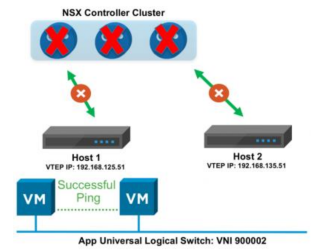
NSX-V 6.3 introduced many new features. On the VMware Network Virtualization blog post, NSX-V 6.3: Cross-VC NSX Security Enhancements, several new Cross-VC NSX security features are discussed. In this paper , another new feature called Controller Disconnected Operation (CDO) mode, which provides additional resiliency for the NSX control plane, is discussed. The features discussed in the mentioned blog posts and within this document become especially important in multi-site deployments. Note,…Read More


VMware Social Media Advocacy

HPE DL380 Gen9 “Starting drivers Please wait”…

HPE DL380 Gen9 “Starting drivers Please wait” (P89 BIOS v2.4x in combination with a MicroSD USB Kit)

HPE DL380 Gen9 “Starting drivers Please wait”…

Note: This issue can have various causes – the following sources will help you: “Starting Drivers. Please wait” after deploying HPE SPP07/2017 or SPP04/2017 to an HP DL380 Gen9 Server with an installed HPE Dual 8GB MicroSD EM USB Kit… Read more Der Beitrag HPE DL380 Gen9 “Starting drivers Please wait” (P89 BIOS v2.4x in combination with a MicroSD USB Kit) erschien zuerst auf All about virtualization .


VMware Social Media Advocacy

Deploy a new virtual machine based on a…

Deploy a new virtual machine based on a snapshot of a powered-on VM

Deploy a new virtual machine based on a…

A useful PowerCLI code snippet if you want to deploy a new virtual machine (VM) based on a snapshot of a powered-on VM: New-VM -Name -VM -Datastore -VMHost -clone -ReferenceSnapshot Der Beitrag Deploy a new virtual machine based on a snapshot of a powered-on VM erschien zuerst auf All about virtualization .


VMware Social Media Advocacy

Automating the build of your vSphere 6.5 home lab

Automating the build of your vSphere 6.5 home lab

Automating the build of your vSphere 6.5 home lab

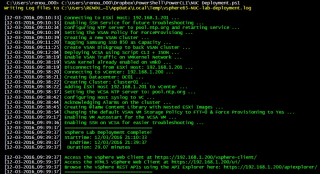
This year at VMworld SFO and BCN I was involved in organizing a couple of great hackathons with the @VMwareCode guys and William Lam, these were highly successful and I have to say the highlight of…


VMware Social Media Advocacy

PowerCLI at VMworld US 2017

PowerCLI at VMworld US 2017

PowerCLI at VMworld US 2017

It’s that time of year again, VMworld US time! There is a whole slew of PowerCLI and automation based sessions and events going on this year that you should be excited for. Hopefully you are already registered and have started adding these sessions to your schedule. If you haven’t, the countdown has begun and this […] The post PowerCLI at VMworld US 2017 appeared first on VMware PowerCLI Blog .


VMware Social Media Advocacy

VMware Horizon Virtualization Pack for Skype…

VMware Horizon Virtualization Pack for Skype for Business – Technical Overview

VMware Horizon Virtualization Pack for Skype…

This video provides an introduction to the features and benefits of the VMware Virtualization Pack for Skype for Business. There is technical detail about requirements, architecture, capabilities, and installation.


VMware Social Media Advocacy

VMworld: 8 VMTN Community Opportunities You…

VMworld: 8 VMTN Community Opportunities You Don’t Want to Miss

VMworld: 8 VMTN Community Opportunities You…

VMware Technology Network is fueled by customers, partners, and employees like you, who take the time to read and contribute information to our VMware ecosystem. Under the VMTN umbrella, all of community is captured – from bloggers, to vExperts, to developers in {code}, to CloudCred leaders.


VMware Social Media Advocacy

VCSA 6.5 Broken Filesystem – “Welcome to…

VCSA 6.5 Broken Filesystem – “Welcome to Emergency Mode”

VCSA 6.5 Broken Filesystem – “Welcome to…

Today I managed to crash the storage used in my home lab. After fixing the FreeNAS box, my vCenter Server Appliance (Version 6.5 Update 1) refused to boot and after opening the console, it welcomed me with the following error … Read more »


VMware Social Media Advocacy

Feedback on VCSA…

Feedback on VCSA Install/Upgrade/Migrate/Restore Terminology

Feedback on VCSA…

The vCenter Server Appliance (VCSA) supports four different lifecycle management workflows: Install, Upgrade, Migrate and Restore. In each of these workflows, you are either asked to provide information about an existing deployment and/or a new deployment. For example, in the Install scenario you will be asked to provide things like the name, hostname, networking information about the VCSA (What) that you wish to deploy as well as information on the underlying infrastructure in which the VCSA…Read More


VMware Social Media Advocacy