VMworld 2017 Europe

VMworld 2017 Europe

VMworld 2017 Europe

Our VMware team shares insights on why you should attend VMworld 2017 Europe, Sept 11-14. Pat Gelsinger, VMware CEO, highlights key focus areas for Digital Transformation: – Transform your data center into real private clouds – Extend into public clouds for more freedom and control – Enable a new digital workforce to with technology – Transform your security architecture
VMware Social Media Advocacy

vRealize Operations 6.6 – Troubleshoot a VM…

vRealize Operations 6.6 – Troubleshoot a VM Dashboard

vRealize Operations 6.6 – Troubleshoot a VM…

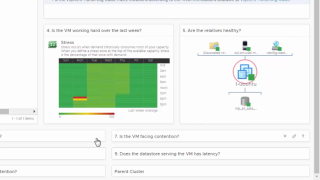
http://bit.ly/2uiPhbK In this demonstration, we will show how an administrator can verify the health and performance of a VM. Let’s assume that an application owner is complaining about poor performance on a VM.


VMware Social Media Advocacy

How to remove ESXi coredump files

How to remove ESXi coredump files

How to remove ESXi coredump files

Hello people, After long time a small guide but really useful for this operation. I had a thought to make an article for this because mostly I wanted to share it with my colleagues but if other people find it useful will be perfect 🙂 First of all login to an ESXi in the cluster… Continue reading How to remove ESXi coredump files


VMware Social Media Advocacy

vSAN Gets an Upgrade to First Class

vSAN Gets an Upgrade to First Class

vSAN Gets an Upgrade to First Class

With the release of vRealize Operations 6.6 I am excited to announce that customers can now manage their vSAN deployments with native integration. No need to install a management pack; just set up your vSAN adapter instances and vRealize Operations will do the rest. As a critical component of the VMware Software Defined Data Center The post vSAN Gets an Upgrade to First Class appeared first on VMware Cloud Management .


VMware Social Media Advocacy

What are VMware vSphere snapshots, and what’s…

What are VMware vSphere snapshots, and what’s the best way to use them?

What are VMware vSphere snapshots, and what’s…

VSphere snapshots help restore a VM to a given point in time but can eat up data store resources. How should you use, monitor and manage snapshots in a virtual environment?


VMware Social Media Advocacy

New fling: DRS Lens

New fling: DRS Lens

New fling: DRS Lens

Advertise here with BSA A cool new fling was just released: DRS Lens. As stated on the flings website: DRS Lens provides a simple, yet powerful interface to highlight the value proposition of vSphere DRS. Providing answers to simple questions about DRS will help quell many of the common concerns that users may have. DRS Lens provides different dashboards […] ” New fling: DRS Lens ” originally appeared on Yellow-Bricks.com . Follow me on twitter – @DuncanYB.


VMware Social Media Advocacy

New Contest : Share Your vROps 6.6 Upgrade Story

New Contest : Share Your vROps 6.6 Upgrade Story

New Contest : Share Your vROps 6.6 Upgrade Story

The VMware Communities is running a contest on vRealize Operations 6.6 (vROps 6.6). Make sure you check it out and participate by sharing your upgrade experience. Top winners will get exciting prizes! Click HERE to Share Your Story If you are all excited about our new release of vROps 6.6 and have already upgraded, please The post New Contest : Share Your vROps 6.6 Upgrade Story appeared first on VMware Cloud Management .


VMware Social Media Advocacy

vRealize Operations 6.6 – Troubleshoot a Host…

vRealize Operations 6.6 – Troubleshoot a Host Dashboard

vRealize Operations 6.6 – Troubleshoot a Host…

http://bit.ly/2uiPhbK Since ESXi servers are the main source of providing resources to a VM, they are extremely critical when it comes to performance and availability. This dashboard will help you insure the health of your ESXi hosts.


VMware Social Media Advocacy

vRealize Operations 6.6 – Optimize vSAN…

vRealize Operations 6.6 – Optimize vSAN Deployments Dashboard

vRealize Operations 6.6 – Optimize vSAN…

http://bit.ly/2uiPhbK The Optimize vSAN Deployments Dashboard allows you to determine which VMs might benefit from moving into vSAN storage from non-vSAN storage, as well as confirming that VMs which have been migrated are performing as well or better on vSAN. And you don’t have to be a vSAN expert to use the dashboard!


VMware Social Media Advocacy

vRealize Operations 6.6 – Troubleshoot with…

vRealize Operations 6.6 – Troubleshoot with Logs Dashboard

vRealize Operations 6.6 – Troubleshoot with…

http://bit.ly/2uiPhbK vRealize Operations allows you to view log data along with metric data for 360 degree troubleshooting with vRealize Log Insight embedded in the product user interface.


VMware Social Media Advocacy

vRealize Operations 6.6 – Host Usage Overview…

vRealize Operations 6.6 – Host Usage Overview Dashboard

vRealize Operations 6.6 – Host Usage Overview…

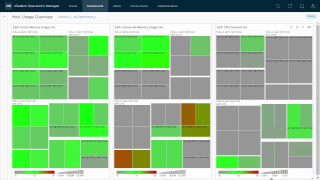
http://bit.ly/2uiPhbK The Host Usage Overview Dashboard is recommended for a Network Operations Center display. There are three heatmaps showing ESXi host Active Memory Usage, Consumed Memory Usage and CPU Demand. These can help find hotspots in your environment where hosts are struggling to provide resources to VMs.


VMware Social Media Advocacy

vRealize Operations 6.6 – vSAN Capacity…

vRealize Operations 6.6 – vSAN Capacity Overview Dashboard

vRealize Operations 6.6 – vSAN Capacity…

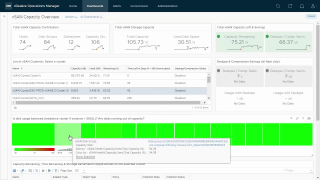
http://bit.ly/2uiPhbK The dashboard simplifies vSAN capacity management by providing you an aggregated view of capacity contributors and utilization for all your vSAN clusters. It also provides transparency into your return on investments on all flash vSAN clusters by showing you the storage savings achieved due to dedupe and compression.


VMware Social Media Advocacy

vRealize Operations 6.6 – vSAN Operations…

vRealize Operations 6.6 – vSAN Operations Overview Dashboard

vRealize Operations 6.6 – vSAN Operations…

http://bit.ly/2uiPhbK The vSAN Operations Overview Dashboard provide a holistic view of your vSAN environment, from the vSAN clusters down to the physical disks. You can also view trending information for VMs being served by vSAN, as well as vSAN IOPS and Latency.


VMware Social Media Advocacy

vRealize Operations 6.6 – vSphere Hardening…

vRealize Operations 6.6 – vSphere Hardening Compliance Dashboard

vRealize Operations 6.6 – vSphere Hardening…

http://bit.ly/2uiPhbK The vSphere Hardening Compliance Dashboard dashboard measures your environment against the vSphere Hardening Guide and shows you the results along with affected objects.


VMware Social Media Advocacy

vSAN ReadyNodeâ„¢ Sizer: Size and Deploy vSAN for…

vSAN ReadyNodeâ„¢ Sizer: Size and Deploy vSAN for the workload of your choice

vSAN ReadyNodeâ„¢ Sizer: Size and Deploy vSAN for…

The new All Flash vSAN ReadyNodeâ„¢ Sizer is now available and is accessible here: https://vsansizer.vmware.com/ What are the key features of the vSAN ReadyNodeâ„¢ Sizer? The key features of vSAN ReadyNodeâ„¢ Sizer are: Evaluation Sizer: A basic evaluation version of the vSAN ReadyNodeâ„¢ Sizer which requires minimal input such as the count of The post vSAN ReadyNodeâ„¢ Sizer: Size and Deploy vSAN for the workload of your choice appeared first on Virtual Blocks .


VMware Social Media Advocacy

Latest Fling from VMware Labs – DRS Lens

Latest Fling from VMware Labs – DRS Lens

Latest Fling from VMware Labs – DRS Lens

As VMware vSphere DRS has become more widely adopted now, more and more users are interested in knowing how it works. They need more insights into DRS activity and actions. They want to know the value that DRS provides to their clusters. DRS Lens is an attempt to provide a UI-based solution to help understand DRS better. DRS Lens provides a simple, yet powerful interface to highlight the value proposition of vSphere DRS. Providing answers to simple questions about DRS will help quell many of…Read More


VMware Social Media Advocacy