vSAN hardware compatibility issue – and the…

vSAN hardware compatibility issue – and the solution, not what I expected! — via Notes from MWhite

vSAN hardware compatibility issue – and the…

I am building out a new pod at work for my lab. It has four new R730 Dell servers that are completely on the HCL for vSAN. It was important to me, so not only did I confirm that myself but I got someone else to confirm. When I installed vSAN in in our management cluster it was all good. Then I did it in my pod but this time instead of vSphere 6.5 it is 6.0 U3. And when I was done and all was good I saw this:


VMware Social Media Advocacy

PowerCLI module for Proactive HA (including…

PowerCLI module for Proactive HA (including simulation) [virtuallyghetto.com]

PowerCLI module for Proactive HA (including…

Proactive HA is a very cool new feature that was introduced in vSphere 6.5, which enables our hardware vendors to communicate their hardware specific health information directly into vSphere and specifically with vSphere DRS. This hardware health information can then be leveraged by vSphere DRS to take proactive actions to guard against potential hardware failures. Brian Graf, Product Manager for Proactive HA, DRS and overall vSphere Availability has a nice blog post here where he goes into more details on how Proactive HA works.


VMware Social Media Advocacy

PowerShell script to gather ESXi host details

PowerShell script to gather ESXi host details — via vrealize

PowerShell script to gather ESXi host details

I came across a situation where I had to quickly gather details of all ESXi host hardware details. For small environment this can be obtained via VIClient UI but if the environment is large it makes lot of sense to have some script ready to serve this purpose for you. After some hit-n-trials finally the script was ready to capture these details and the entire process of collecting around 300 host details was so fast that the output was ready and stored in a nice .csv format within minute.


VMware Social Media Advocacy

Design a ROBO infrastructure (Part 2): Design…

Design a ROBO infrastructure (Part 2): Design areas and technologies — via StarWind Blog

Design a ROBO infrastructure (Part 2): Design…

In the previous post, we have explained and described business requirements and constraints in order to support design and implementation decisions suited for mission-critical applications, considering also how risk can affect design decisions.


VMware Social Media Advocacy

Design a ROBO (Part 1): Introduction and…

Design a ROBO (Part 1): Introduction and high-level design — via StarWind Blog

Design a ROBO (Part 1): Introduction and…

A Remote Office / Branch Office (ROBO) is an office located in a different site or a remote geographical area from another office (usually the headquarter or the main office). Several organizations have one (or more) main office, as well as remote offices in another city, country or continent.


VMware Social Media Advocacy

VMware vExpert 2017 benefits

VMware vExpert 2017 benefits — via vInfrastructure Blog

VMware vExpert 2017 benefits

VMware vExpert program recognizes people that have demonstrated significant contributions to the community and a willingness to share their expertise with others. Contributing is not always blogging or Twitter as there are many public speakers, book authors, CloudCred task writing, script writers, VMUG leaders, VMTN community moderators and internal champions among this group.


VMware Social Media Advocacy

Predictive DRS Made Simple

Predictive DRS Made Simple — via VMware Cloud Mgmnt Blog

Predictive DRS Made Simple

In 2016 VMware made big news with our Predictive DRS (pDRS) announcement and analysts and customers have been buzzing about it ever since. Predictive DRS is a game changer and helps you in the fight against resource contention. As you know, when contention occurs, applications slow down and your users are affected. Successfully mitigating resource contention is one of the most critical issues faced by any administrator of a virtualized environment.


VMware Social Media Advocacy

What Is vRealize Network Insight? Interview…

What Is vRealize Network Insight? Interview with Shobhana Viswanathan (@shobhanav) — via VMware Cloud Mgmnt Blog

What Is vRealize Network Insight? Interview…

Recently I was honored to be invited to VMware’s headquarters to conduct a series of video interviews. One of those interviews was with Shobhana Viswanathan, Sr. Product Line Marketing Manager in VMware’s Cloud Management Business Unit. In the interview, we talked about VMware’s new vRealize Network Insight.


VMware Social Media Advocacy

Announcing VMware vCloud NFV 2.0 – Getting…

Announcing VMware vCloud NFV 2.0 – Getting There Faster — via VMware Telco NFV Blog

Announcing VMware vCloud NFV 2.0 – Getting…

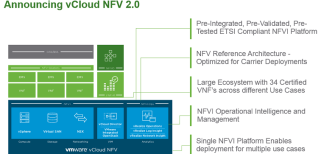
With more than 80 production deployments across more than 45 communication service providers (CSPs), you can safely say that we have gained significant real-world experience in deploying and supporting our customers in rolling out NFV platforms, creating new services, and operating these services. Today we announce the new version of our VMware vCloud NFV platform, which represents the culmination of this experience and our ongoing commitment to supporting our service provider customers in reaching their business goals.


VMware Social Media Advocacy

Automating vSphere Global Permissions with…

Automating vSphere Global Permissions with PowerCLI — via virtuallyGhetto

Automating vSphere Global Permissions with…

vSphere Global Permissions was first introduced in vSphere 6.0, which provides a simple and consistent method for assigning permissions for individual users and/or groups across multiple vCenter Servers joined to the same vCenter Single Sign-On (SSO) Domain. Global permissions works in the same way as traditional vSphere Permissions, but rather than assigning a permission to a specific entity, the association is applied at the root level of the vCenter Server.


VMware Social Media Advocacy

NSX News You Can Use by Roger Fortier – March…

NSX News You Can Use by Roger Fortier – March 6, 2017 — via VMware News and Update

NSX News You Can Use by Roger Fortier – March…

In this week’s News You Can Use, we hear from Tom Corn in a podcast from BankInfoSecurity on using the cloud to prevent breaches. We also learn about an early adopter of NSX, Baystate Health, as well as some best practices for migrating new or existing applications onto VMware NSX.


VMware Social Media Advocacy

vRops upgrade path

vRops upgrade path — via Michael Ryom

vRops upgrade path

This is just a quick guide to the vRops upgrade path. I work a lot with vRops in different aspects. As of late I have been running in to a few environments which has not kept up with vRops’s release cycle. Needles to say vRops has come a long way from 5.8 or 6.0. Last week vRops 6.5 was release and once every quarter(or so) a new release will come out. In that sense, it is good to know how to upgrade from one release of vRops to the next or more so to the latest.


VMware Social Media Advocacy

And… With VxRail scale/success… come critical…

And… With VxRail scale/success… come critical updates. — via Virtual Geek

And… With VxRail scale/success… come critical…

I mentioned in this post that we just passed the one year anniversary of VxRail, and it is cooking. 8,000+ nodes. 100K cores. 65+ PBs of storage. 70+ countries. And we’re just getting started.


VMware Social Media Advocacy

What’s New in VMware Validated Design for…

What’s New in VMware Validated Design for Software-Defined Data Center 4.0

What’s New in VMware Validated Design for…

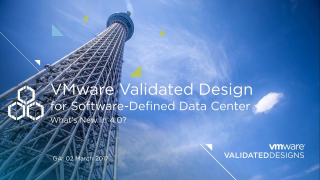
In this session, Ryan Johnson provides an overview of what’s new in the VMware Validated Design for Software-Defined Data Center 4.0 that went GA in March 2017. The session addresses the major bill of materials and design updates from the prior 3.x releases.


VMware Social Media Advocacy

Send F Key to VMware Fusion Via MacBook Keyboard

Send F Key to VMware Fusion Via MacBook Keyboard — via VCDX56.com

Send F Key to VMware Fusion Via MacBook Keyboard

So I figure I’ll finally write this down. Since i start using a MacBook back in 2010 i also switched from VMware Workstation to VMware Fusion. What I’m constantly forgetting since I’m not using it that much is how to press F keys in Fusion based VMs. I can say that 90% of the cases when I need to send the F keys to a Fusion based VM is when it is running a ESXi hosts as a VM. I do this from time to time even though I got a home lab with a minimum of 1 ESXi based management server.


VMware Social Media Advocacy

VMware Adapter for SAP Landscape Management…

VMware Adapter for SAP Landscape Management 1.4.1 – Automate and manage your VMware virtualized SAP Landscape

VMware Adapter for SAP Landscape Management…

On behalf of David Gallant, ISBU, Product Management and the Integrated Systems Business Unit, we are very pleased to announce the General Availability of VMware Adapter for SAP Landscape Management 1.4.1.


VMware Social Media Advocacy