Video – Virtual SAN 6.5 Technical Overview -via ntpro.nl
Video – Virtual SAN 6.5 Technical Overview
Learn about our innovation and many new enhancements with Virtual SAN 6.5 as we highlight 3 new exciting feature, announced at VMworld Europe 2016
Video – Virtual SAN 6.5 Technical Overview -via ntpro.nl
Learn about our innovation and many new enhancements with Virtual SAN 6.5 as we highlight 3 new exciting feature, announced at VMworld Europe 2016
Log Insight 3.6: Machine Learning Dashboard Widgets – SFlanders.net
As I have covered in the past, Log Insight features machine learning on the Interactive Analytics page. I recently covered the new event type user alert threshold, but also in 3.6 Log Insight introduced the ability to save machine learning queries to dashboards. Read on to learn more!
What to Expect in PowerCLI 6.5? – VMware Blogs
PowerCLI 6.5 was announced last week at VMworld Europe and, while we are waiting for it to be generally available, we thought it would be a good time to give you an idea of what to look forward to in the meantime.
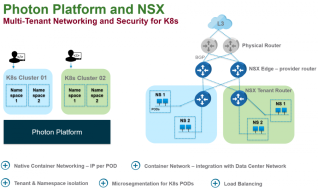
How VMware NSX Enables Enterprises to Deploy and Operationalize Containerized Applications at Scale -VMware Blogs
On October 17th, VMware Photon Platform introduced Kubernetes as a Service.
New Course Option for Expired VCPs – VMware Blogs
For candidates who hold an expired VMware Certified Professional (VCP) certification, we are adding another option for earning a new VCP.
How to run a Docker Container on the vCenter Server Appliance (VCSA) 6.5? – virtuallyGhetto
One of the most notable changes in the vCenter Server Appliance (VCSA) in vSphere 6.5 is a switch of the underlying OS from SLES to VMware’s very own Photon OS. With this change, VMware will now own the entire software stack within the VCSA (OS + Application). This will allow VMware to quickly respond and deliver OS and security updates to customers at a much quicker rate than it was possible before.
VMware vSphere 6.5: Content Library -via dtechinspiration.com
As part of vSphere 6.5 Testing what&#rsquo;s new in Content Library. Only Few changes there : Like 1. While Deploying Virtual Machine you can set Customization Specification2. Sync your content quickly between vCenter server over HTTP During this task, you… Continue Reading →
VMware vSphere 6.5: Auto Deploy -via dtechinspiration.com
Now a Days i am doing R&D for 6.5 vSphere. We will see Auto Deploy. As per me it&#rsquo;s very easy compare to last version. 1. We know how to install Auto Deploy and all those steps.2. Now Whats New… Continue Reading →
VMware vSphere 6.5: Host-Client HTML5 -via dtechinspiration.com
As we all are aware that C# client is no more available.VMWare come-up with HTML5. How it look like and what all options are there lets take a look. Login into vSphere Client via : https://esxiname-FQDN/ui/ After login below is… Continue Reading →
VMworld Sessions – The Architectural Future of Network Virtualization -via Virtualization Gains
This was one of my favorite sessions on the NSX track in VMworld Barcelona, Bruce Davie, formally of Cisco and Nicira, now CTO and Principal Engineer for Networking at VMware. What Iliked mostwas how he Read More …Read More
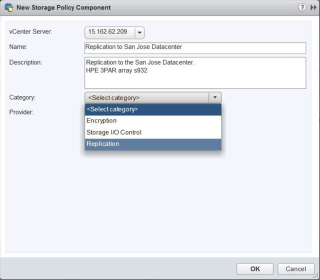
VVols 2.0 with array based replication support announced with vSphere 6.5 -via vSphere-land
VMware recently announced vSphere 6.5 and it includes the next big version of Virtual Volumes (VVols) which is based on the updated VASA 3.0 specification. The initial release of VVols was part of vSphere 6.0 which went GA in March 2015 and was based on VASA 2.0. VVols has been out now for over 18 months and with vSphere 6.5 expect to see maturity, improvements and of course a big capability that was missing in the initial release, support for array based replication.
Automatic space reclamation (UNMAP) is back in vSphere 6.5 -via vSphere-land
A long time ago in a vSphere version far, far away VMware introduced support for automatic space reclamation which allowed vSphere to send UNMAP commands to a storage array so space from deleted or moved VMs could be un-allocated (reclaimed) on the storage array. This was a welcome feature as block storage arrays have no visibility inside a VMFS volume so when any data is deleted by vSphere the array is unaware of it and it remains allocated on the array. UNMAP was supposed to fix that so when data was deleted vSphere would send a string of UNMAP commands to the array telling it exactly which disk blocks it could have back.
VCAP6-NV (3V0-643) Study Guide – Part 10. – vzealand.com
This is part 10 of 20+ blogs I am writing covering the exam prep guide for the VMware Certified Advanced Professional 6 – Network Virtualisation Deployment (3V0-643) VCAP6-NV certification.
vSphere 6.5 Link-O-Rama – vSphere-land
Your complete guide to all the essential vSphere 6.5 links from all over the VMware universe. Bookmark this page and keep checking back as it will continue to grow as new links are added everyday. Also be sure and check out the Planet vSphere-land feed for all the latest blog posts from the Top 100 vBloggers.
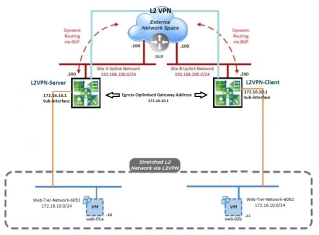
VCAP6-NV (3V0-643) Study Guide – Part 9C. NSX L2 VPN. -via vzealand.com
This is part 9C of 20+ blogs I am writing covering the exam prep guide for the VMware Certified Advanced Professional 6 – Network Virtualisation Deployment (3V0-643) VCAP6-NV certification. At the time of writing there is no VCAP Design exam stream, thus you’re automatically granted the new VMware Certified Implementation Expert 6 – Network Virtualisation (VCIX6-NV)…Read More
How to recreate a missing virtual machine disk descriptor file
http://kb.vmware.com/kb/1002511 This video demonstrates how to recreate a missing virtual machine disk descriptor .vmdk file. Note: VMware recommends to attempt to restore the missing descriptor file from backups if possible. If this is not possible, proceed with recreating the virtual machine disk descriptor file. To create a virtual machine disk descriptor file: – Identify the size of the flat file in bytes. – Create a new blank virtual disk that is the same size as the original. This serves as a baseline example that is modified in later steps. – Rename the descriptor file (also referred to as a header file) of the newly-created disk to match the name of the original virtual disk. – Modify the contents of the renamed descriptor file…Read More
Log Insight: Configuration APIs -SFlanders.net
A few months back, I blogged about Log Insight GET configuration APIs. At the time, my goal was to provide a set of BASH functions that could be used to call Log Insight APIs and also to provide some minimum documentation on the Tech Preview configuration APIs in Log Insight 3.6. For one of my […] The post Log Insight: Configuration APIs appeared first on SFlanders.net by Steve Flanders.
VMware adds entry-level option to mobility management platform -siliconANGLE
VMware Inc. used its European user conference to introduce a low-end version of its Workspace ONE enterprise mobility management platform and added enhanced security for Microsoft Office 365 applications, along with support for Skype for Business for users of its Horizon virtual desktop infrastructure.
VMware vSphere 6.5 new features – HA -Enterprise Daddy
As discussed in my previous post, where I mentioned that vSphere 6.5 was announced and I covered all the vSphere 6.5 new features and provided an overview of all of them. In today’s post, we will dig deep into one of the features – HA that has long been part of vSphere but has seen […] The post VMware vSphere 6.5 new features – HA appeared first on Enterprise Daddy.
VMworld 2016 Europe – Day Two Keynote
With a different vibe to day one’s opening act, day … Read More