VMworld: The View from the CTO’s Chair — Virtualization Review

VMworld: The View from the CTO’s Chair
Chris Wolf’s transition from observer to participant.
VMworld: The View from the CTO’s Chair — Virtualization Review
Chris Wolf’s transition from observer to participant.
Michael Ryom: Custom vRops Content Pack for Log Insight
I work as a consultant. Mainly on vRops and Log Insight. This means that I have installed vRops and Log Insight quite a few times now. It also means that troubleshooting vRops is not that unfamiliar to me and what better tool to troubleshoot vRops with than VMware’s own Log Insight! In order to help …Read More
VMware’s ‘Rock Stars’ in Q2 Were NSX & VSAN
VMware ups its 2016 revenue forecast to $7B on the strength of newer products such as NSX, VSAN, and VxRail.
Prepare for Next-Generation Retail: The Future of Retail Mobility -VMware Radius
A very short time ago, we saw the introduction of the Internet, smartphone, and tablet. All disruptive technologies that sparked billions in new revenue and changed the way we live and communicate, along with how we work and operate on a daily basis. These technologies paved the path for what we are about to see …
vSphere 6 Lockdown Modes
As with vSphere 6 there two types lockdown modes:- Normal and strict lockdown modes. So what is the difference in these lockdown modes. Checkout this Excellent VMware Blog Article by Mike Foley https://blogs.vmware.com/vsphere/2015/03/vsphere-6-0-lockdown-modes.html
Quick Tip – How to disable the landing page for vCenter Server 5.x & 6.x?
The question of wanting to disable the default landing page for the vCenter Server is one that comes up infrequently. In fact, I probably see this maybe once or twice a year. However, when it does come up, it usually revolves around two topics: some sort of security risk and limiting users from obtaining software […]
New Virtual SAN Solution Overview Paper: Mixed Workloads in HCI
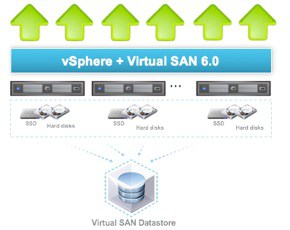
A new Solution Overview paper discusses how Virtual SAN provides a resolution to the complexities originally plaguing dedicated infrastructure hardware. The white paper can be obtained here, but a summary of the piece can be found below.
VSAN Upgrading from 6.1 to 6.2 Hybrid to All Flash – Part 3–anthonyspiteri
When VSAN 6.2 was released earlier this year it came with new and enhanced features and with the price of SSDs continuing to fall and an expanding HCL it seems like All Flash instances are becoming more the norm and for those that have already deployed VSAN in a Hybrid configuration the temptation to upgrade to All Flash is certainly there. Duncan Epping has previously blogged the overview of migrating from Hybrid to All Flash so I wanted to expand on that post and go through the process in a little more detail. This is the final part of a three part blog series with the process overview outlined below.
VMware Ranked No. 1 in Cloud Systems Management and Datacenter Automation Software by Global Analyst Firm for Third Consecutive Year
VMware, Inc. today announced that leading analyst firm IDC has named VMware as the market share leader in both the worldwide cloud systems management(1) and the datacenter automation(2) software markets based on 2015 revenues. This is the third consecutive year that VMware has topped both categories.
Operationalizing Micro-segmentation – NSX Securing “Anywhere” – Part III
Welcome to part 3 of the Micro-Segmentation Defined – NSX Securing “Anywhere” blog series. This installment covers how to operationalize NSX Micro-Segmentation. Be sure to check out Part 1 on the definition of micro-segmentation and Part 2 on securing physical workloads with NSX.
VCAP6-DCV Deployment – Objective 4.1 – Implement and Maintain Complex vSphere Availability Solutions
Objectives 4.1 are broke down as the following
Threepeat!! First Ever Triple VCDX Certification Holder: Matt Vandenbeld
As anyone who’s pursued a VMware certification can attest, holding three VCDXs is quite an achievement. We recently talked with Matt Vandenbeld — the first person to earn three VMware Certified Design Expert (VCDX) certifications — to learn the secrets of his success. (Spoiler alert: Matt really enjoys working with and learning about VMware technology. […] The post Threepeat!! First Ever Triple VCDX Certification Holder: Matt Vandenbeld appeared first on VMware Education and Certification Blog .
A Completely New User Experience on Socialcast
Here’s the big reveal of the redesigned and reimagined Socialcast enterprise chat and social collaboration platform! Register for the webinar here.
Announcing the New VMware Virtual SAN IDC Lab Validation Report
Hot off the press: VMware Virtual SAN IDC Lab Validation Report With the launch of VMware Virtual SAN 6.2, VMware expanded the capabilities of Virtual SAN as a platform and introduced better data efficiency features by delivering deduplication and compression of data as well as providing RAID-5/RAID-6 support for all flash Virtual SAN environments. This The post Announcing the New VMware Virtual SAN IDC Lab Validation Report appeared first on Virtual Blocks.
LucD notes: vSphereDSC – Intro
My attempts to marry DSC and vSphere have been going on for nearly a year* now. I showed some of my attempts and intermediate results at VMworld 2015, in two sessions at the PowerShell + DevOps Global Summit and recently during a session at the 24th VMUGBE+. But now I’m finally going public with the …Read More
Bootstrap a Single-node VSAN Cluster under Running vCenter Server — vMusketeers
In my NSX Lab, I needed a single-node cluster with VSAN enabled beside another normal cluster with three nodes. William Lam has a genius post about how to bootstrap a single-node VSAN cluster to add your vCenter on it in your lab, but unfortunately even thoughhis adviceworks perfectly when you have a single ESXi host, itdoes not work well when you already have a vCenter in place. Mystory begins from the VSAN Default Storage Policy. This policy enforces that adeployment of VMs needs tohave:…Read More
Journey to VCIX-NV – Part 1 – Deploying NSX Manager on VMware Workstation
The VMware NSX Manager is the first component you have to deploy. The NSX Manager represents the Management Plane of this platform andenables you to usethe NSX Platform. Usually the NSX Manager is deployed by importing OVA File on vCenter Server or ESXi Host. When you follow the installationwizard for OVA/OVF it allows you to add network information, anadmin account password and aPrivileged CLI password. As described in my intro post, and for my lab purposes I have deployed the NSX Manager…Read More
NSX-V: Multi-site Options and Cross-VC NSX Design Guide
Check-out the new NSX-V Multi-site Options and Cross-VC NSX Design Guide The goal of this design guide is to outline several NSX solutions available for multi-site data center connectivity before… The post NSX-V: Multi-site Options and Cross-VC NSX Design Guide appeared first on The Network Virtualization Blog.
Automate PowerCLI Install using Powershell
Automate PowerCLI Install
Why you should always upgrade vCenter before ESXi — VMwaremine
Why you should read release notes before upgrading to new version, not after.