How to audit vSphere Standalone VMRC or HTML5…

How to audit vSphere Standalone VMRC or HTML5 VMRC connections–virtuallyghetto
How to audit vSphere Standalone VMRC or HTML5…

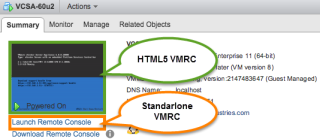
An interesting question that came in last week from one of our TAMs was how to identify and audit Virtual Machine Remote Console (VMRC) logins from vSphere? The TAM was specifically interested in being able to correlate that a particular user had logged into the VMRC of a VM during a specific period of time. Luckily, this is easily retrievable through vCenter Servers’s Event sub-system that stores information about everything that happens in your vSphere environment. The Events can be accessed using either the vSphere Web Client shown below or programmatically using the vSphere API which the UI is built on top of.

VMware Social Media Advocacy

Configuring VMware Identity Manager and VMware…

Configuring VMware Identity Manager and VMware Horizon 7 Cloud Pod Architecture — vDelboy’sView

Configuring VMware Identity Manager and VMware…

With the release of VMware Horizon® 7 and VMware Identity Manager™ 2.6, it is now possible to configure VMware Identity Manager to work with Horizon Cloud Pod Architecture when deploying your desktop and application pools over multiple data centers or locations. Using VMware Identity Manager in front of your VMware Horizon deployments that are using Cloud…Read More


VMware Social Media Advocacy

How to find Dell PERC FD332 or H330 Firmware…

How to find Dell PERC FD332 or H330 Firmware Versions in ESXi 6

How to find Dell PERC FD332 or H330 Firmware…

Today’s adventure seemed an easy task but ended up taking much too long to find the right answer. The task… ‘Is there a way to find the firmware version of a Dell Perc FD332 or H330 controller using command line in ESXi 6?’ The answer: ‘zcat /var/log/boot.gz |grep -i firm’ Things that didn’t work […]


VMware Social Media Advocacy

Bring Windows Media Redirection to VMware…

Bring Windows Media Redirection to VMware Horizon Client for Linux

Bring Windows Media Redirection to VMware…

Multimedia redirection (MMR) technology helps improve performance by utilizing the client endpoint to process media—instead of the server—so CPU utilization on the server can be reduced. It also can reduce the bandwidth and thus provide a smooth playback experience. For a long time, MMR can only be deployed to VMware Horizon Client for Windows, as […] The post Bring Windows Media Redirection to VMware Horizon Client for Linux appeared first on VMware End-User Computing Blog .


VMware Social Media Advocacy

Quick Tip – How to quickly find the VM Display…

Quick Tip – How to quickly find the VM Display Name of your vCenter Server?

Quick Tip – How to quickly find the VM Display…

It is a pretty common practice for customers to use their vCenter Server to manage the underlying ESXi host which is also running the vCenter Server VM, sometimes referred to as a self managed vSphere Cluster. For organizations that have a strict naming convention which includes the VM display name as well as the OS hostname (FQDN), it is generally not too difficult to identify the actual VM that is running your vCenter Server.


VMware Social Media Advocacy

Adding vCenter appliance to Fusion

Adding vCenter appliance to Fusion — Network Inferno

Adding vCenter appliance to Fusion

Inside the content of the vCenter Server appliance ISO there are the files. Normal process is to use the HTML page and install the VMware Client Integration Plugin. Given that I want to deploy to Fusion this is not going to help me. In the folder ‘vcsa’ there is a file vmware-vcsa. It does not have an extension but in truth it is an ova file. Append the extension .ova to the end of this file so it is vmware-vcsa.ova.


VMware Social Media Advocacy

VMworld 2016 US – all parties, gatherings,…

VMworld 2016 US – all parties, gatherings, events and activities–runningsystem

VMworld 2016 US – all parties, gatherings,…

As in the last years, I put together a list with all the parties, gatherings, events and activities taking place during VMworld US 2016. This year, VMworld comes back to Las Vegas, Nevada. So you can expect some really great locations for parties and gatherings after a long day at the conference. The official VMworld Party for example will take place at the famous Las Vegas Motor Speedway – definitely a great place for a great party.


VMware Social Media Advocacy

Life in the Fast Lane – Previewing the 2016…

Life in the Fast Lane – Previewing the 2016 VMworld Party

Life in the Fast Lane – Previewing the 2016…

Work hard, party hard. The VMworld Party is as much a part of the VMworld experience as the breakout sessions, Solutions Exchange, Hands-on Labs, and keynotes! It’s a great chance for attendees to get together and decompress over some food, drinks and fun.


VMware Social Media Advocacy

Virtual Machine Security & VMware Monitoring:…

Virtual Machine Security & VMware Monitoring: Dark Art or Actual Science? — opvizor

Virtual Machine Security & VMware Monitoring:…

Virtual machine security and VMware monitoring should be all science, right? But it isn’t. According to professionals at Kaspersky Lab, assuring the security and health of a virtual network is still very much a black art. One of the primary issues is that businesses and their IT departments most commonly try to use the same security measures and monitoring techniques they used for their old, physical machines and networks on their new, virtualized ones.


VMware Social Media Advocacy

Restarting VMs after a Datacenter Down Event

Restarting VMs after a Datacenter Down Event

Restarting VMs after a Datacenter Down Event

One of my customers recently had a catastrophic thermal event in one of their datacenters and so had to shut down all of their infrastructure at that site. After the cooling issue was resolved, we were asked to help them to get their infrastructure back online. Fortunately, we have included several small details as best practices in our vSphere designs, and one of those really paid off for us. We always create a VM to Host affinity rule that keeps one Domain Controller, the vCenter server, its PSC and its Database (if external) on a known host in the management cluster.


VMware Social Media Advocacy

My time @VMware (A Love Story)

My time @VMware (A Love Story) — vTimD

My time @VMware (A Love Story)

So, I’m sure I’ve made it very apparent over the past couple months that I made a transition in jobs. I left Dell Services and became a Sr. Pre-Sales SE in the NSBU @VMware. I knew since I started working with VMware products that I would eventually like to work at the “mothership”. I had always heard nothing but great things about the company. After my first couple months in, I can tell you insider information. It’s even better than anyone ever said.


VMware Social Media Advocacy

Virtual SAN 6.2 Performance with OLTP and VDI…

Virtual SAN 6.2 Performance with OLTP and VDI Workloads

Virtual SAN 6.2 Performance with OLTP and VDI…

Virtual SAN is a VMware storage solution that is tightly integrated with vSphere—making storage setup and maintenance in a vSphere virtualized environment fast and flexible. Virtual SAN 6.2 adds several features and improvements, including additional data integrity with software checksum, space efficiency features of RAID-5 and RAID-6, deduplication and compression, and an in-memory client read cache.


VMware Social Media Advocacy